

PinnoBaby
Participating Frequently
March 5, 2023
Answered

Spritesheet cutting off frames upon export

  • March 5, 2023
  • 2 replies
  • 2910 views

Hello, i have a graphic symbol consisting of 16 frames that i would like to export onto a spritesheet. However when i do so only the first 2  frames show up on the exported Spritesheet. How do i go about this without losing much quality of the frames/graphic? 

if someone could help id be very grateful.

Kind Regards,

Jamie
    This topic has been closed for replies.
    Correct answer Mario_CR

    Okay Dude, thanks for the reply. Could you give me a pointer on what i should do to go about this/and or export options to get all frames on either one or multiple spritesheets without necessarily losing aspect ratio/HD quality of the graphic symbol? (im nooby when it comes to this) Many Thanks.


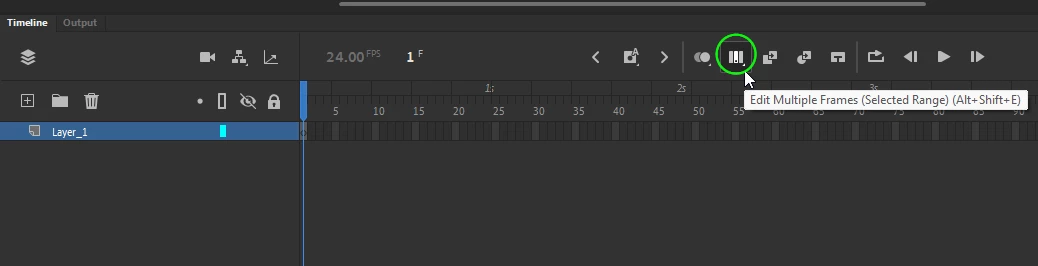
    Go to the symbol and make its frames smaller. Use the Edit Multiple Frames button to select all your frames and scale them down all at once, then try generating the spritesheet again. If you want multiple spritesheets you'll have to put some frames into another symbol and export separately.


    Just for reference, the biggest sprites in Hollow Knight were about 500 x 500 px.

    2 replies

    kglad
    Community Expert
    Community Expert
    March 5, 2023

    what steps are you taking to generate the spritesheet?


    and what the question about quality?

    PinnoBaby
    PinnoBabyAuthor
    Participating Frequently
    March 7, 2023

    So i have a graphic symbol that consists of 16 frames. To generate the spritesheet, i click the library tab, right click on the graphic name in the library list and then i select generate spritesheet, with all export options set to auto and then press export. However on the exported png spritesheet,  only 2 of the 16 frames are displayed. How do i get the other frames onto the spritesheet without losing the 4k quality of the frames, or do i have to make multiple sprite sheets containing the rest of the frames?


    kglad
    Community Expert
    Community Expert
    March 7, 2023

    what export options are set to "auto"?  do you mean you're using the default settings that you see after right clicking your library symbol?


    if so, copy and paste here a screenshot of your settings.  if not, what do you mean by auto?

    kglad
    Community Expert
    Community Expert
    March 5, 2023

    in the future, to find the best place to post your message, use the list here, https://community.adobe.com/


    p.s. i don't think the adobe website, and forums in particular, are easy to navigate, so don't spend a lot of time searching that forum list. do your best and we'll move the post if it helps you get responses.


    <moved from using the community>