

static textfields
Hi guys,
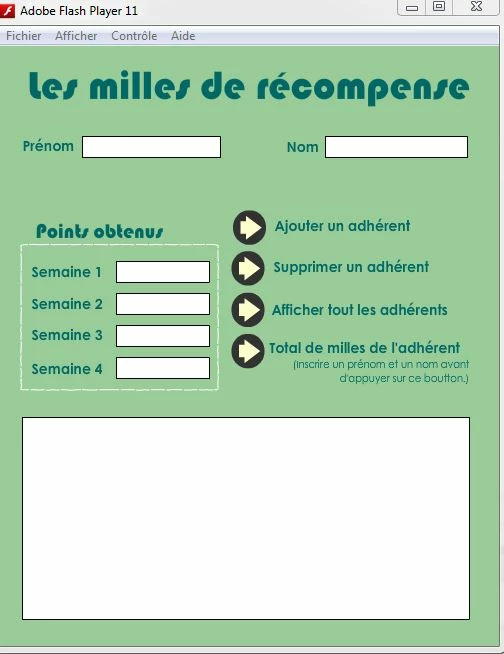
I do not know what happens. My input fields do not work and I have no syntax error. I cannot enter data.
This is my code and below my .swf
tks in advance.
package {
import flash.display.*;
import flash.text.*;
import flash.events.MouseEvent;
public class U1A7_Fidelisation extends MovieClip {
var affichage: String="";
//Déclarer la création du tableau adherents et les varialbes à être utilisés.
var rang1:Array = [];
var adherent:Array = [rang1];
public function U1A7_Fidelisation()
{
btnAjouter.addEventListener(MouseEvent.CLICK, ajouter);
btnAfficher.addEventListener(MouseEvent.CLICK, afficher);
btnSupprimer.addEventListener(MouseEvent.CLICK, supprimer);
btnMillesTotale.addEventListener(MouseEvent.CLICK, millesTotale);
//Inclure le fichier externe qui contient la fonction pour caluler les milles accumulés et
//les milles en prime.
include "U1A7_Milles.as"
}
//fonction pour ajouter les renseigments inscrits par l'utilisateur au tableau.
function ajouter(event:MouseEvent):void
{
var nom:String;
var prenom:String;
var semaineUne:int;
var semaineDeux:int;
var semaineTrois:int;
var semaineQuatre:int;
//Extraire les informations nécessaires des champs de saisie.
prenom = txtPrenom.text;
nom = txtNom.text;
semaineUne = int(semaine1.text);
semaineDeux = int(semaine2.text);
semaineTrois = int(semaine3.text);
semaineQuatre = int(semaine4.text);
adherent.push([prenom, nom, semaineUne, semaineDeux, semaineTrois, semaineQuatre]);
}
//fonction pour supprimer les renseigments du tableau.
function supprimer(event:MouseEvent):void
{
var indiceP:int=-1;
var indiceN:int=-1;
for (var rang:int = 0; rang < adherent.length; rang++)
{
indiceP =(adherent[rang][0].indexOf(txtPrenom.text));
indiceN =(adherent[rang][1].indexOf(txtNom.text));
if ((indiceP != -1) && (indiceN != -1)) // prénom et nom ont été repérés.
{
adherent.splice(rang,1); // rang - indique la rangée à supprimer.
// 1 - indique de supprimer cette rangée seulement.
}
}
}
//fonction pour afficher afin que tout les renseignements inscrits dans le tableau
//deviennent visibles.
function afficher (event:MouseEvent):void
{
affichage=("");
for (var rang:int = 0; rang < adherent.length; rang++)
{
for (var col:int = 0; col < adherent[0].length; col++)
{
affichage = affichage + " " + adherent[rang][col];
}
affichage = affichage + "\n";
}
monMessage.text = affichage;
txtPrenom.text = "";
txtNom.text = "";
semaine1.text = "";
semaine2.text = "";
semaine3.text = "";
semaine4.text = "";
}
//fonction pour calculer le total de points(milles) accumulés en 4 semaines d'un client
//et pour voir si ils obtiendront des milles en prime.
function millesTotale(event:MouseEvent):void
{
var prenom2:String;
var nom2:String;
var semaineUne2:int;
var semaineDeux2:int;
var semaineTrois2:int;
var semaineQuatre2:int;
var somme:int;
var sommeMessage:String;
affichage = "";
prenom2 = txtPrenom.text;
nom2 = txtNom.text;
semaineUne2 = int(semaine1.text);
semaineDeux2 = int(semaine2.text);
semaineTrois2 = int(semaine3.text);
semaineQuatre2 = int(semaine4.text);
somme = (semaineUne2 + semaineDeux2 + semaineTrois2 + semaineQuatre2);
if (somme >= 5000)
{
sommeMessage ="1000";
}
else if (somme < 5000)
{
sommeMessage ="0";
}
affichage = (prenom2 + nom2 + " a accumulé " + somme + " milles. Elle/Il a obtenu " + sommeMessage + " mille(s) en prime.");
//Afficher le message dans le champ de saisie monMessage.
monMessage.text = affichage;
txtPrenom.text = "";
txtNom.text = "";
semaine1.text = "";
semaine2.text = "";
semaine3.text = "";
semaine4.text = "";
}
}


 AdChoices