
Participant
April 27, 2025
Answered

symbol with text in action script 3

  • April 27, 2025
  • 1 reply
  • 407 views

Hello, I have a problem with displaying a text symbol in ActionScript 3.

I am making a project to test the operation of dialog boxes and for this I need to display symbols on which there will be pictures of a speaking character, a dialog background and text - but it is the only thing that is not displayed.

I hid the symbol at the beginning of the code and make it visible when interacting with the object, I also checked through debugging whether the symbol is visible - it says yes, although there is nothing on the screen.

The text symbol is made as dynamic text in the Arial font, the font has the desired language built in, the size is 20 pt and opaque. I tried to move the symbol to the hud but nothing changed.
The code itself is written below, and the photo shows that the dialog has started, but the text is not highlighted.

there is a lot of code here that is not related to the dialogue, because of which you need to ignore a lot, but just in case I left even such nonsense.
the function that makes the symbols visible starts on the 65th line, and on the 70th line specifically the text symbol.

import flash.events.KeyboardEvent;
import flash.ui.Keyboard;
import flash.display.MovieClip;
import flash.events.Event;
import flash.display.Stage;

lilyEc.gotoAndStop("lily stand front frame");
textBoxEc.visible = false; // Initially hide the dialogue box
lilyphrase1Ec.visible = false; // Initially hide the dialogue text

var rightPressed: Boolean = false;
var leftPressed: Boolean = false;
var upPressed: Boolean = false;
var downPressed: Boolean = false;
var spacePressed: Boolean = false;
var linkSpeed: Number = 6;
var dialogActive: Boolean = false;
var lastDirection: String = "front";

stage.addEventListener(KeyboardEvent.KEY_DOWN, keyDownHandler);
stage.addEventListener(KeyboardEvent.KEY_UP, keyUpHandler);
stage.addEventListener(Event.ENTER_FRAME, gameLoop);

function keyDownHandler(keyEvent: KeyboardEvent):void {
if (!dialogActive) {
if (keyEvent.keyCode == Keyboard.RIGHT) rightPressed = true;
else if (keyEvent.keyCode == Keyboard.LEFT) leftPressed = true;
else if (keyEvent.keyCode == Keyboard.DOWN) downPressed = true;
else if (keyEvent.keyCode == Keyboard.UP) upPressed = true;
}

if (keyEvent.keyCode == Keyboard.SPACE && !spacePressed) {
spacePressed = true;
if (checkInteraction()) {
startDialogue();
}
}
}

function keyUpHandler(keyEvent: KeyboardEvent):void {
if (keyEvent.keyCode == Keyboard.RIGHT) rightPressed = false;
else if (keyEvent.keyCode == Keyboard.LEFT) leftPressed = false;
else if (keyEvent.keyCode == Keyboard.DOWN) downPressed = false;
else if (keyEvent.keyCode == Keyboard.UP) upPressed = false;
else if (keyEvent.keyCode == Keyboard.SPACE) spacePressed = false;
}

function checkInteraction():Boolean {
return lilyEc.hitTestObject(dialogSirEc);
}

function checkCollision(nextX:Number, nextY:Number):Boolean {
lilyEc.x = nextX;
lilyEc.y = nextY;

var isColliding:Boolean = lilyEc.hitTestObject(catEc) || lilyEc.hitTestObject(sirEc) ||
lilyEc.hitTestObject(stairEc) || lilyEc.hitTestObject(wallEc);

lilyEc.x -= (nextX - lilyEc.x); // Reset position
lilyEc.y -= (nextY - lilyEc.y);

return isColliding;
}

function startDialogue():void {
dialogActive = true;
rightPressed = leftPressed = upPressed = downPressed = false;
lilyEc.gotoAndStop("lily stand " + lastDirection + " frame");
textBoxEc.visible = true; // show dialogue box
lilyphrase1Ec.visible = true; // text
trace("Dialogue started with sirEc.");
// additional dialogue
}

function gameLoop(loopEvent: Event):void {
if (dialogActive) {
lilyEc.gotoAndStop("lily stand " + lastDirection + " frame");
return;
}

var nextX:Number = lilyEc.x;
var nextY:Number = lilyEc.y;
var moving:Boolean = false;

if (rightPressed && lilyEc.x + linkSpeed <= 500 && !checkCollision(lilyEc.x + linkSpeed, lilyEc.y)) {
nextX += linkSpeed;
lastDirection = "right";
moving = true;
}
if (leftPressed && lilyEc.x - linkSpeed >= 180 && !checkCollision(lilyEc.x - linkSpeed, lilyEc.y)) {
nextX -= linkSpeed;
lastDirection = "left";
moving = true;
}
if (downPressed && lilyEc.y + linkSpeed <= 410 && !checkCollision(lilyEc.x, lilyEc.y + linkSpeed)) {
nextY += linkSpeed;
lastDirection = "front";
moving = true;
}
if (upPressed && lilyEc.y - linkSpeed >= -70 && !checkCollision(lilyEc.x, lilyEc.y - linkSpeed)) {
nextY -= linkSpeed;
lastDirection = "back";
moving = true;
}

lilyEc.x = nextX;
lilyEc.y = nextY;

// Play correct walking animation
if (moving) {
lilyEc.gotoAndStop("lily walk " + lastDirection + " frame");
} else {
lilyEc.gotoAndStop("lily stand " + lastDirection + " frame");
}

// Camera follows Lily by moving the parent container
this.x = stage.stageWidth / 2 - lilyEc.x;
this.y = stage.stageHeight / 2 - lilyEc.y;
}
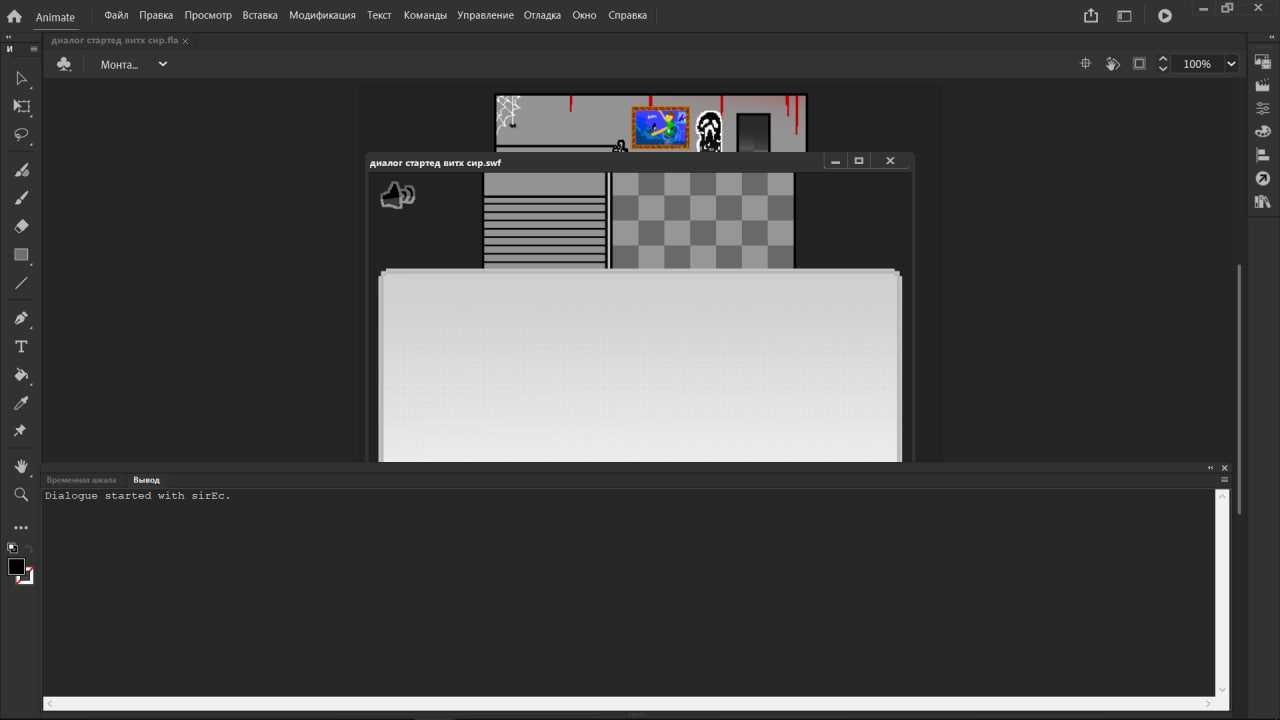
I show that the dialogue has started, but the symbol is not displayed

    Correct answer muholovke_7744

    now add this in the same spot ( that function)


    lilyphrase1Ec.parent.addChild(lilyphrase1Ec);


    I understood what solution you were getting at and added to your line, I didn't think about what could be done there, although I've already encountered this! Thank you very much


    I improved your line and everything worked
    if (lilyphrase1Ec.parent != stage) {
    stage.addChild(lilyphrase1Ec); // Moves it directly to the root stage
    }

    1 reply

    kglad
    Community Expert
    Community Expert
    April 27, 2025

    what's the relevant code?

    Participant
    April 28, 2025

    wdym?

    Are you talking about my code being poorly organized or are you asking where exactly the problem is?

    If 1. then yes, I think my code is not very high quality, I just started doing this and I learn a lot in the middle of the process by mixing everything into the code in random order. I will write everything in more detail from now on.

    I tried to organize and describe as many details in the code as possible:

    // Set Lily's starting animation frame to standing front
    lilyEc.gotoAndStop("lily stand front frame"); 
     
    // Hide dialogue box and dialogue text at start
    textBoxEc.visible = false; 
    lilyphrase1Ec.visible = false; 
     
     
    // ------------------------------
    // Variables for key control
    // ------------------------------
     
    // Flags to track if movement keys are being pressed
    var rightPressed: Boolean = false;
    var leftPressed: Boolean = false;
    var upPressed: Boolean = false;
    var downPressed: Boolean = false;
     
    // Also flag for space
    var spacePressed: Boolean = false;
     
    //movement speed
    var linkSpeed: Number = 6;
    //lack of dialogue
    var dialogActive: Boolean = false;
    //maintaining the direction where lily was looking
    var lastDirection: String = "front";
     
    // ------------------------------
    // Event Listeners
    // ------------------------------
     
    // Listen for when a key is pressed down
    stage.addEventListener(KeyboardEvent.KEY_DOWN, keyDownHandler);
    // Listen for when a key is released
    stage.addEventListener(KeyboardEvent.KEY_UP, keyUpHandler);
    // Listen for every new frame of the game (main game loop)
    stage.addEventListener(Event.ENTER_FRAME, gameLoop);
     
    // ------------------------------
    // Handle Key Presses
    // ------------------------------
     
    // Function called when any key is pressed
    function keyDownHandler(keyEvent: KeyboardEvent):void {
      // If dialogue is NOT active, allow movement controls
        if (!dialogActive) {
            if (keyEvent.keyCode == Keyboard.RIGHT) rightPressed = true;
            else if (keyEvent.keyCode == Keyboard.LEFT) leftPressed = true;
            else if (keyEvent.keyCode == Keyboard.DOWN) downPressed = true;
            else if (keyEvent.keyCode == Keyboard.UP) upPressed = true;
        }
        //interaction via space, start of startDialogue function
        if (keyEvent.keyCode == Keyboard.SPACE && !spacePressed) {
            spacePressed = true;
            if (checkInteraction()) {
                startDialogue();
            }
        }
    }
     
     
    // ------------------------------
    // Handle Key Releases
    // ------------------------------
     
    // Function called when any key is released
    function keyUpHandler(keyEvent: KeyboardEvent):void {
        if (keyEvent.keyCode == Keyboard.RIGHT) rightPressed = false;
        else if (keyEvent.keyCode == Keyboard.LEFT) leftPressed = false;
        else if (keyEvent.keyCode == Keyboard.DOWN) downPressed = false;
        else if (keyEvent.keyCode == Keyboard.UP) upPressed = false;
        else if (keyEvent.keyCode == Keyboard.SPACE) spacePressed = false;
    }
     
    // Function that checks if Lily is touching the "dialogSirEc" hitbox
    function checkInteraction():Boolean {
        return lilyEc.hitTestObject(dialogSirEc);
    }
     
    // ------------------------------
    // Check for Collisions
    // ------------------------------
     
    // Function that checks if Lily is about to collide with certain objects
    function checkCollision(nextX:Number, nextY:Number):Boolean {
        // Temporarily move Lily to the new position
        lilyEc.x = nextX;
        lilyEc.y = nextY;
        
        // Check if Lily touches any obstacles (cat, sir, stair, wall)
        var isColliding:Boolean = lilyEc.hitTestObject(catEc) || lilyEc.hitTestObject(sirEc) || 
                                  lilyEc.hitTestObject(stairEc) || lilyEc.hitTestObject(wallEc);
        
        // Move Lily back to her original position
        lilyEc.x -= (nextX - lilyEc.x); 
        lilyEc.y -= (nextY - lilyEc.y);
        
        return isColliding;
    }
     
    // ------------------------------
    // Start Dialogue
    // ------------------------------
     
    // Function that starts a dialogue sequence
    function startDialogue():void {
        dialogActive = true; // Freeze movement
        rightPressed = leftPressed = upPressed = downPressed = false; // Stop all key motions
        
        // Make Lily stand facing the last moved direction
        lilyEc.gotoAndStop("lily stand " + lastDirection + " frame");
        
        // Show the dialogue box and text
        textBoxEc.visible = true;
        lilyphrase1Ec.visible = true;
        
        // Output a debug message
        trace("Dialogue started with sirEc.");
        
        // Additional dialogue logic can be added here
    }
     
    // ------------------------------
    // Main Game Loop
    // ------------------------------
     
    // Function that runs every frame to update game logic
    function gameLoop(loopEvent: Event):void {
        
        // If dialogue is happening, freeze Lily standing and stop movement
        if (dialogActive) {
            lilyEc.gotoAndStop("lily stand " + lastDirection + " frame");
            return;
        }
        
        // Store next movement position temporarily
        var nextX:Number = lilyEc.x;
        var nextY:Number = lilyEc.y;
        var moving:Boolean = false; // Track if Lily is moving
        
        // Handle right movement
        if (rightPressed && lilyEc.x + linkSpeed <= 500 && !checkCollision(lilyEc.x + linkSpeed, lilyEc.y)) {
            nextX += linkSpeed;
            lastDirection = "right";
            moving = true;
        } 
        // Handle left movement
        if (leftPressed && lilyEc.x - linkSpeed >= 180 && !checkCollision(lilyEc.x - linkSpeed, lilyEc.y)) {
            nextX -= linkSpeed;
            lastDirection = "left";
            moving = true;
        } 
        // Handle down movement
        if (downPressed && lilyEc.y + linkSpeed <= 410 && !checkCollision(lilyEc.x, lilyEc.y + linkSpeed)) {
            nextY += linkSpeed;
            lastDirection = "front";
            moving = true;
        } 
        // Handle up movement
        if (upPressed && lilyEc.y - linkSpeed >= -70 && !checkCollision(lilyEc.x, lilyEc.y - linkSpeed)) {
            nextY -= linkSpeed;
            lastDirection = "back";
            moving = true;
        }
        
        // Move Lily to the new position
        lilyEc.x = nextX;
        lilyEc.y = nextY;
        
        // Update Lily's animation depending on movement
        if (moving) {
            lilyEc.gotoAndStop("lily walk " + lastDirection + " frame");
        } else {
            lilyEc.gotoAndStop("lily stand " + lastDirection + " frame");
        }
        
        // Camera follow logic: center the stage view on Lily
        this.x = stage.stageWidth / 2 - lilyEc.x;
        this.y = stage.stageHeight / 2 - lilyEc.y;
    }


    Since many lines are now occupied by explanations, the lines related to the required function are now from line 106 to 122, and the symbol that I need to make visible is on line 116.

    kglad
    Community Expert
    Community Expert
    April 28, 2025

    there are no line numbers posted here and i'm using a mobile phone to check your code.  ie copy and paste, just the relevant lines.