
Participating Frequently
October 12, 2023
Answered

Symbols shake when exporting

  • October 12, 2023
  • 1 reply
  • 1107 views

So basically everytime i export my animation, even though in the app it looks fine, when i export it every symbol i used the frame picker one glitches like that, the eyes used to do the same but i used another (bad) technique to fix it, it wouldnt be a problem if the other technique wasnt so bad (making a copy of the symbol everytime i wanted to change it), since it takes too much time and space to do.
Here is the file on animate and both the glitched exports.
    This topic has been closed for replies.
    Correct answer Mario_CR

    ok, i will! this one should be it. https://drive.google.com/file/d/1nIra4-e-91UG86po-RBVnSB-ZJjCAgfH/view?usp=sharing


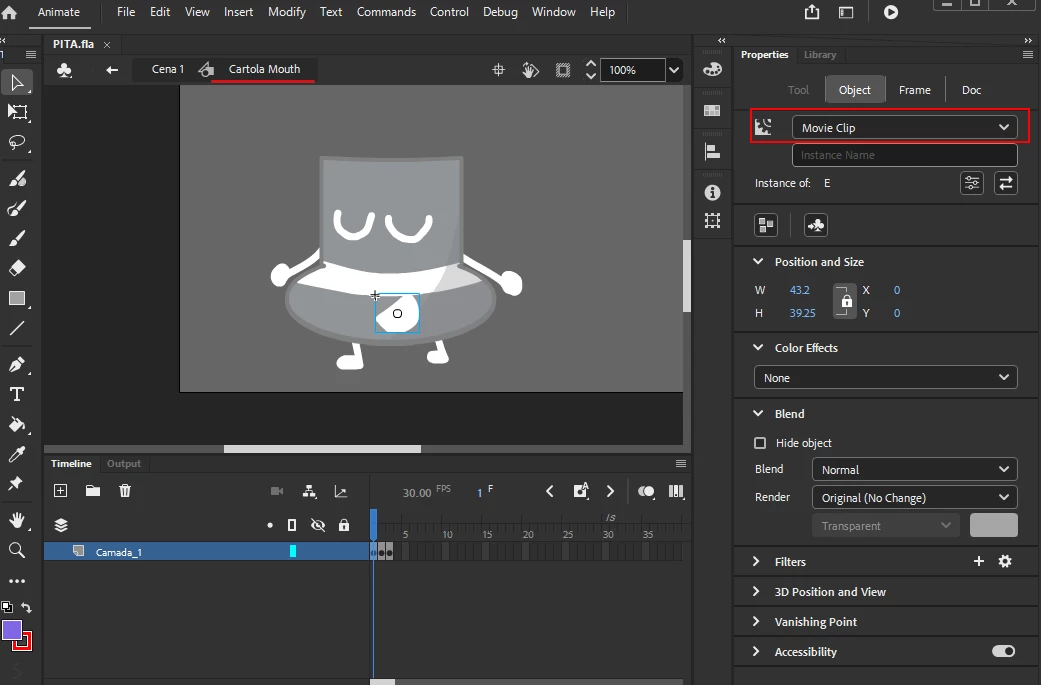
    Thank you, looks like the problem is that you still have Movie Clips inside the symbol "Cartola Mouth". These need to be removed or converted to Graphics also:


    Here's a corrected version: https://we.tl/t-1Zgy6gGbGd


    1 reply

    Mario_CR
    Community Expert
    Community Expert
    October 12, 2023

    Hi, double check that your symbols are Graphics instead of MovieClips so you can control the frame looping. You can change this from the properties panel.


    Once your symbols are graphics go to the Looping section and change the frame looping to Single Frame. If you already have keyframes on the timeline you'll have to go back and do this for every keyframe.


    Participating Frequently
    October 13, 2023

    Yeah, i did do this, but for some reason it just doesnt want to work when i export it, i will try to double check it, thanks for the help anyway!

    Participating Frequently
    October 15, 2023

    uhm... so i double-checked and even made another animation and sadly the bug still continues, would love to know what that is! thanks.