
Participant
June 21, 2024
Answered

Transparency issues with overlapping shapes in symbols

  • June 21, 2024
  • 1 reply
  • 1152 views

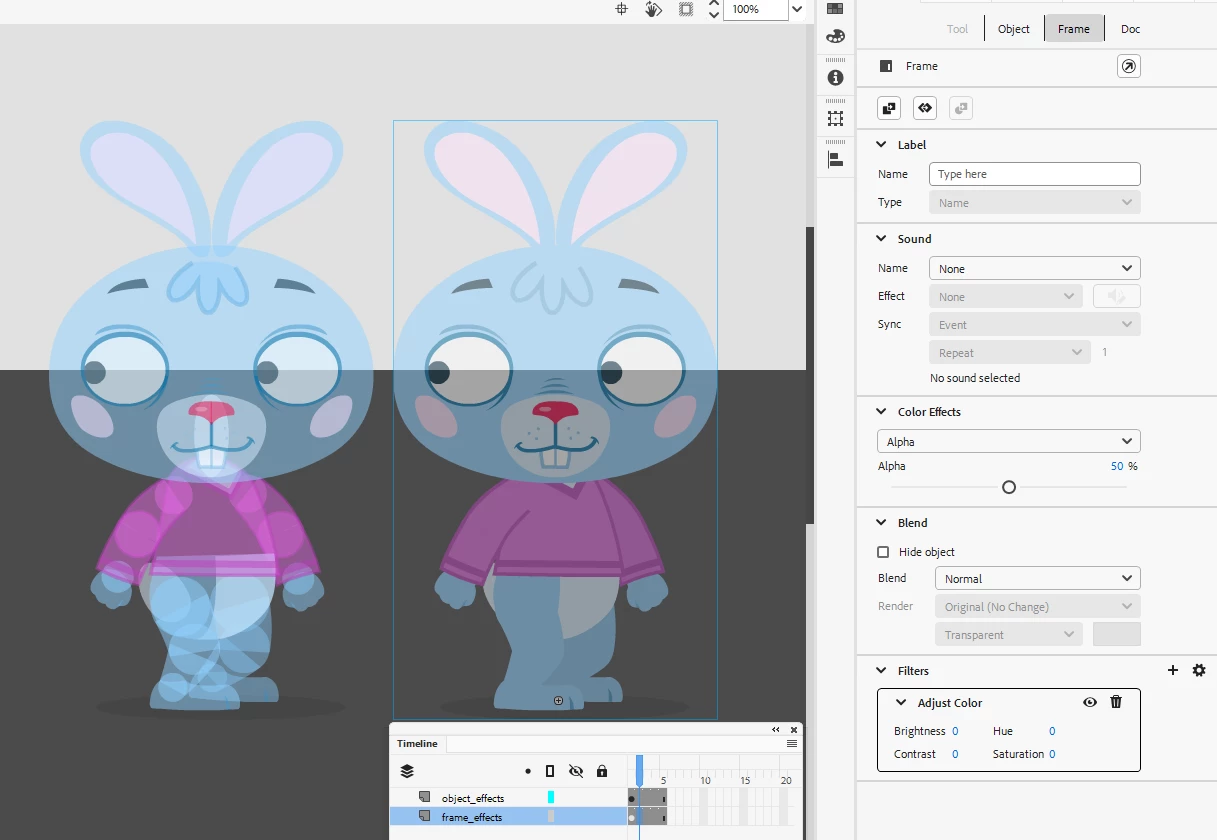
I have a graphic/movieclip that I want to fade into an animation. But there are transparency issues on overlapping shapes. I cannot use a bitmap for this as I want to animate the objects in the movieclip and have it transition into another scene. 
This does not happen in Illustrator where you have a group of shapes and set the opcaity to 50% the whole group is set to 50%. without any overlapping issues.  Is there another workaround for this?
    This topic has been closed for replies.
    Correct answer n. tilcheff

    Make sure you use frame effects and not instance effects; give your frame a null filter and alpha and you will get the desired result.


    1 reply

    n. tilcheff
    n. tilcheffCorrect answer
    Legend
    June 21, 2024

    Make sure you use frame effects and not instance effects; give your frame a null filter and alpha and you will get the desired result.


    Nick - Character Designer and Animator, Flash user since 1998 | Member of the Flanimate Power Tools team - extensions for character animation
    Jen_C22Author
    Participant
    June 21, 2024

    Thanks man! Solved the problem. I had quite some scenes where this was happening.