
Participating Frequently
April 24, 2023
Answered

Troubleshooting issue with dropping ball into specific region and using gotoAndStop(1)

  • April 24, 2023
  • 2 replies
  • 605 views

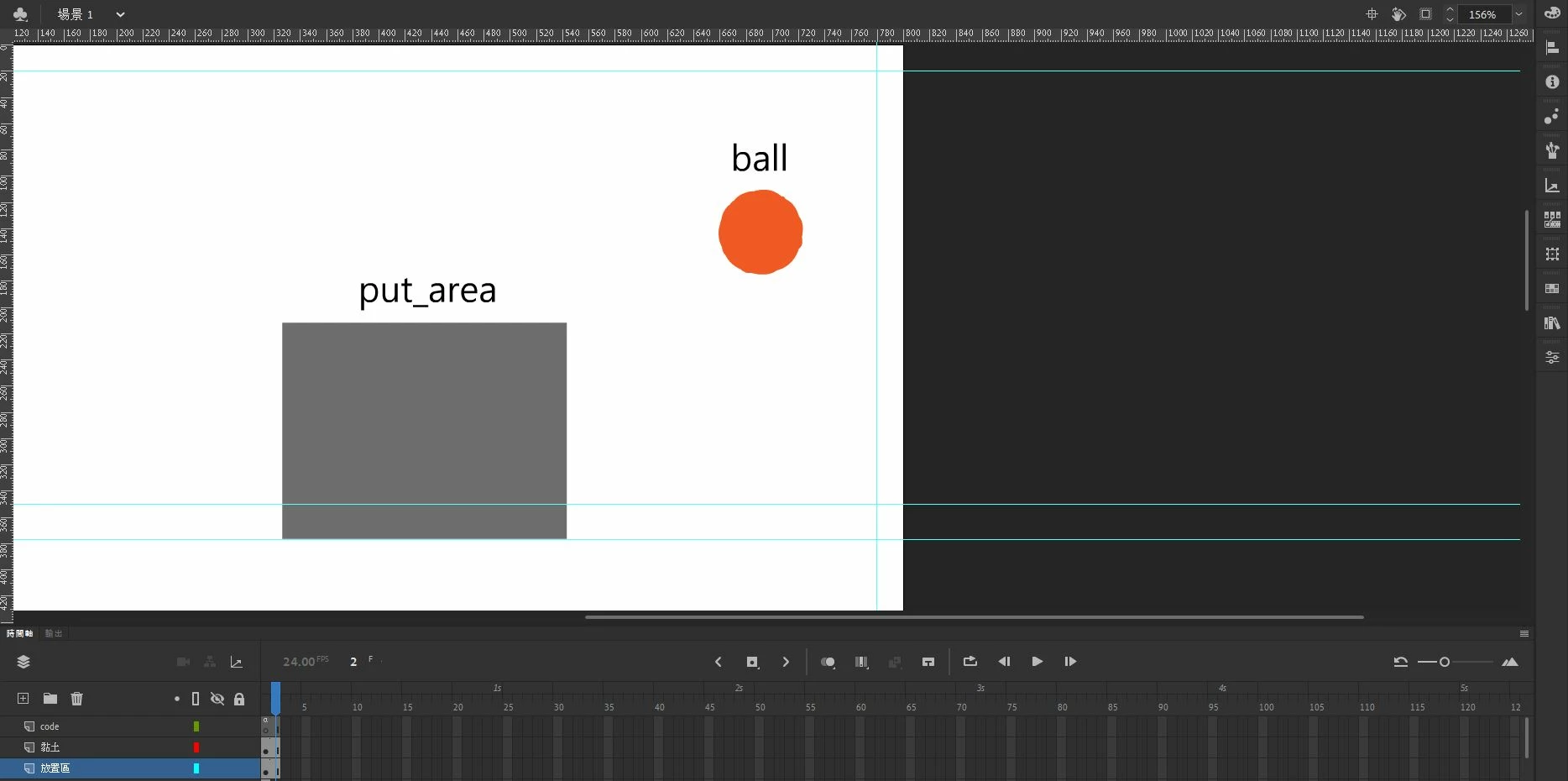
I am trying to drop "the ball" into a specific region. When the ball is in the specific region, I want the page  immediately go to frame 1 using the command "gotoAndStop(1)". However, it is not working. Can someone please help me troubleshoot this issue? Thank you.


this.stop();

var root = this;
this.ball.addEventListener("pressmove", moveBall);

function moveBall(e) {
    e.currentTarget.x= e.stageX;
    e.currentTarget.y= e.stageY;
    root.ball.alpha=0.5;
}

this.ball.addEventListener("pressup", dropBall);

function dropBall() {
    root.ball.alpha = 1;
    if (root.ball.x > 326.5 && root.ball.x < 543.5 && root.ball.y > 211.95 && root.ball.y < 376.7) {
        root.ball.gotoAndStop(1);
        root.ball.alpha = 0.2;
    } 
	else {root.ball.gotoAndStop(0);}
}


When the ball is in the specific region, "root.ball.alpha = 0.2;" is work, but the page not go to frame 1.


This topic has been closed for replies.
Correct answer JoãoCésar17023019

Hi.


I would like to suggest another approach for your code that takes into account the scale of the stage, the point where the instance was touched for the drag, besides being more oriented to object and dynamic, I think.

var root = this;
var ball = root.ball;

function main()
{
	createjs.Touch.enable(stage);
	stage.mouseMoveOutside = true;
	
	root.stop();
	
	ball.dragAlpha = 0.5;
	ball.hitAlpha = 0.2;
	ball.missAlpha = 1;
	ball.hitFrame = 1;
	ball.missFrame = 0;
	ball.dropArea = { top: 211.95, right: 543.5, bottom: 376.7, left: 326.5 };
	ball.on("mousedown", onMouseDown);
}

function onMouseDown(e)
{
	var target = e.currentTarget;
	
	target.offset = { x: stage.mouseX / stage.scaleX - target.x, y: stage.mouseY / stage.scaleY - target.y };
	target.alpha = target.dragAlpha;
	target.pressMoveListener = ball.on("pressmove", onPressMove);
	target.pressUpListener = ball.on("pressup", onPressUp);
}

function onPressMove(e)
{
	var target = e.currentTarget;
	
	target.x = stage.mouseX / stage.scaleX - target.offset.x;
	target.y = stage.mouseY / stage.scaleY - target.offset.y;
}

function onPressUp(e)
{
	var target = e.currentTarget;
	var dropArea = target.dropArea;
	
    if (target.x > dropArea.left && target.x < dropArea.right && target.y > dropArea.top && target.y < dropArea.bottom)
	{
        root.gotoAndStop(ball.hitFrame);
        target.alpha = target.hitAlpha;
    }
	else
	{
		target.alpha = target.missAlpha;
		root.gotoAndStop(ball.missFrame);
	}

	target.off("pressmove", target.pressMoveListener);
	target.off("pressup", target.pressUpListener);
}

if (!root.frame0Started)
{
	main();
	root.frame0Started = true;
}


Please let us know if you have further questions.


Regards,

JC

2 replies

JoãoCésar17023019
Community Expert
JoãoCésar17023019Community ExpertCorrect answer
Community Expert
April 26, 2023

Hi.


I would like to suggest another approach for your code that takes into account the scale of the stage, the point where the instance was touched for the drag, besides being more oriented to object and dynamic, I think.

var root = this;
var ball = root.ball;

function main()
{
	createjs.Touch.enable(stage);
	stage.mouseMoveOutside = true;
	
	root.stop();
	
	ball.dragAlpha = 0.5;
	ball.hitAlpha = 0.2;
	ball.missAlpha = 1;
	ball.hitFrame = 1;
	ball.missFrame = 0;
	ball.dropArea = { top: 211.95, right: 543.5, bottom: 376.7, left: 326.5 };
	ball.on("mousedown", onMouseDown);
}

function onMouseDown(e)
{
	var target = e.currentTarget;
	
	target.offset = { x: stage.mouseX / stage.scaleX - target.x, y: stage.mouseY / stage.scaleY - target.y };
	target.alpha = target.dragAlpha;
	target.pressMoveListener = ball.on("pressmove", onPressMove);
	target.pressUpListener = ball.on("pressup", onPressUp);
}

function onPressMove(e)
{
	var target = e.currentTarget;
	
	target.x = stage.mouseX / stage.scaleX - target.offset.x;
	target.y = stage.mouseY / stage.scaleY - target.offset.y;
}

function onPressUp(e)
{
	var target = e.currentTarget;
	var dropArea = target.dropArea;
	
    if (target.x > dropArea.left && target.x < dropArea.right && target.y > dropArea.top && target.y < dropArea.bottom)
	{
        root.gotoAndStop(ball.hitFrame);
        target.alpha = target.hitAlpha;
    }
	else
	{
		target.alpha = target.missAlpha;
		root.gotoAndStop(ball.missFrame);
	}

	target.off("pressmove", target.pressMoveListener);
	target.off("pressup", target.pressUpListener);
}

if (!root.frame0Started)
{
	main();
	root.frame0Started = true;
}


Please let us know if you have further questions.


Regards,

JC

Participating Frequently
April 27, 2023

Thank you very much for your insightful response, which has indeed resolved other issues, especially the positioning problem. I have learned a lot from your answer and am very grateful.

JoãoCésar17023019
Community Expert
Community Expert
April 27, 2023

Awesome! You're welcome!

kglad
Community Expert
Community Expert
April 24, 2023

it's not clear which timeline you want to direct to frame 1, but you're directing root.ball to frame 1, not the main timeline and i infer that's not what you want.

Participating Frequently
April 26, 2023

Thank you for your response. May I ask how I can change the main timeline to frame 1?

kglad
Community Expert
Community Expert
April 26, 2023

you would change, for example:


 root.ball.gotoAndStop(1);


to 


root.gotoAndStop(1);