
Validate combinations with button and problem sound button
I would like to design something quite simple.
I created orange buttons that play a sound when clicked. The black circles are not buttons, it's just the instruction that the user will have to do to move to the next frame :
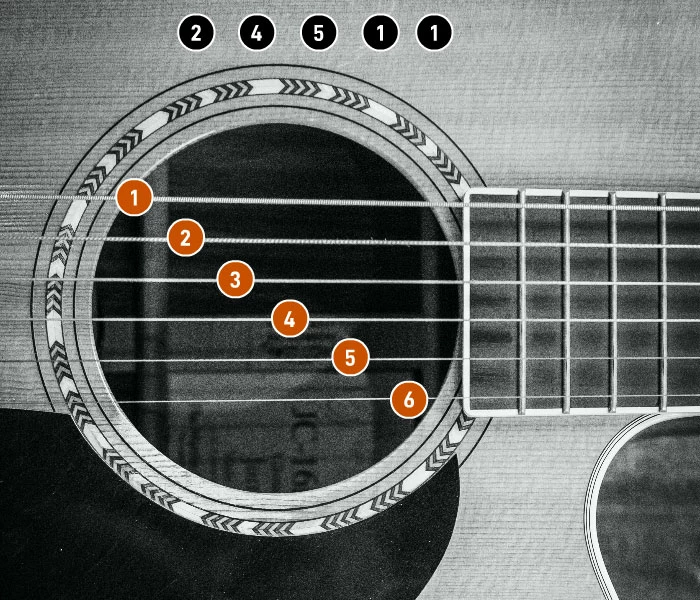
My first issue is that when you click a orange button, you have to wait for the sound to end before clicking that same button again.
How can you click that same button immediately to play the same sound again
without the previous sound cutting off ?
My second slightly more complex problem is that i would like the user to click on what is requested in the black instruction.
How to know if the user has clicked on the right buttons in the requested order to automatically move to the next image, a bit like a combination except that he does not need to validate to advance to the next frame ?
I think you have to create a listener for each button and create variables to store the result of each but I don't see how to know that the user has respected the requested order by clicking once on the right button
Here is my code which is quite simple :
this.stop();

if(!this.defined1){
this.sound1=createjs.Sound.createInstance("corde1");
this.defined1=true;

}

function complete1F(){
this.sound1.play();
}

if(!this.defined2){
this.sound2=createjs.Sound.createInstance("corde2");
this.defined2=true;

}

function complete2F(){
this.sound2.play();
}

if(!this.defined3){
this.sound3=createjs.Sound.createInstance("corde3");
this.defined3=true;

}

function complete3F(){
this.sound3.play();
}


if(!this.defined4){
this.sound4=createjs.Sound.createInstance("corde4");
this.defined4=true;

}

function complete4F(){
this.sound4.play();
}

if(!this.defined5){
this.sound5=createjs.Sound.createInstance("corde5");
this.defined5=true;

}

function complete5F(){
this.sound5.play();
}

if(!this.defined6){
this.sound6=createjs.Sound.createInstance("corde6");
this.defined6=true;

}

function complete6F(){
this.sound6.play();
}


this.corde1.addEventListener("click", fl_ClickToGoToAndStopAtFrame.bind(this));

function fl_ClickToGoToAndStopAtFrame()
{
	this.sound1.play();
}

this.corde2.addEventListener("click", fl_ClickToGoToAndStopAtFrame_2.bind(this));

function fl_ClickToGoToAndStopAtFrame_2()
{
	this.sound2.play();
}

this.corde3.addEventListener("click", fl_ClickToGoToAndStopAtFrame_3.bind(this));

function fl_ClickToGoToAndStopAtFrame_3()
{
	this.sound3.play();
}

this.corde4.addEventListener("click", fl_ClickToGoToAndStopAtFrame_4.bind(this));

function fl_ClickToGoToAndStopAtFrame_4()
{
	this.sound4.play();
}

this.corde5.addEventListener("click", fl_ClickToGoToAndStopAtFrame_5.bind(this));

function fl_ClickToGoToAndStopAtFrame_5()
{
	this.sound5.play();
}

this.corde6.addEventListener("click", fl_ClickToGoToAndStopAtFrame_6.bind(this));

function fl_ClickToGoToAndStopAtFrame_6()
{
	this.sound6.play();
}
Thank you for your help.


 AdChoices