Participant
April 20, 2017
Answered

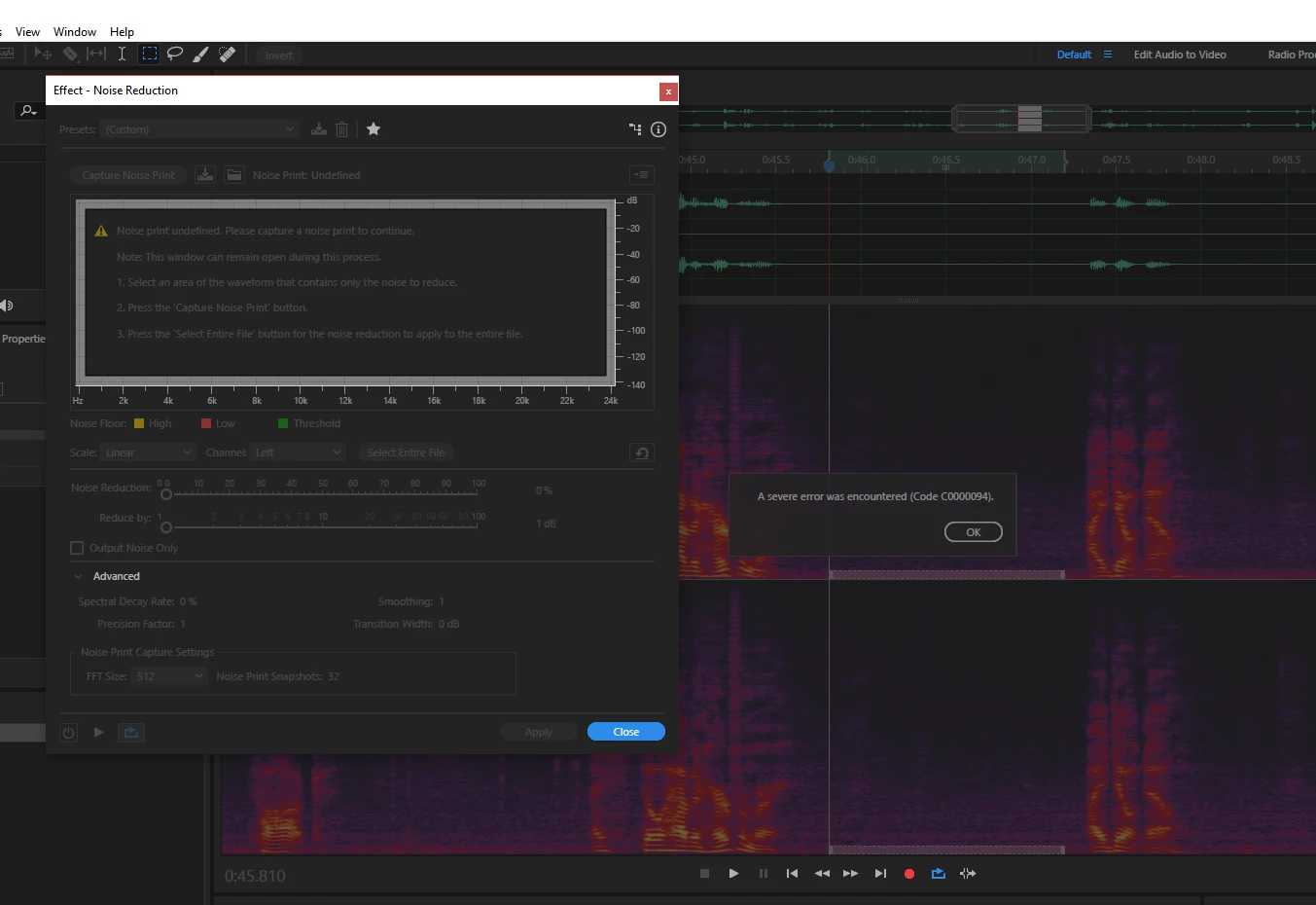
A severe error was encountered Code (C0000094)

  • April 20, 2017
  • 21 replies
  • 13078 views

When capturing a noise print while using the effect - noise reduction I get this error and I an not able to use the noise reduction effect. On a few occasions Audition has crashed.

This topic has been closed for replies.
Correct answer Bob Howes

See the announcement from Durin at the top of the forum...the fix for this issue has now been released.

21 replies

Bob Howes
Bob HowesCorrect answer
Inspiring
May 17, 2017

See the announcement from Durin at the top of the forum...the fix for this issue has now been released.

Akeblay
Known Participant
May 15, 2017

Also having this issue. Audition either gives this code or freezes when ever I try playback to test the Noise Reduction. I tried changing the FFT Size and I am still freezing.
Tried uninstalling/reinstalling.

No fix yet.

Kevin J. Monahan Jr.
Legend
May 13, 2017

Hi,

Here is a KB doc we recently wrote: Troubleshoot errors related to Noise reduction in Audition

Thanks,
Kevin

Kevin Monahan - Sr. Community and Engagement Strategist – Adobe Pro Video and Audio
Inspiring
May 13, 2017

This is all well and cool, but will this issue be fixed in the next update of Audition and if yes, will you tell us here that it is safe to upgrade again? (I have rolled back to previous version) }:>

SteveG_AudioMasters_
Community Expert
Community Expert
May 13, 2017

You may rest assured that one of the primary purposes of the next update will be to fix this!

Inspiring
May 8, 2017

Same issue here.

Participant
May 4, 2017

Download and install Creative Cloud apps Install previous version of app.

This error is related to the new update.

Hope this helps, Inês.

Participant
April 28, 2017

Hey Esunga.

I found the solution to your "Code error C0000094"

In the Effect Noise Reduction window there is an option at the very bottom called "FFT Size"

Increase it to 8192.

I had this same issue today and this solved the problem.

To learn more about these setting I recommend watching Jason Levine YouTube videos.

Especially this one on noise reduction.

How to use Noise Reduction & Restoration Tools in Audition CC (Audio 101: Part 4) - YouTube

He goes into great detail how these setting work and why.

He's the Audition Gooroo.

Good luck.

Dekado Productions
Participant
April 28, 2017

Thank you, thank you, thank you Legacy man. Increasing the FFT size to 8192 worked for me. Working on a wedding video and been pulling my hair out and I don't have much hair to spare. I was about to reinstall my whole OS because of this.

fiendishmedia
Participating Frequently
May 2, 2017

That stopped the error message but then when playing back after capturing a noise print, the software simply dies.

Chaulk5
Participant
April 27, 2017

I'm having this same problem. I can't get any work done. Guess I'll have to install an early version for now. Hope they fix this soon!

voxguy
Participating Frequently
April 27, 2017

I completely agree--my business depends on this software.

Time to find something different--if they're this slow to respond--that translates to not caring.

No excuse.  Poor customer support/handling.  timeforchange​

Inspiring
April 27, 2017

Terry, I am not here to defend Adobe or anything, as I am also affected by this error and in the past they have made some dubious decisions, constantly changing things which worked perfectly, etc. But I also realize that Adobe is a HUGE corporation with LOTS of products working on two platforms (PC and Mac) and millions of customers not all of whom are affected, so by default they can not be quick and agile with fixing things. Implementation of a fix and testing takes time, and meanwhile you can easily resolve the problem by simply rolling back to previous version of software, which has no such bug. I did that and my workflow is not affected at all after this Of course it would be nice for Adobe rep to show here and tell us all when the issue will be fixed so we can upgrade to the newest version again, but even if they won't do it, no big deal, really (or maybe I am too generous).

Participant
April 27, 2017

This issue is completely unacceptable to have been shipped to customers. I was just affected by it just now, wasted a few minutes and frustrations due to multiple crashes until I remembered a free software that is always reliable.

For anyone who needs some Noise Reduction work done, I recommend you download 'Audacity' until Adobe fixes their issues with Audition.

Participating Frequently
April 26, 2017

Oh man, I am so pissed.  I developed a rack for to process all audio for a 15 hour music event.  Ran into this issue with the crash, reverted back to the previous version and how a lost my presets rack that had multiple customized effects within it.  Probable took me a day to tweak them to the way I wanted.  I have about an hour left of event to edit and now I need to rebuild the rack. 

Adobe get your crap together and test updates your updates.  NR is so common that should be on your checklist.

I thought Adobe had put the days of sloppy bloated coding in the past...  Apparently not. 

SteveG_AudioMasters_
Community Expert
Community Expert
April 26, 2017

mattm91500708  wrote

Oh man, I am so pissed.  I developed a rack for to process all audio for a 15 hour music event.  Ran into this issue with the crash, reverted back to the previous version and how a lost my presets rack that had multiple customized effects within it.

I thought Adobe had put the days of sloppy bloated coding in the past...  Apparently not. 

If you had saved the EffectPresets file in your Preferences folder from the faulty version, and replaced the one in the previous version with it, you could have used it in your previous version; as far as I'm aware there have been no structural changes, so this would work fine, I think.

I don't think that this bug has anything to do with 'sloppy bloated coding'. It certainly doesn't affect all users, and anyway even the most efficient coding can still have bugs in it!

I should add, for the benefit of everybody reading this thread, that the reason that there isn't a rushed fix is because the developers are trying their best to make damn sure that a fix for one system doesn't screw over another one. And since this is a dual-platform program and the bug doesn't appear to be limited to a single platform, testing is invariably going to take longer, I'm afraid. But in the end, this is for everybody's benefit.