
May 3, 2020
Question

Adding headline and creator to the file name while importing

  • May 3, 2020
  • 1 reply
  • 662 views

Hi everyone,

While Importing, I just want to rename the files in this order (see the added image);

from: "orgfilename.ORF"

to:  "yyyymmdd_orgfilename_seq_headline_creator.ORF"
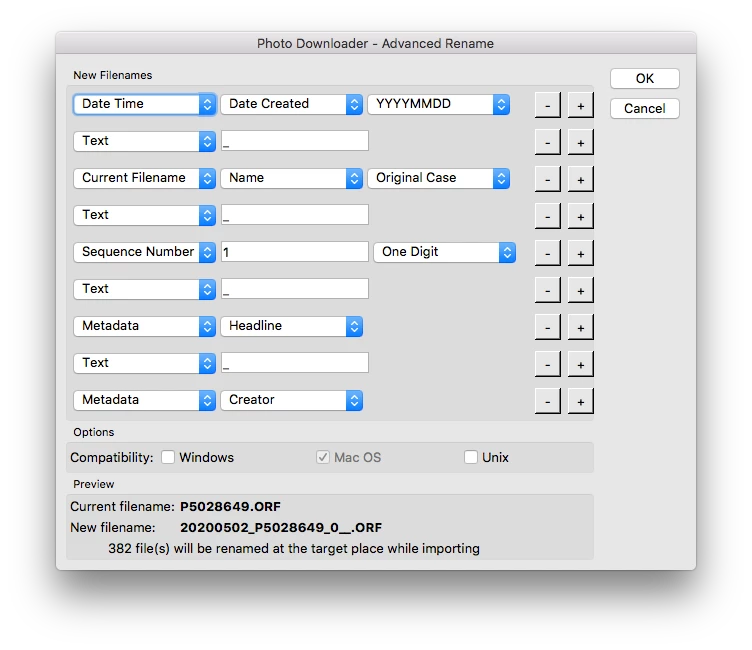
Advanced renaming is offering the option to do so, but there is no empty space to insert the "headline" or "creator" into the file name.

Is this a bug or am I missing something?


Thanx


EDIT: The Metadate should contain the "headline" and "creator" so these can be read out and added to the filename. But where and when should they have been added? In the Camera? Is there a way to manipulate the metadata during the import (just like photomechanics)?

This topic has been closed for replies.

1 reply

Stephen Marsh
Community Expert
Community Expert
May 3, 2020

Check the original Olympus raw files, if there is no metadata in the file for headline or creator, then that explains why there is nothing to use for the rename. 


The Headline and Creator metadata fields have very specific IPTC definitions:


Creator – Contains the name of the photographer, but in cases where the photographer should not be identified the name of a company or organisation may be appropriate.


Headline – A brief synopsis of the caption. Headline is not the same as Title.

May 4, 2020

Thanks for your reply.

Yeah unfortunatly I need to go for photomec. There, I've the possibility to add almost everything to the metadata before importing the files. Thats really, really powerfull. Such a shame bridge is not capable of this...