OK, 'nother quick question: have you always used a RAID system? Even with your old files?
OK, just saw your edit.
Please check the following on the new folder and compare that to the old folder:
In the Finder select one of the new folder(s) that you're documents/images are contained in and press Command-i (i for information). A new window will pop up on the left side of the screen. On the bottom you will see a region called "Sharing & Permissions:"
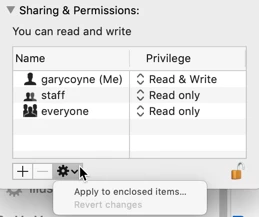
First, do you have Read & Write privileges ? If not, continue.
To do anything here, you need to unlock the padlock on the bottom right. Click it and a window will pop up asking you for your authorization (your Mac password). Once that's done, click on the "Everyone" and on the right change "Read only," to "Read & Write."
Now, if there are folders inside this, go to the dropdown gear below and select "Apply to enclosed items..." and you can save yourself some time.
HOWEVER: be judicious when you do this. This should ONLY be done if there are nothing but documents inside these folders. Never EVER do this if there are applications or preferences or other application-related files. Don't ask me how I know this to be true. Otherwise, I do this all the time as necessary.



 AdChoices