
Participant
November 9, 2023
Answered

Adobe Bridge crashes daily

  • November 9, 2023
  • 3 replies
  • 698 views

Hallo,

Adobe Bridge crashes daily on my MacStudio (M1 Max, MacOS Ventura 13.6.1) - The system has no memory. Why uses Bridge 178 GB of memory?

My system stops running - the only solution ist to quit Bridge:
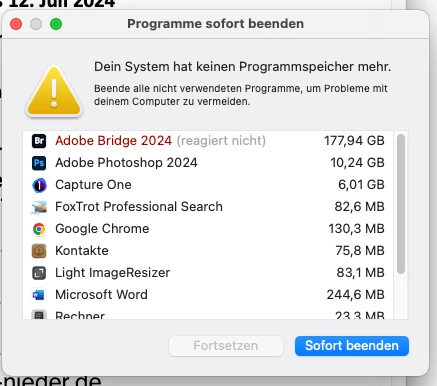
 

Thank you for help - Greetings from Germany.

Dominik

This topic has been closed for replies.
Correct answer pankajg6675616

Hi,


Thanks for your feedback.


The issue has been fixed in the latest Bridge release 14.0.1, along with a few other critical bug fixes.
The complete list of fixed issues is available at https://helpx.adobe.com/bridge/kb/fixed-issues.html.
Please try the build and confirm if the fix holds up at your end.


Regards,
Bridge Team

3 replies

asiema26128538
Participant
December 22, 2023

Hello,

I would like to bring to your attention an issue regarding the Adobe Bridge application. Based on my personal experience, I have noticed that when the Camera Raw interface is opened, the Adobe Bridge application stops working. Additionally, there seem to be several other issues with the application.

I have tried restarting my MacBook Pro, but the application did not work. Furthermore, I have uninstalled and reinstalled the application, but it still fails to function.

I would like to inquire if there is a solution to this problem. Are there any updates or specific instructions that I can follow to resolve this issue? Or are there any additional steps I should take to ensure that the application runs properly?

I would greatly appreciate any assistance with this matter and I look forward to your response.

Thank you very much.

pankajg6675616Community ManagerCorrect answer
Community Manager
November 10, 2023

Hi,


Thanks for your feedback.


The issue has been fixed in the latest Bridge release 14.0.1, along with a few other critical bug fixes.
The complete list of fixed issues is available at https://helpx.adobe.com/bridge/kb/fixed-issues.html.
Please try the build and confirm if the fix holds up at your end.


Regards,
Bridge Team

Yamonov
Legend
November 10, 2023

Thank you for your response. I have updated the application. I have set it to log in case of a memory leak, so I will monitor the situation over the next few days. If I encounter a memory leak again, I will reply to this thread.

--Yamonov
Yamonov
Legend
November 10, 2023

I'm experiencing severe memory leaks with Adobe Bridge on Ventura 13.6.1 (M1 ULTRA) as well. This issue has been persistent since the version where the Bridge's UI was changed. I hope Adobe acknowledges this and provides an early fix.

Despite these challenges, Bridge is essential for my work. To manage the situation, I've created an AppleScript, despite being a beginner at scripting, that forcefully quits and restarts Bridge when memory leaks begin. It's set up to be monitored every minute with Keyboard Maestro. By default, the script activates when Bridge's memory usage exceeds 20GB.

While I realize my AppleScript might be rudimentary and could have inefficiencies or flaws, it's currently functioning as intended in my case.


-- Set name of the application to monitor
set appName to "Adobe Bridge 2024"
set memThreshold to 20 * 1048576 -- set gigabyte

-- Function to get the process id
on getPid(appName)
    try
        return do shell script "pgrep -x " & quoted form of appName
    on error
        return -1
    end try
end getPid

-- Function to get memory usage
on getMemUsage(pid)
    try
        return (do shell script "ps -o rss= -p " & pid) as number
    on error
        return -1
    end try
end getMemUsage

-- Function to quit application and force quit if necessary
on quitApp(appName, pid, memUsage)
    display notification "Restarting due to high memory usage in Bridge" sound name "Morse"
    try
        with timeout of 3 seconds
            tell application appName to quit
        end timeout
    end try
    tell application "System Events" to set quitAppFlag to (name of processes) contains appName
    if quitAppFlag then
        do shell script "kill -9 " & pid
        delay 1
        display notification "Force quit executed. Restarting now." sound name "Submarine"
        tell application appName to run
        return "FORCE_QUIT_Used Memory:" & memUsage as text
    else
        display notification "Normal termination completed. Restarting now." sound name "Submarine"
        tell application appName to run
        return "NORMAL_TERMINATION_Used Memory:" & memUsage as text
    end if
end quitApp

-- Main routine
set pid to getPid(appName)
if pid is not -1 then
    set memUsage to getMemUsage(pid)
    if memUsage is not -1 and memUsage > memThreshold then
        quitApp(appName, pid, memUsage)
    else
        return 0
    end if
end if


--Yamonov