martinv44029552
Inspiring
February 29, 2020
Answered

Adobe Bridge CS4 Migration to new iMac unable to open?

  • February 29, 2020
  • 1 reply
  • 1679 views

Hello

I think I may know the answer to this question but as I'm not at all knowledgeable on technical issues, I thought it best to ask just in case there is a solution.

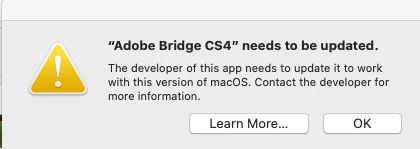
I recently migrated Adobe Bridge CS4 from my old iMac to my new iMac running OS Catalina and I find I can't open it and this dialogue box comes up.

along with this one.


Is there a solution, as all my images are located in this older version of bridge and I really didn't want keep switching between computers?

Any help would be appreciated.

Many thanks in advance.

This topic has been closed for replies.
Correct answer gary_sc

Hello Gary

I think we're probably in different time zones?


I'm very good at confusing people, you're not the first!

I think I've clearly misinterpreted your original responce.

I have Adobe Bridge CS4 on my old Mac.

I thought your were implying if I downloaded Photoshop Elements onto my old Mac and then transfered CS4 to it, I could then migrate the whole lot onto my new computer, obviously you weren't?


I did initially try the external hard drive route but when I connected to my new Mac, a window popped up saying, 'Couldn't open folder because I don't have permission.'

I'm trying now to solve this issue!

Apologies for taking up your time, I am unfortunately a novice in some areas of Computer language.


Hi Martin,


No problem, glad to see you through to success.


OK, when any message says that it can't get past a folder due to permissions, that's when you need to tell your computer, that you can give it permissions. 


Please look up earlier in this thread about the instructions I gave, particularly about Permisions and I had a screenshot. The important part starts with the statement "In the Finder select the folder that you're documents/images..." Select the folder that your content is in, try instructions and see if that works.


Let me know

 

1 reply

gary_sc
Community Expert
Community Expert
February 29, 2020

Hi Martin, 


Bad news, good news.


The bad news (as I gathered you've already suspected) is that there is absolutely no way for CS4, or any 32bit application to work in Catalina. Just isn't going to happen in any way, shape, or form.


The good news is that there are a variety of options available to you to upgrade your applications. Also good news is that since your images apparently are all in one folder, they will be easy to transfer over to your new iMac (congrats by the way, always nice to get a new machine).


The least expensive way to upgrade is via Photoshop Elements. This will cost about $80 and is a permanent item. That is, you do not have to pay any monthly or annual fees to keep using it. 


If you wish to try some other software, there is Luminar 4 (about $90) and if you want a Lightroom alternative, there On1 Photo studio. If you google alternatives to Photoshop, you will find at least a dozen that vary in price from free to very reasonable. Now, I have to say that I've not used most of any of these, I do pretty much everything I need to do in Lightroom and Photoshop. But I'd be amiss if I didn't at least point these out.


Lastly, there are the various Photoshop plans. These range from $9.99 to $19.99/month depending on what you want/need. The other good news in this is that when you see what new features and capabilities you will have here, you will be pleased and impressed. 


If you need any help in determining the difference between Lightroom and Lightroom Classic, just google that and if you need any more , just ask me.


Good luck,

gary_sc
Community Expert
Community Expert
February 29, 2020

Oh, I meant to place the link to the Photoshop Plans


https://www.adobe.com/creativecloud/photography/compare-plans.html


Good luck,