

Adobe Bridge is consuming all the application memory.
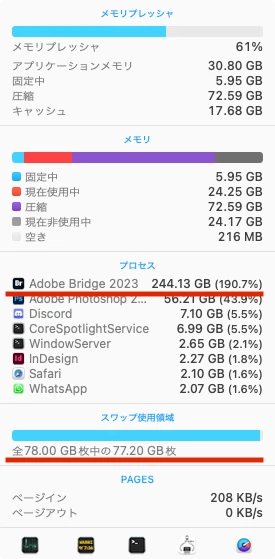
Bridge2023 and Bridge(Beta) abnormally consume application memory. This issue frequently occurred with the 2023 version, and it seems to persist in Bridge(Beta), even when simply launching it with no windows open. The attached images show 244GB and 78GB of SWAP being used. The BridgeBeta version consumes up to about 330GB of application memory, and a warning was issued from MacOS.
I'm unsure what triggers this. I don't want to create swap files, so when this happens, I have no choice but to reboot. As a result, I'm running a script that checks the memory usage every 5 minutes and terminates or executes the 'kill -9' command if it exceeds 20GB.
It's quite bothersome. My system environment is a Mac (M1 ULTRA) running MacOS Ventura version 13.5, with 128GB RAM.


 AdChoices