


Open for Voting
Adobe bridge reports it does not support DNG files
Platform: Windows 10 (version 22H2), running Adobe Bridge 2024 (14.1.5.311).
I am using the same workflow I have been using for 15 years: convert files to DNG using DNG Converter (Settings - Compatibity: Camera Raw 11.2 or later; JPG Preview: Medium Size; Embed fast load data; Don’t use lossy compression; Preserve Pixel Count; Don’t embed original), and then open in Bridge for sorting, and finally exporting.
Camera Model for source images: Nikon D3 and Nikon D300, shooting in NEF/raw-format.
What I’m seeing:
- No thumbnails are visible on my DNG files. (Some random jpg images I have looked at seem to have a thumbnail.)
- Sometimes I see a “Generating thumbnail” message
- When I try to export the files to jpg, I get the error message: “unsupported format”.

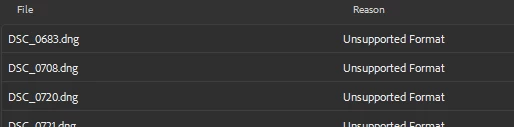
Troubleshooting steps tried:
- Restarting Bridge
- Rebooting PC
- Clearing cache (Tools->Cache->Clear cache)
- Downloading the latest DNG Converter, and trying export again (still with DNG version 11.2).
This workflow worked a few days ago, so I’m at a loss what more to try. Could this be a Windows 10 issue?
 AdChoices