

Adobe Bridge showing wrong time stamp for MP$ files from Canon R6Mk2
Can anybody explain or offer a solution to why Bridge shows a different time stamp to Windows 11 on video files MP4 created on my Canon R6Mk2.
I have never had video creating capability until I purchased my Canon R6Mk2 so this problem is new to me and unknown if this a new bug in Bridge or been there for some time.
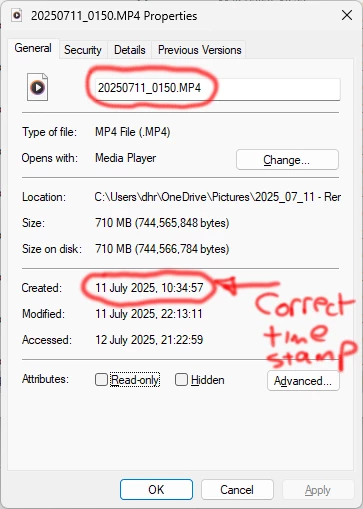
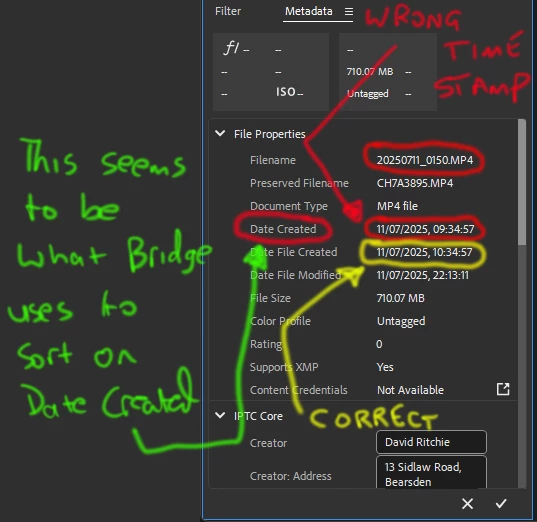
Windows 11 is showing the correct timestamp for the file created in camera, but Adobe Bridge shows the timestamp for the file created as 1 hour earlier than windows. This means when I try to sort files in Date/Time Created the video files are always out of sequence.
Yes, I can go in and manually adjust the creation time, but it's a pain 1) having to do it every time, 2) having to do it all.
The First image attached shows Windows Properties with the correct file time stamp.
The second image attached shows what Bridge is doing and adjusting the file time stamp by an hour, and it is this which appears to be used when sorting by Date/Time.
I have spoken to Canon, and they confirm it nothing to do with them, but an Adobe problem.
I am using Win 11 Version 10.0.22631 Build 22631
and Bridge Version 15.1.0.635
any help would be appreciated


 AdChoices