
Participant
February 7, 2021
Question

Adobe Bridge Thumbnails

  • February 7, 2021
  • 1 reply
  • 290 views

Hi All,

I have started to use Adobe Bridge to manage my images.

On some of the thumbnails on each top right corner is a the crop symbol see image:
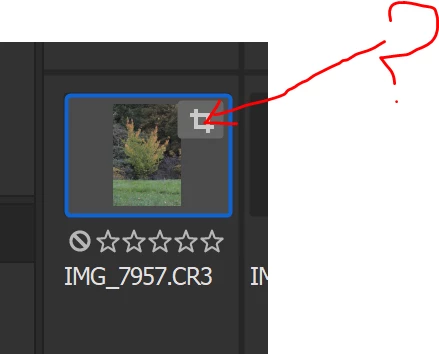
can anyone tell why is there and what is is used for? clicking on it doesn't carry out an action.


Thank You

This topic has been closed for replies.

1 reply

gary_sc
Community Expert
Community Expert
February 7, 2021

That's just to let you know that the image was cropped. If you make any adjustments on the image you'll see a different icon up there. Again, it doesn't DO anything but let you know that the image has been cropped or adjusted.


BTW, Bridge is a great image VIEWER but not all that good for image management unless you are very diligent in how you manage and organize your images. Simply, Bridge is NOT a DAM (Digital Asset Management).


If you are interested in such things, I'd suggest you check out Lightroom Desktop which is a DAM, and viewer. 


I use both back and forth depending on whether the image I'm looking at is for short term use (preparring images for sale on Craigslist as a quick example) or long term storage (such as images from a holiday or a family event). For the former, it's Bridge, for the latter it's LRC. You may want to check it out.

Participant
February 8, 2021

Thank You for letting me know👍