saturngraphics
Participant
June 20, 2019
Question

AI format files showing transparency grid in Bridge preview

  • June 20, 2019
  • 8 replies
  • 5301 views

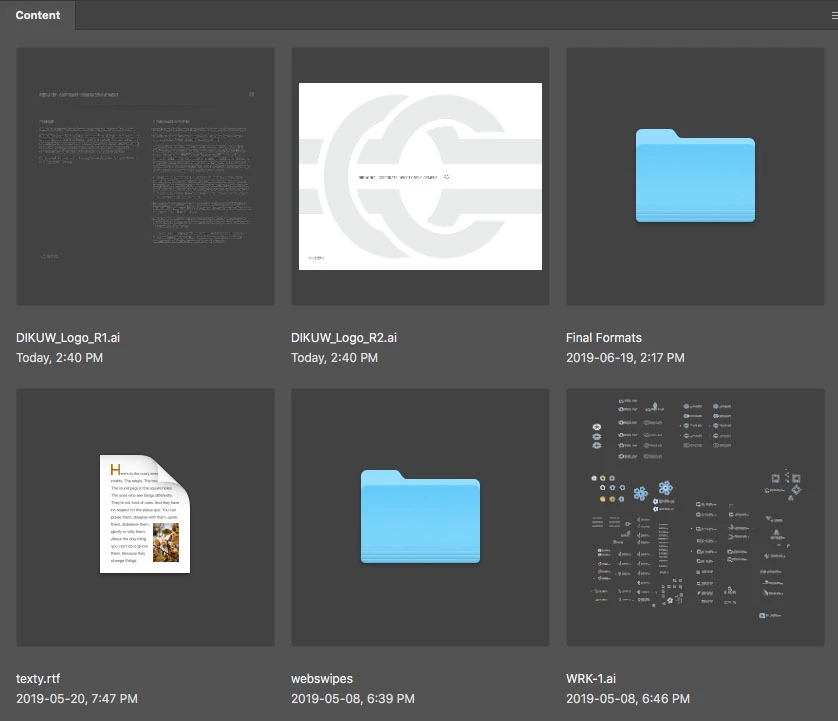
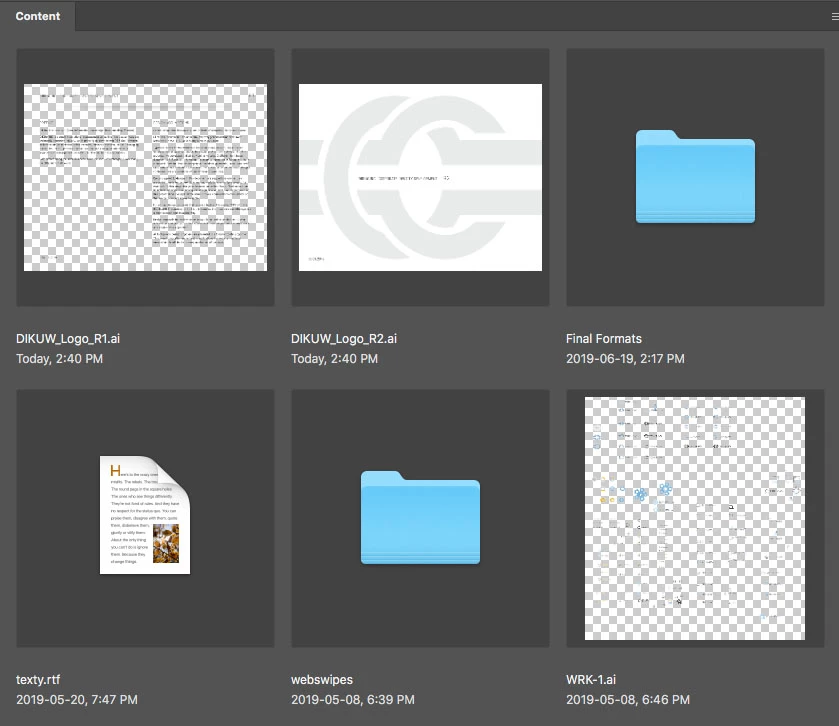
So, with the latest update of Adobe Bridge, AI format files are now showing transparency grid in Bridge preview and thumbnails, instead of standard white background (the way it's been, like forever). Unchecking "Show Transparency Grid" in the the thumbnail preview options drop-down actually makes it worse... rendering the artboard background as dark grey instead (screenshots attached).

The worst part about this is that the transparency grid seems to be generated completely at random, as you can see in the screenshot (DIKUW_Logo_R1 vs DIKUW_Logo_R2), where one shows transparent background and the other artboard-white. There's no difference in the setup of these two files, as far as I can see... they're both presentation files for a 2 rounds of a logo design. R2 was in fact generated from R1 (resaved with a different name and updated content).

I find this new development extremely annoying... can anyone shed some light on what's happening here and/or how I can remedy this?

Thank you.
This topic has been closed for replies.

8 replies

Participating Frequently
August 5, 2020

a year later and this is still not corrected?

wckdtall
Inspiring
August 6, 2020

Adobe has a tendency to introduce features, sometimes it would seem as an experiment, and never revisit them. Ask the scripting communities about extendscript toolkit, or documentation on their programs. Look at the seams in Illustrator patterns, or the lack of improvement to smart objects. Clearly their sprints are focused on improving touch technology, and kind of supporting export capabilities. I'm no fan of work arounds, but with CC you can always download earlier versions, which bridge really hasn't changed over the years aside from removing and readding features like the output module. Which is another good example as it still doesn't support clear rasterization of vector images, and to do that you have to use Photosshop's Contact Sheet II script. Unfortunately we all have to look past some feature annoyances.

wckdtall
Inspiring
July 14, 2020

In case anyone is curious to what may be causing files to show up with the transparency grid, it seems to appear the moment you introduce any level of transparency, blending mode, effect or potentially other appearances/transparencies to the file to the AI file. I'm on 10.1.0.163, which seems to offer disable Transparency which reverts to white, and disable Transparency Grid, which reverts to the tone of the Image Backdrop, which has a slider. This portion offers the ability to solve having only gray behind your image, but it will burn your eyes. Just wanted to share what I've found to be causing the AI transparency grid, as consistency would be nice! But Illustrator does not believe in being consistent.

Adobe Employee
May 21, 2020

Hi,

Bridge v10.1 now has an option "Show Transparency" that can be turned off for the white background. 10.1 is currently in pre-release. You can sign up for the Bridge prerelease program from adobeprelease.com. Public release is June 2020. 


Thanks!

Teja

Participant
December 11, 2019

Just got an update today (10.0.1.126) and still the issue persists. I understand it`s ok for .psd files but for .ai is a total disaster...The company where i work has  catalogs pages with products daily..all pages made in illustrator and it`s very difficult to find stuff now with a transparent background (and yes few pages still have white background..which is weird).. How longs does it take for you ADOBE to fix this or add an option to turn off the transparency for .ai files...the problem started with version 2019...and yes you added some gimmick for this with the interface colors...but it`s not a real fix..was perfect like it was before...why you guys always come with "good" ideas instead of listening to people needs and fix what and improve not mess things up more...

Adobe Employee
December 12, 2019

Hi


Sorry for the trouble. We have prioritized this for the next version.


In the meantime, the workaround in my previous reply to this thread (which I understand is not ideal) is the only alternative. This workaround is possible now in the public 10.0 release (no need to sign up for prerelease).


Thanks,

Teja

Adobe Employee
October 16, 2019

Hi


This is not the best solution, but with the latest version of Bridge, you will be able to "Hide Tiles" and control the background color of the thumbnails from pure white to pure black. 


Although the Bridge v10.0 is not yet released, you can download the latest Bridge version from our prerelease website: https://www.adobeprerelease.com/ Select Adobe Bridge. Download v10.0 Drop 4 (or latest) from there.

In this version, at the bottom of the Content panel, you will see a check box to hide the tiles. After you hide the tiles, you can go to Edit menu->preferences->interface and use the "Image backdrop" slider to change it to pure white. 


This is the best solution for now. We will plan to have an option to "hide transparency" in the future so that there is no grid.


Teja

benc34199373
Participating Frequently
July 17, 2019

Yes, quite annoying this. I work with a lot of dielines and I can barely make out what I am looking at with the transparency grid getting in the way.

Akash Sharma
Legend
July 17, 2019

This is a known issue in the current version of Bridge and our engineering team is working on it.

Please stay tuned for more updates.

~Akash

magentad82906687
Participant
August 20, 2019

Thanks. If we even just had the option to change the dark gray background to white I think that would be good enough.

I understand the reasoning behind having Bridge support transparency but it makes it difficult for those of us that work in print heavy environments.

jbm007
Community Expert
Community Expert
June 24, 2019

Actually there maybe.

Check the file size.

I have found some files with transparencies are 1/9 th the size of the files that do not show the transparency.

Akash Sharma
Legend
June 21, 2019

Hi saturngraphics,

Sorry about the trouble caused because of the transparency support for .AI and .EPS files in Bridge 9.1.

I've shared this feedback with our Engineering team to review.

However, I'd recommend that you also post this on our Feedback community here: Bridge | Photoshop Family Customer Community

Our Engineers do monitor this space and look for major feature requests, issues and feedback from our valuable users like you to better shape the product further.

Thanks,

Akash

saturngraphics
Participant
June 24, 2019

Thanks for the reply... I have posted to the suggested forum as well.

Mike

On Fri, Jun 21, 2019 at 9:18 AM Akash Sharma <forums_noreply@adobe.com>

Akash Sharma
Legend
June 24, 2019

Thanks Mike.