
Participant
August 17, 2017
Answered

Alphabetical organization of Bridges Explorer bar

  • August 17, 2017
  • 7 replies
  • 1526 views

A few month ago after an Creative Cloud update, all my drop down folder previews lost there alphabetical organization. Making it pain to get to where I need to go quickly. I'm able to sort the content windows perfectly fine, this just effects the explorer bar, when I preview a folders contents. Please help! Image example below:
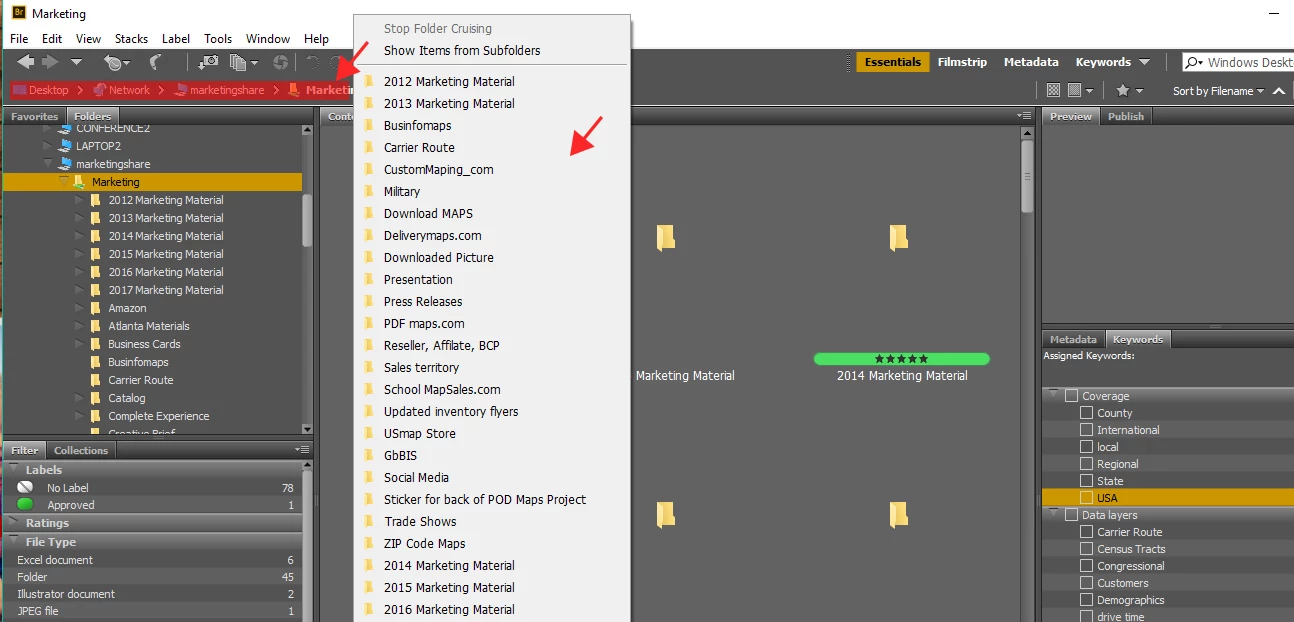
This topic has been closed for replies.
Correct answer Deepak_Gupta1

Hi All,

We have released a new version of Adobe Bridge (CC 2019) on 15 October 2018. The new version build number is 9.0.0.204. This version is available to install via Adobe Creative Cloud application.

This version fixes the Alphabetic sorting order of folders in Explorer bar.

Please check the following link to know about all new features in Adobe Bridge CC 2019 - https://helpx.adobe.com/bridge/using/whats-new.html

You may need to update the Creative Cloud application and restart your computer to see the updated installer.

Thanks,

Deepak Gupta

7 replies

Deepak_Gupta1
Deepak_Gupta1Correct answer
Participating Frequently
October 15, 2018

Hi All,

We have released a new version of Adobe Bridge (CC 2019) on 15 October 2018. The new version build number is 9.0.0.204. This version is available to install via Adobe Creative Cloud application.

This version fixes the Alphabetic sorting order of folders in Explorer bar.

Please check the following link to know about all new features in Adobe Bridge CC 2019 - https://helpx.adobe.com/bridge/using/whats-new.html

You may need to update the Creative Cloud application and restart your computer to see the updated installer.

Thanks,

Deepak Gupta

arnobweb
Participant
September 15, 2018

Any update? Same problem, with DropBox folder...

Klaas vT
Inspiring
August 27, 2018

Hi,

This is still an issue... Does anyone have a fix yet?

Mike Witherell
Community Expert
Community Expert
June 6, 2018

I am seeing this same issue in June 2018. Is there a Bridge fix for this?

Mike Witherell in Washington DC

Mike Witherell
arnobweb
Participant
May 27, 2018

I have the same problem, but with my folders that are stored in DropBox, access in Finder. Folders that are in a hard disk are classified alphabetically. What to do?

Participant
March 30, 2018

I have the same issue but in a slightly more extreme variant. Every so often I waste 20minutes trying to fix it but nothing works. I keep hoping for an update that will fix it.

Participant
March 30, 2018

I have the same issue  :-(((

Stephen Marsh
Community Expert
Community Expert
August 18, 2017

Perhaps try resetting Bridge’s preferences…

Troubleshoot Adobe Bridge for errors and freezes

(point #2)

Participant
August 25, 2017

Thank you for the suggestion, but sadly that did not work. The Path Bar is still unorganized.

Sahil.Chawla
Adobe Employee
Adobe Employee
September 18, 2017

Hi Jeredb,

Are you working on Network Drives?

Regards,
Sahil