Inspiring
October 18, 2018
Answered

Any way to batch save uncompressed TIFFs with ZIP compression

  • October 18, 2018
  • 1 reply
  • 2612 views

I have many thousands of TIFF files saved (uncompressed), and I am needing a way to batch save them with ZIP compression.  In Bridge, it appears that my only option is LZW compression, but I am not very familiar with the program so I may be missing something.  Is there a way to do this in Bridge?

This topic has been closed for replies.
Correct answer Jeff Arola

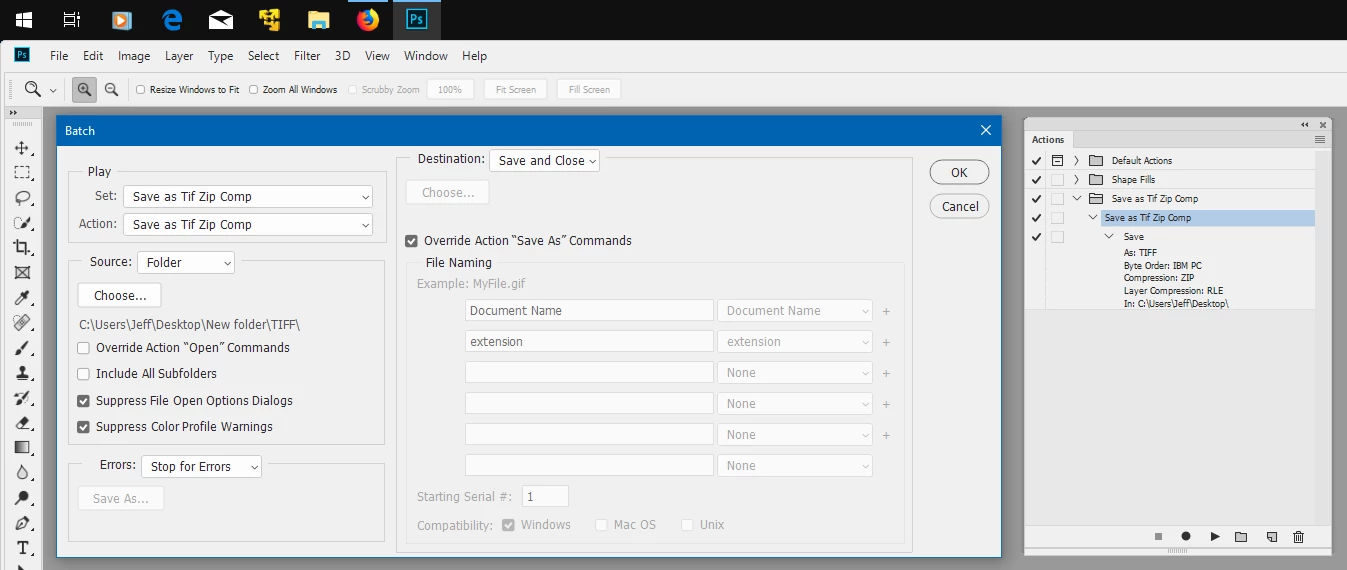
You could record an action in photoshop Save as Tif with Zip Compression and then use Batch in Photoshop under File>Automate>Batch to batch run the action on a folder of tifs.

1 reply

Jeff Arola
Community Expert
Jeff ArolaCommunity ExpertCorrect answer
Community Expert
October 22, 2018

You could record an action in photoshop Save as Tif with Zip Compression and then use Batch in Photoshop under File>Automate>Batch to batch run the action on a folder of tifs.

Inspiring
October 23, 2018

Maybe I need to start a new thread for this, but this inevitably results in Photoshop crashing.  I've done it in the past (this was what I was doing before my post; I was looking for an easier way), and it's worked until fairly recently.  Now, however, I get a progress bar on my first photo in a folder ("Writing TIFF Format") which freezes 99% of the way through.  It never finishes. 

If I try the action on a single photo, it works.  The issue only seems to arise with Batch processing.

Jeff Arola
Community Expert
Community Expert
October 24, 2018

What operating system are you using?

Resetting the photoshop preferences might fix it.

Go to Photoshop CC (Edit)>Preferences>General, click Reset Preferences On Quit and restart photoshop.