Known Participant
May 25, 2021
Answered

append a word "webshop" to the title

  • May 25, 2021
  • 5 replies
  • 1138 views

Hello together,

i need your help to append my title with a word "webshop".

example:

current title:

car 01

new tittle:

car 01 webshop


I have the code but it doesn't work:


#target bridge
if( BridgeTalk.appName == "bridge" ) {
FT = MenuElement.create("command", "Add Webshop to Title", "at the end of Tools");
}
FT.onSelect = function () {
AddWebshopToTitle();
}

function AddWebshopToTitle(){
var thumbs = app.document.selections;
if(!thumbs.length) return;
if (ExternalObject.AdobeXMPScript == undefined) ExternalObject.AdobeXMPScript = new
ExternalObject("lib:AdobeXMPScript");
for(var a in thumbs){
var selectedFile = thumbs[a].spec;
/*var Title = decodeURI(selectedFile.name).replace(/\.[^\.]+$/, '')//([0-9/[-].jpg/]*) nur name*/
var webshop = "Webshop"
var myXmpFile = new XMPFile( selectedFile.fsName, XMPConst.UNKNOWN,
XMPConst.OPEN_FOR_UPDATE);
var myXmp = myXmpFile.getXMP();
/*myXmp.deleteProperty(XMPConst.NS_DC, "title");*/
myXmp.appendArrayItem(XMPConst.NS_DC, "title", webshop, 0,
XMPConst.ALIAS_TO_ALT_TEXT);
myXmp.setQualifier(XMPConst.NS_DC, "title[1]",
"http://www.w3.org/XML/1998/namespace", "lang", "x-default");
if (myXmpFile.canPutXMP(myXmp)) {
myXmpFile.putXMP(myXmp);
myXmpFile.closeFile(XMPConst.CLOSE_UPDATE_SAFELY);
}
}
}


Thank you


Correct answer Stephen Marsh


I can't find where this script came from, I'm guessing Paul Riggott.


I made some cosmetic changes to the GUI for modern versions of Bridge.
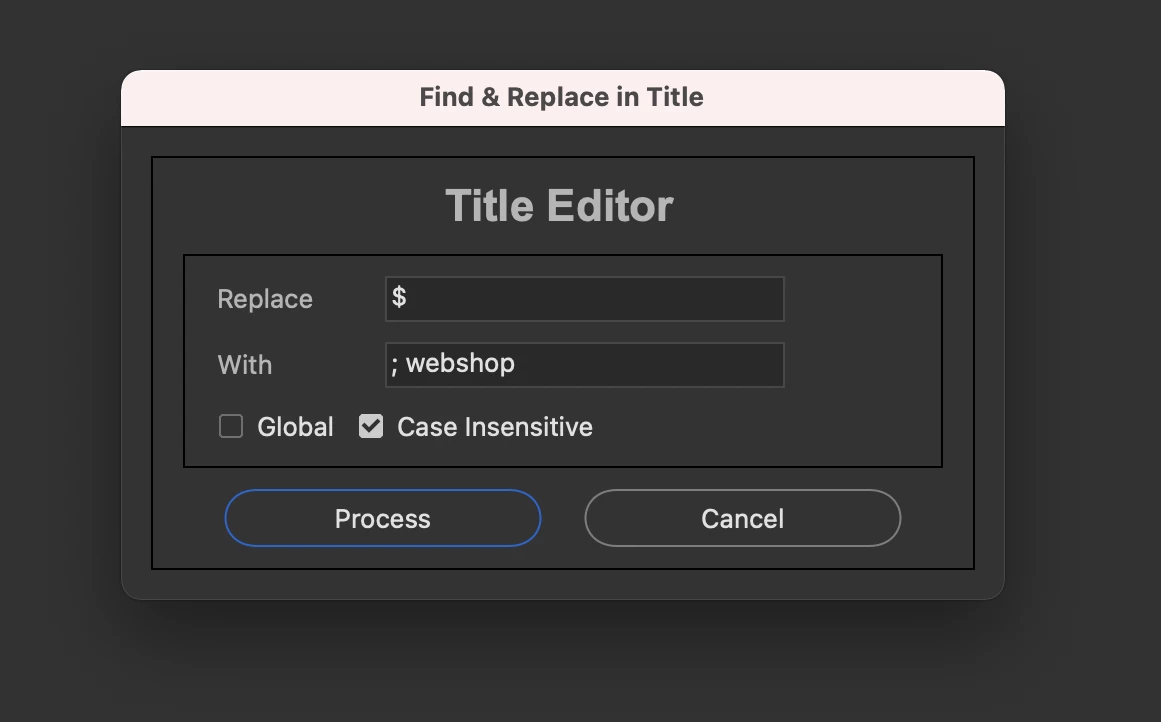


#target bridge
if (BridgeTalk.appName == "bridge") {
    ReplaceTitle = new MenuElement("command", "Find and Replace in Title", "at the end of tools");
}
ReplaceTitle.onSelect = function () {
    var win = new Window('dialog', 'Find & Replace in Title');
    g = win.graphics;
    var myBrush = g.newBrush(g.BrushType.SOLID_COLOR, [0.2, 0.2, 0.2, 1]);
    g.backgroundColor = myBrush;
    win.orientation = 'column';
    win.p1 = win.add("panel", undefined, undefined, { borderStyle: "black" });
    win.p1.preferredSize = [380, 100];
    win.g1 = win.p1.add('group');
    win.g1.orientation = "row";
    win.title = win.g1.add('statictext', undefined, 'Title Editor');
    win.title.alignment = "fill";
    var g = win.title.graphics;
    g.font = ScriptUI.newFont("Arial", "BOLD", 22);
    win.p6 = win.p1.add("panel", undefined, undefined, { borderStyle: "black" }); //Replace
    win.p6.preferredSize = [380, 100];
    win.g600 = win.p6.add('group');
    win.g600.orientation = "row";
    win.g600.alignment = 'fill';
    win.g600.st1 = win.g600.add('statictext', undefined, 'Replace');
    win.g600.st1.preferredSize = [75, 20];
    win.g600.et1 = win.g600.add('edittext');
    win.g600.et1.preferredSize = [200, 20];
    win.g610 = win.p6.add('group');
    win.g610.orientation = "row";
    win.g610.alignment = 'fill';
    win.g610.st1 = win.g610.add('statictext', undefined, 'With');
    win.g610.st1.helpTip = "Leave this field blank if you want to remove the characters";
    win.g610.st1.preferredSize = [75, 20];
    win.g610.et1 = win.g610.add('edittext');
    win.g610.et1.preferredSize = [200, 20];
    win.g620 = win.p6.add('group');
    win.g620.orientation = "row";
    win.g620.alignment = 'fill';
    win.g620.cb1 = win.g620.add('checkbox', undefined, 'Global');
    win.g620.cb1.helpTip = "Replace all occurrences of";
    win.g620.cb2 = win.g620.add('checkbox', undefined, 'Case Insensitive');
    win.g620.cb2.value = true;
    win.g1000 = win.p1.add('group');
    win.g1000.orientation = "row";
    win.g1000.alignment = 'center';
    win.g1000.bu1 = win.g1000.add('button', undefined, 'Process');
    win.g1000.bu1.preferredSize = [170, 30];
    win.g1000.bu2 = win.g1000.add('button', undefined, 'Cancel');
    win.g1000.bu2.preferredSize = [170, 30];
    win.g1000.bu1.onClick = function () {
        if (win.g600.et1.text == '') {
            alert("No replace value has been entered!");
            return;
        }
        win.close(0);
        var sels = app.document.selections;
        for (var a in sels) {
            var thumb = sels[a];
            md = thumb.synchronousMetadata;
            if (win.g620.cb1.value && !win.g620.cb2.value) var patt = new RegExp(win.g600.et1.text.toString(), "g");
            if (!win.g620.cb1.value && win.g620.cb2.value) var patt = new RegExp(win.g600.et1.text.toString(), "i");
            if (win.g620.cb1.value && win.g620.cb2.value) var patt = new RegExp(win.g600.et1.text.toString(), "gi");
            if (!win.g620.cb1.value && !win.g620.cb2.value) var patt = new RegExp(win.g600.et1.text.toString());
            md.namespace = "http://purl.org/dc/elements/1.1/";
            var Caption = md.title ? md.title[0] : "";
            if (Caption == "") continue;
            var result = patt.test(Caption.toString());
            if (result == true) {
                var newCaption = Caption.replace(patt, win.g610.et1.text.toString());
                setTitle(sels[a].spec, newCaption);
            }
        }
    }
    win.show();
    function setTitle(file, Caption) {
        if (!ExternalObject.AdobeXMPScript) ExternalObject.AdobeXMPScript = new ExternalObject('lib:AdobeXMPScript');
        var xmpf = new XMPFile(File(file).fsName, XMPConst.UNKNOWN, XMPConst.OPEN_FOR_UPDATE);
        var xmp = xmpf.getXMP();
        xmp.deleteProperty(XMPConst.NS_DC, "title");
        xmp.setLocalizedText(XMPConst.NS_DC, "title", null, "x-default", Caption);
        if (xmpf.canPutXMP(xmp)) {
            xmpf.putXMP(xmp);
        }
        xmpf.closeFile(XMPConst.CLOSE_UPDATE_SAFELY);
    }
};


Regular Expression Based Find:

$


Replace:

; webshop

 

5 replies

Participant
September 17, 2025

Your script isn’t modifying the existing title. It is just adding a new array item, so “Webshop” doesn’t appear after the current title. To fix it, you need to read the current title, append “Webshop” to it, and write it back. Your namespace usage with x-default and http://www.w3.org/XML/1998/namespace is correct. I can rewrite the script to automatically append “Webshop” to selected files’ titles without overwriting or creating extra entries.

It also includes a reference link for more information on XML and XMP namespaces: https://2wins.eu 

Legend
September 17, 2025

This is an old topic...

Jörn5F90Author
Known Participant
July 1, 2021

Hello together,


i need your help


i have this titel

"car blue; Auto blau"

How can I add webshop to title before and after the semicolon like this

"car blue webshop; Auto blau webshop"


Thanks, Jörn

Stephen Marsh
Community Expert
Community Expert
July 4, 2021

@Jörn5F90 


Using the previous "Title Editor" script, you can use the following regular expression find/replace:


Find:

(^.+)(;)(.+)


Replace:

$1 webshop;$3 webshop

or if you want space after the semi-colon

$1 webshop; $3 webshop


This assumes that the "quote marks" don't actually exist in the title and that there are only two entries, separated by a semi-colon.


Jörn5F90Author
Known Participant
July 5, 2021

Thank you it works


Stephen Marsh
Community Expert
Community Expert
June 1, 2021

So @Jörn5F90 – where did you end up?

Stephen Marsh
Community Expert
Stephen MarshCommunity ExpertCorrect answer
Community Expert
May 28, 2021


I can't find where this script came from, I'm guessing Paul Riggott.


I made some cosmetic changes to the GUI for modern versions of Bridge.


#target bridge
if (BridgeTalk.appName == "bridge") {
    ReplaceTitle = new MenuElement("command", "Find and Replace in Title", "at the end of tools");
}
ReplaceTitle.onSelect = function () {
    var win = new Window('dialog', 'Find & Replace in Title');
    g = win.graphics;
    var myBrush = g.newBrush(g.BrushType.SOLID_COLOR, [0.2, 0.2, 0.2, 1]);
    g.backgroundColor = myBrush;
    win.orientation = 'column';
    win.p1 = win.add("panel", undefined, undefined, { borderStyle: "black" });
    win.p1.preferredSize = [380, 100];
    win.g1 = win.p1.add('group');
    win.g1.orientation = "row";
    win.title = win.g1.add('statictext', undefined, 'Title Editor');
    win.title.alignment = "fill";
    var g = win.title.graphics;
    g.font = ScriptUI.newFont("Arial", "BOLD", 22);
    win.p6 = win.p1.add("panel", undefined, undefined, { borderStyle: "black" }); //Replace
    win.p6.preferredSize = [380, 100];
    win.g600 = win.p6.add('group');
    win.g600.orientation = "row";
    win.g600.alignment = 'fill';
    win.g600.st1 = win.g600.add('statictext', undefined, 'Replace');
    win.g600.st1.preferredSize = [75, 20];
    win.g600.et1 = win.g600.add('edittext');
    win.g600.et1.preferredSize = [200, 20];
    win.g610 = win.p6.add('group');
    win.g610.orientation = "row";
    win.g610.alignment = 'fill';
    win.g610.st1 = win.g610.add('statictext', undefined, 'With');
    win.g610.st1.helpTip = "Leave this field blank if you want to remove the characters";
    win.g610.st1.preferredSize = [75, 20];
    win.g610.et1 = win.g610.add('edittext');
    win.g610.et1.preferredSize = [200, 20];
    win.g620 = win.p6.add('group');
    win.g620.orientation = "row";
    win.g620.alignment = 'fill';
    win.g620.cb1 = win.g620.add('checkbox', undefined, 'Global');
    win.g620.cb1.helpTip = "Replace all occurrences of";
    win.g620.cb2 = win.g620.add('checkbox', undefined, 'Case Insensitive');
    win.g620.cb2.value = true;
    win.g1000 = win.p1.add('group');
    win.g1000.orientation = "row";
    win.g1000.alignment = 'center';
    win.g1000.bu1 = win.g1000.add('button', undefined, 'Process');
    win.g1000.bu1.preferredSize = [170, 30];
    win.g1000.bu2 = win.g1000.add('button', undefined, 'Cancel');
    win.g1000.bu2.preferredSize = [170, 30];
    win.g1000.bu1.onClick = function () {
        if (win.g600.et1.text == '') {
            alert("No replace value has been entered!");
            return;
        }
        win.close(0);
        var sels = app.document.selections;
        for (var a in sels) {
            var thumb = sels[a];
            md = thumb.synchronousMetadata;
            if (win.g620.cb1.value && !win.g620.cb2.value) var patt = new RegExp(win.g600.et1.text.toString(), "g");
            if (!win.g620.cb1.value && win.g620.cb2.value) var patt = new RegExp(win.g600.et1.text.toString(), "i");
            if (win.g620.cb1.value && win.g620.cb2.value) var patt = new RegExp(win.g600.et1.text.toString(), "gi");
            if (!win.g620.cb1.value && !win.g620.cb2.value) var patt = new RegExp(win.g600.et1.text.toString());
            md.namespace = "http://purl.org/dc/elements/1.1/";
            var Caption = md.title ? md.title[0] : "";
            if (Caption == "") continue;
            var result = patt.test(Caption.toString());
            if (result == true) {
                var newCaption = Caption.replace(patt, win.g610.et1.text.toString());
                setTitle(sels[a].spec, newCaption);
            }
        }
    }
    win.show();
    function setTitle(file, Caption) {
        if (!ExternalObject.AdobeXMPScript) ExternalObject.AdobeXMPScript = new ExternalObject('lib:AdobeXMPScript');
        var xmpf = new XMPFile(File(file).fsName, XMPConst.UNKNOWN, XMPConst.OPEN_FOR_UPDATE);
        var xmp = xmpf.getXMP();
        xmp.deleteProperty(XMPConst.NS_DC, "title");
        xmp.setLocalizedText(XMPConst.NS_DC, "title", null, "x-default", Caption);
        if (xmpf.canPutXMP(xmp)) {
            xmpf.putXMP(xmp);
        }
        xmpf.closeFile(XMPConst.CLOSE_UPDATE_SAFELY);
    }
};


Regular Expression Based Find:

$


Replace:

; webshop


Jörn5F90Author
Known Participant
May 25, 2021

I found a solution

#target bridge
if( BridgeTalk.appName == "bridge" ) {
FT = MenuElement.create("command", "Testing", "at the end of Tools");
}
FT.onSelect = function () {
var thumbs = app.document.selections;
if(!thumbs.length) return;
if (ExternalObject.AdobeXMPScript == undefined) ExternalObject.AdobeXMPScript = new ExternalObject("lib:AdobeXMPScript");
for(var a in thumbs){
var selectedFile = thumbs[a].spec;
/*var FileName = decodeURI(selectedFile.name).slice(0,7);*/
var TitleName = decodeURI(selectedFile.title);
var webshop = "Colour Swatch Webshop"
var myXmpFile = new XMPFile( selectedFile.fsName, XMPConst.UNKNOWN, XMPConst.OPEN_FOR_UPDATE);
var myXmp = myXmpFile.getXMP();
var Desc=[];
var count = myXmp.countArrayItems(XMPConst.NS_DC, "title");
for(var i = 1;i <= count;i++){
Desc.push(myXmp.getArrayItem(XMPConst.NS_DC, "title", i));
}
Desc=Desc.toString() + " " + webshop;
myXmp.deleteProperty(XMPConst.NS_DC, "title");
myXmp.appendArrayItem(XMPConst.NS_DC, "title", Desc, 0, XMPConst.ALIAS_TO_ALT_TEXT);
myXmp.setQualifier(XMPConst.NS_DC, "title[1]", "http://www.w3.org/XML/1998/namespace", "lang", "x-default");
if (myXmpFile.canPutXMP(myXmp)) {
myXmpFile.putXMP(myXmp);
myXmpFile.closeFile(XMPConst.CLOSE_UPDATE_SAFELY);
}
}
}

Jörn5F90Author
Known Participant
May 25, 2021

Now I want to copy the title field behind the semicolon like:


car webshop; car webshop


here my code, but doesn't work:

#target bridge
if( BridgeTalk.appName == "bridge" ) {
FT = MenuElement.create("command", "Testing1", "at the end of Tools");
}
FT.onSelect = function () {
var thumbs = app.document.selections;
if(!thumbs.length) return;
if (ExternalObject.AdobeXMPScript == undefined) ExternalObject.AdobeXMPScript = new ExternalObject("lib:AdobeXMPScript");
for(var a in thumbs){
var selectedFile = thumbs[a].spec;
/*var FileName = decodeURI(selectedFile.name).slice(0,7);*/
var TitleName = decodeURI(selectedFile.title);
var webshop = ";"
var myXmpFile = new XMPFile( selectedFile.fsName, XMPConst.UNKNOWN, XMPConst.OPEN_FOR_UPDATE);
var myXmp = myXmpFile.getXMP();
var Desc=[];
var count = myXmp.countArrayItems(XMPConst.NS_DC, "title");
for(var i = 1;i <= count;i++){
Desc.push(myXmp.getArrayItem(XMPConst.NS_DC, "title", i));
}
Desc=Desc.toString() + " " + webshop + " " + TitleName;
myXmp.deleteProperty(XMPConst.NS_DC, "title");
myXmp.appendArrayItem(XMPConst.NS_DC, "title", Desc, 0, XMPConst.ALIAS_TO_ALT_TEXT);
myXmp.setQualifier(XMPConst.NS_DC, "title[1]", "http://www.w3.org/XML/1998/namespace", "lang", "x-default");
if (myXmpFile.canPutXMP(myXmp)) {
myXmpFile.putXMP(myXmp);
myXmpFile.closeFile(XMPConst.CLOSE_UPDATE_SAFELY);
}
}
}

gregreser
Legend
May 26, 2021

I don't think selectedFile.title will read the current title field, if that's what you are tyring to do.


You are doing a lot of changes with multiple scripts. Maybe it would be better to export the metadata to a spreadsheet, fix everything once, then import it back to the images and be finished.