
Inspiring
June 1, 2021
Answered

Audio File Color Profile?

  • June 1, 2021
  • 1 reply
  • 398 views

I am using Bridge to manage a large number of .wav audio files. Even though Bridge recognizes and plays them, there seems to be no way to add columns that make sense for audio, such as length or bit rate. Instead, Bridge offers options such as "dimensions" or "color profile". Is there a way to add some meaningful columns to audio file lists?
 

This topic has been closed for replies.
Correct answer gary_sc

Hmmm, since I do not do any audio, this has never entered my brain as to what might be availalbe.


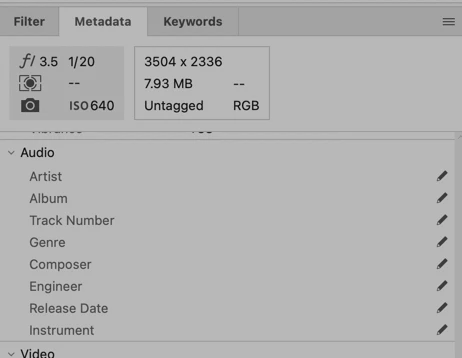
Even in the metadata section, bit-rate is not even listed:

 I suppose for length you could filter by size. After all, a long audio file should be larger than a short audio file, no?


Otherwise I suggest you send such a request to https://adobebridge.uservoice.com


Unless someone who does use Audio and knows more about this, that might be all that can be done, at least by me.


Good luck!!

1 reply

gary_sc
Community Expert
gary_scCommunity ExpertCorrect answer
Community Expert
June 1, 2021

Hmmm, since I do not do any audio, this has never entered my brain as to what might be availalbe.


Even in the metadata section, bit-rate is not even listed:

 I suppose for length you could filter by size. After all, a long audio file should be larger than a short audio file, no?


Otherwise I suggest you send such a request to https://adobebridge.uservoice.com


Unless someone who does use Audio and knows more about this, that might be all that can be done, at least by me.


Good luck!!

Inspiring
June 2, 2021

Thank you. I find it a bit strange that after 16 years in production Bridge shows very little awareness of the difference between image and audio files.