

Dario de Judicibus
Known Participant
June 27, 2022
Answered

Automatically create a collection based on image type

  • June 27, 2022
  • 2 replies
  • 229 views

Is there a way to automatically create a collection of sort to list all images of the same format?

For example, I wish to create an «SVG Collection» to show all .SVG files in my D-disk, whatever they are, that is a flat colection. I am not interested to know in which folder they are, but only sort them by name in a single long list. I have my SVG files in many different folders and sometimes it is a mess to rememeber where a certain file is stored. I also wish to have that collection automatically updated as soon as a new SVG file is loaded on D-disk, of course.

Any way to do it?
This topic has been closed for replies.
Correct answer Lumigraphics

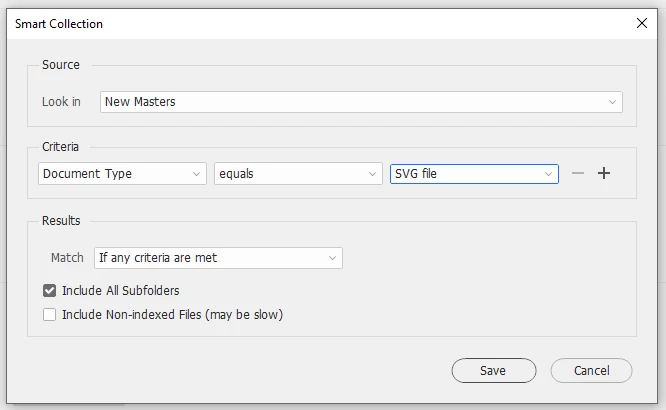
Create a Smart Collection (which is really just a saved search.)

https://helpx.adobe.com/bridge/using/collections-bridge.html

2 replies

gary_sc
Community Expert
Community Expert
June 27, 2022

Hi Dario,


I think you want to use the Filter Panel for this. When viewing a folder of mixed items, it will show the mixed items, and if you check one of the boxes, you will ONLY be looking at those items. Note that if, for example, you didn't have any JPG images in the viewed files, there would not be any JPG options listed (you can't select what doesn't exist). Would this work for you?

Dario de Judicibus
Known Participant
June 27, 2022

Useful but not what I needed. The answer is the @Lumigraphics 's one. Thank you anyway. 

LumigraphicsCorrect answer
Legend
June 27, 2022

Create a Smart Collection (which is really just a saved search.)

https://helpx.adobe.com/bridge/using/collections-bridge.html