


ultrachrome
Inspiring
April 4, 2020
Answered

Batch rename failing to add file type suffix to new name

  • April 4, 2020
  • 3 replies
  • 3593 views

Hello


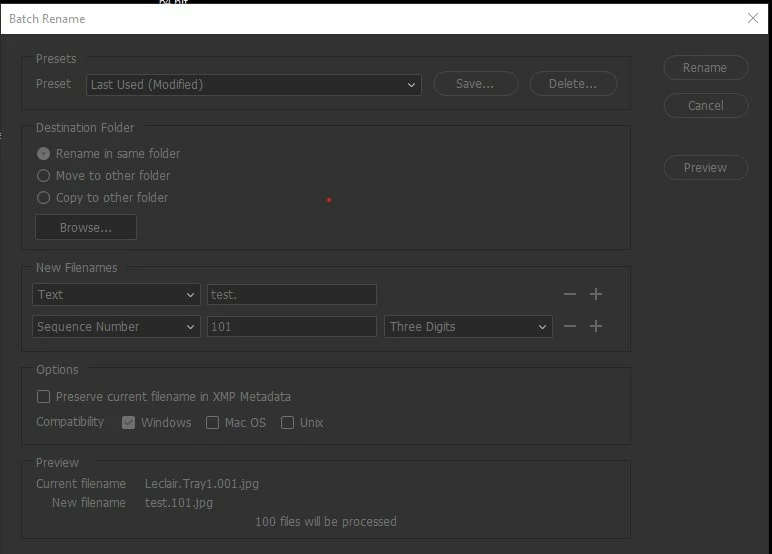
My batch rename in Bridge started dropping the file suffix to the end of the file names even though in the preview at the bottom of the Batch Rename shows that it will be included. So I'm having to now add it into the naming protocol as text. So, I now need to add a line to the "new filenames" area of that window .jpg, .tif or .psd.

In the attached photo at the bottom where it shows you the preview the new file name is showing the .jpg but once I actually process these files, that .jpg won't be there and my thumbnails disappear because bridge doesn't know what they are anymore.


What's going on here?

This topic has been closed for replies.
Correct answer Stephen Marsh

Bridge's Batch Rename Tool has been designed with intentional safety nets so that it is really hard to rename your files without a filename extension. It is possible to break this, however, your screenshot shows that even when not explicitly adding in the existing filename extension it will be used (or should be used).


Your memory is correct.


I just tested in Bridge CC 2018 & 2019 on the Mac and the existing extension was not removed when the interface was configured as you show.


I have not yet had time to test on CC 2020.


Bridge CC 2020 on Windows retained the extension too.


From a few years ago:


https://community.adobe.com/t5/bridge/bridge-losing-file-extensions-during-batch-rename/td-p/9232332?page=1

3 replies

Stephen Marsh
Community Expert
Stephen MarshCommunity ExpertCorrect answer
Community Expert
April 6, 2020

Bridge's Batch Rename Tool has been designed with intentional safety nets so that it is really hard to rename your files without a filename extension. It is possible to break this, however, your screenshot shows that even when not explicitly adding in the existing filename extension it will be used (or should be used).


Your memory is correct.


I just tested in Bridge CC 2018 & 2019 on the Mac and the existing extension was not removed when the interface was configured as you show.


I have not yet had time to test on CC 2020.


Bridge CC 2020 on Windows retained the extension too.


From a few years ago:


https://community.adobe.com/t5/bridge/bridge-losing-file-extensions-during-batch-rename/td-p/9232332?page=1

ultrachrome
Inspiring
April 7, 2020

Thank you Stephen...I was worried I was having a early onset seniors moment. I guess if I have a bug that means I'll simply need to add the suffix into the naming protocol, that's exactly what I'll do. Either that or uninstall and reinstall the program and see what happens.

Stephen Marsh
Community Expert
Community Expert
April 7, 2020

If you are going to uninstall/reinstall, I believe that you will have to manually reset the Bridge preferences as they are retained when uninstalling, therefore if the problem was preference file related then you would not have achieved anything... Which means that before uninstalling, try resetting the preferences first, it may save an unnecessary uninstall and reinstall!


If you have a large amount of images missing extensions and you don't know which files are which image type, then the following may help to automate adding the correct file extension to unknown format files:


https://prepression.blogspot.com/2017/09/exiftool-automatically-adding-missing.html

Chuck Uebele
Community Expert
Community Expert
April 4, 2020

I'll move this post to the Bridge forum. 

ultrachrome
Inspiring
April 4, 2020

Thank you

gary_sc
Community Expert
Community Expert
April 4, 2020

Hi Ultrachrome,


It does appear that the suffix was turned off. Can you try it again and make sure that it's been added?


Thanks!

c.pfaffenbichler
Community Expert
Community Expert
April 4, 2020

First of all: What are you doing posting this issue on the Photoshop Forum instead of the Bridge Forum? 


Secondly: Have you deliberately removed »Current Filename > Extension«? 

ultrachrome
Inspiring
April 4, 2020

I didn't realize there was a specific bridge forum. I'll go shoot myself now for this transgression 😊


No I don't think I removed it. I think I didn't need it before but there is a possiblity it was simply in the list and as I seldom change things in this list, I could have accidently removed it. I don't think so though. As you can see in the preview...the .jpg is shown without the current file name window being in the list.

c.pfaffenbichler
Community Expert
Community Expert
April 5, 2020

No big thing, more a pet peeve of mine.

A lot of stuff seems to get directed to the Photoshop Forum for which better avenues might exist.