Participant
February 28, 2024
Answered

Batch rename images with consecutive numbering into middle of filenames

  • February 28, 2024
  • 2 replies
  • 594 views

Hi all,


I'm wondering if it's possible for batch rename to implement consecutive numbering into the MIDDLE of a filename.  In the attached example, I want to replace the  .1's  with .1, .2., .3 etc but keep everything else identical. 


Would appreciate any instructions, as hard to figure it out within the batch rename function....
 

This topic has been closed for replies.
Correct answer Stephen Marsh

@John34902474s7aw 


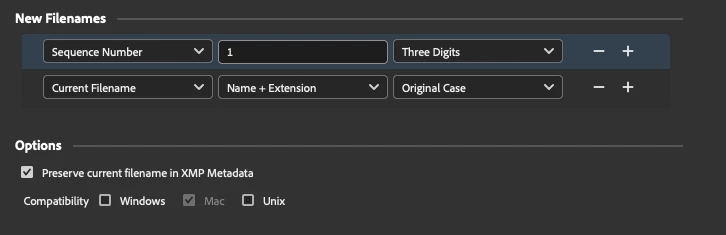
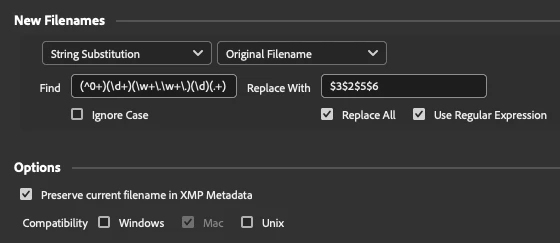
A 2-step approach as the original 1-step intermediate filename method was giving me problems, the preview didn't match the results!


Work on file copies until you know that this gives you the expected result!


STEP 1:


STEP 2:


Find:

(^0+)(\d+)(\w+\.\w+\.)(\d)(.+)(\.[^\.]+$)


Replace (Use Regular Expression):

$3$2$5$6


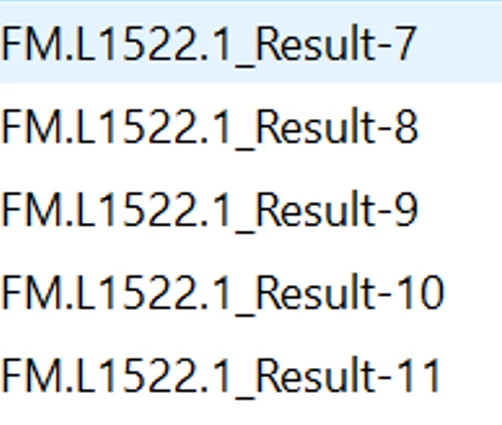
The final result:

FM.L1522.1_Result-7
FM.L1522.2_Result-8
FM.L1522.3_Result-9
FM.L1522.4_Result-10
FM.L1522.5_Result-11

2 replies

Stephen Marsh
Community Expert
Stephen MarshCommunity ExpertCorrect answer
Community Expert
February 28, 2024

@John34902474s7aw 


A 2-step approach as the original 1-step intermediate filename method was giving me problems, the preview didn't match the results!


Work on file copies until you know that this gives you the expected result!


STEP 1:


STEP 2:


Find:

(^0+)(\d+)(\w+\.\w+\.)(\d)(.+)(\.[^\.]+$)


Replace (Use Regular Expression):

$3$2$5$6


The final result:

FM.L1522.1_Result-7
FM.L1522.2_Result-8
FM.L1522.3_Result-9
FM.L1522.4_Result-10
FM.L1522.5_Result-11

Participant
February 28, 2024

Thanks - 

Not experienced with this coding business, so a question - 


Would the content in step 2 remain the same whether renumbering small groups of e.g. 5 images, or large groups of e.g. 50 images in this way?   I.e. could I save this as a preset, and use it for different sized groups of images in future? 

Stephen Marsh
Community Expert
Community Expert
February 28, 2024
quote

Thanks - 

Not experienced with this coding business, so a question - 


Would the content in step 2 remain the same whether renumbering small groups of e.g. 5 images, or large groups of e.g. 50 images in this way?   I.e. could I save this as a preset, and use it for different sized groups of images in future? 


By @John34902474s7aw


It should... I tried to make it robust and flexible, however, I only tested on 5 images.


Work on duped copies until you know, just in case.


Stephen Marsh
Community Expert
Community Expert
February 28, 2024

@John34902474s7aw 


Yes, this is possible, set this up as per this screenshot:


<SOLUTION BEING REWORKED>


Participant
February 28, 2024

Thanks - not displaying the screenshot though. Possible to retry?

Stephen Marsh
Community Expert
Community Expert
February 28, 2024

@John34902474s7aw wrote:

Thanks - not displaying the screenshot though. Possible to retry?


I had to remove the original suggestion as it had unforeseen errors.