
Participating Frequently
November 4, 2022
Question

Batch Rename in Bridge 13.0 - Metadata doesn't work anymore!

  • November 4, 2022
  • 2 replies
  • 373 views

I have updated to Adobe Bridge 13 (Version 13.0.0.562).

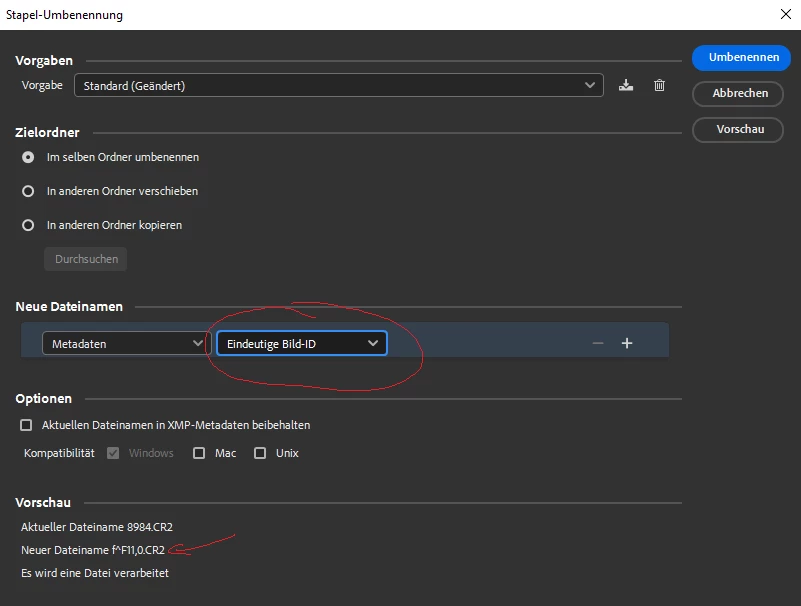
Now Batch Rename with Metadata isn't working anymore. Regardless of which Metadata-value I select, it always takes an aperture value (e.g. "f^F11,0"). So it ignores the selected Metadata-value and fills the batch-rename with "f^F11,0".

I often use "Metadata Image-ID" for Batch Rename. With this annoying bug, that is not possible at the moment. 😞

Do you also have this bug?
 

This topic has been closed for replies.

2 replies

Rahul Saraogi
Community Manager
Community Manager
November 24, 2022

Hi,


The mentioned issue is fixed in the latest patch release #13.0.1.583. Please install and confirm if that fixes the issue.
You can refer to the issues fixed in the patch at the following link https://helpx.adobe.com/bridge/kb/fixed-issues.html


Thanks,
Bridge Team

Rahul Saraogi
Community Manager
Community Manager
November 5, 2022

Hello,


Thank you for reaching out to us. We are able to reproduce the issue and the team is currently investigating the same.


Thanks,

Bridge Team