Participant
March 26, 2025
Answered

Batch Rename Multiple Files with different names

  • March 26, 2025
  • 1 reply
  • 942 views

HI Bridge Users: 

I have a unique problem that i'm unable to find a solution. As a photographer, I do use the bath rename often to rename a batch of files to a certain name all at once, but not different file names. 


At my day job, i deal with file names that are given to me like this and i would have to rename each indivudal file name manually and it sucks to do that when you're working with hundres of files. For example:

No real person name used here:
Orinigal file name:

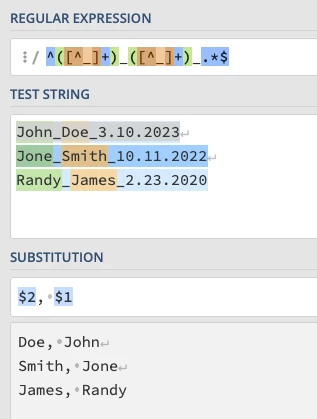
John_Doe_3.10.2023
Jone_Smith_10.11.2022
Randy_James_2.23.2020

I want it to siimply batch rename them to:
Doe, John
Smith, Jone
James, Randy

So in other words, Keep the name of person but do last name first and first name last. is there a script or rule i can use to do this in the bath rename feature? Or can we do this useing Adobe Acrobate Pro?


Thanks in advance

Correct answer Stephen Marsh

The Regular Expression find/replace:


Find:
^([^_]+)_([^_]+)_.*$


Replace:
$2, $1


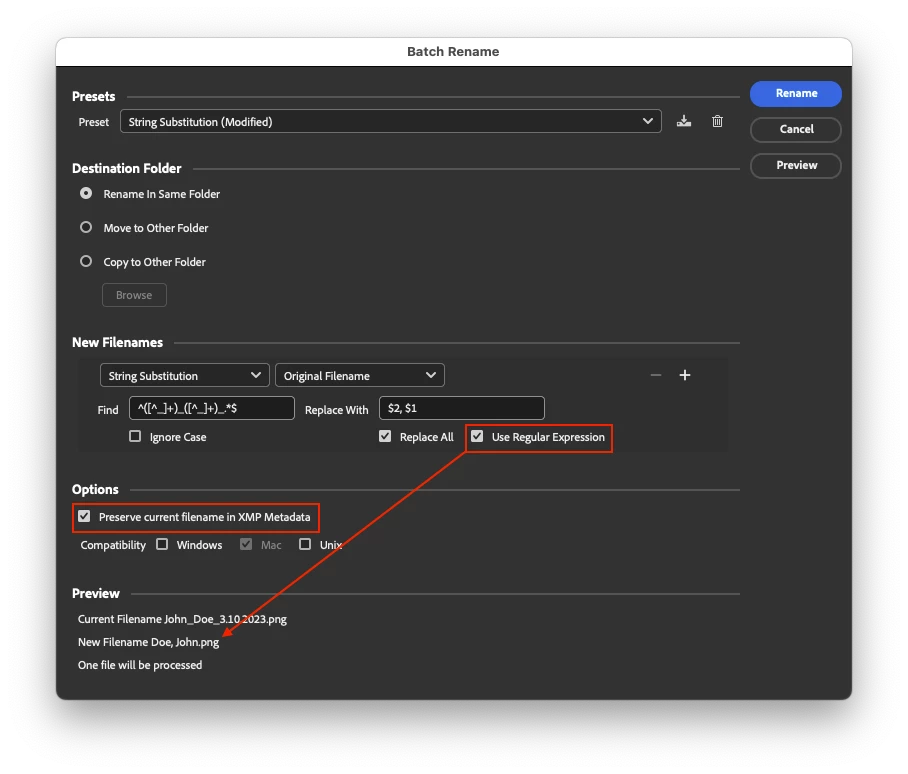
Using Bridge's Batch Rename tool with the String Substitution Regular Expression option:


1 reply

Stephen Marsh
Community Expert
Stephen MarshCommunity ExpertCorrect answer
Community Expert
March 27, 2025

The Regular Expression find/replace:


Find:
^([^_]+)_([^_]+)_.*$


Replace:
$2, $1


Using Bridge's Batch Rename tool with the String Substitution Regular Expression option:


Participant
March 27, 2025

Wow! This is amazing! I just tried it and it works! What d a HUGE game changer! Thanks so much for this! I appreciate you. You make a difference in this community!

Stephen Marsh
Community Expert
Community Expert
March 27, 2025

@Eyecapture25715713 


Thanks, you're welcome!


Multiple valid regular expressions can be used, that was just one example.


Also, using basic Mac or Windows commands, it is possible to rename files by first using a spreadsheet to split the source names on spaces to columns, then combine using a formula into the command to copy/paste into the command prompt.


There are also scripts to batch rename from a spreadsheet source.