Known Participant
March 27, 2020
Answered

Batch rename - String substitution intermediate filename

  • March 27, 2020
  • 3 replies
  • 2636 views

Hello, I'd like to see some example of this rename feature. I found an article online talking about this, where it says: Intermediate Filename replaces a string that is defined by preceding options in the New Filenames pop-up menus. What are these pop-up menus? Anyone is acquainted with this? 

Thanks
This topic has been closed for replies.
Correct answer Stephen Marsh

The previous links assume some knowledge of regular expressions/grep.


Here is a simplified example:


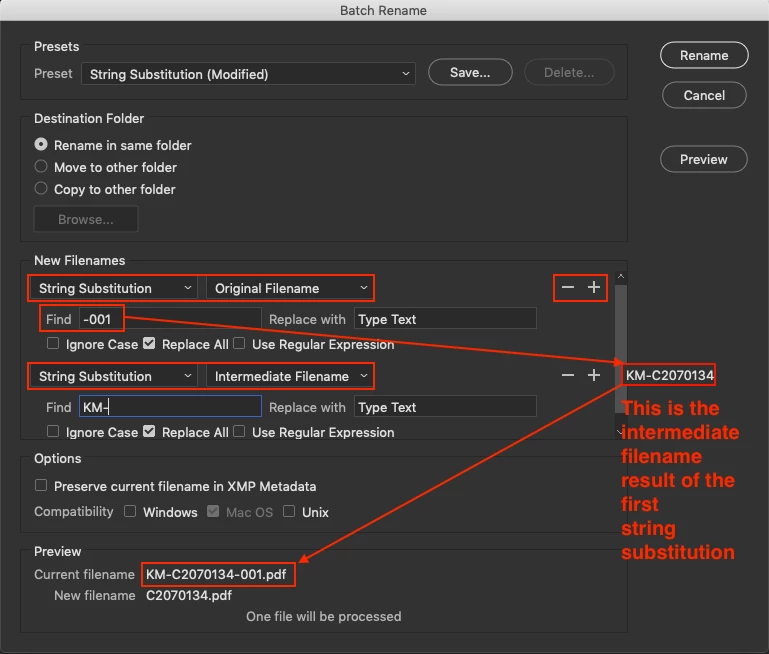
The first set of string substitution filename dropdown menus define the original name and the initial find/replace routine.


The output of the first routine is set as the intermediate filename dropdown menu which is added via the - + symbols, then a second find/replace is performed on the intermediate filename which then becomes the final filename!


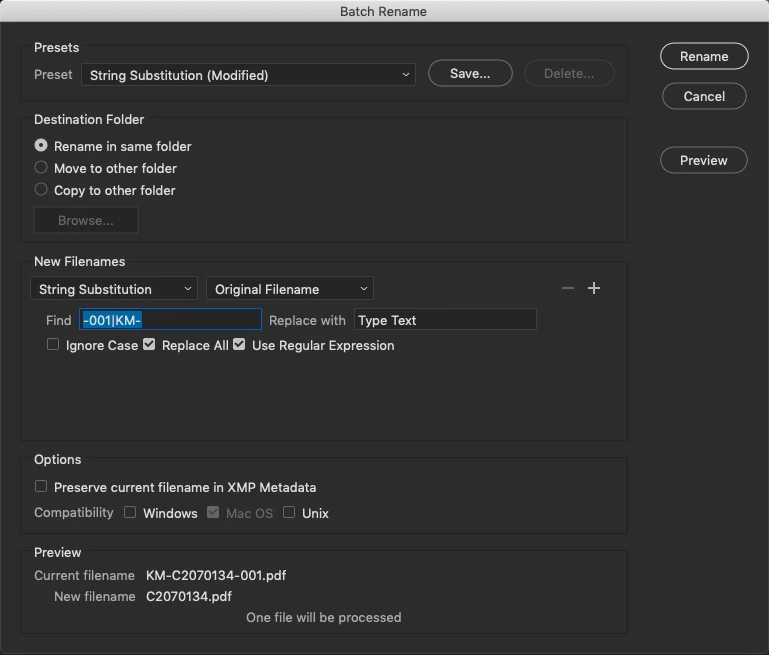
I only used this as a simplified example of how the intermediate filename works, I would probably just do it using a single rename option using a regular expression based string substitution in this example:


3 replies

Stephen Marsh
Community Expert
Community Expert
April 4, 2020

So, did that help?

SilvestroAuthor
Known Participant
April 4, 2020

Yes, perfectly! Thank you very much

Stephen Marsh
Community Expert
Stephen MarshCommunity ExpertCorrect answer
Community Expert
March 27, 2020

The previous links assume some knowledge of regular expressions/grep.


Here is a simplified example:


The first set of string substitution filename dropdown menus define the original name and the initial find/replace routine.


The output of the first routine is set as the intermediate filename dropdown menu which is added via the - + symbols, then a second find/replace is performed on the intermediate filename which then becomes the final filename!


I only used this as a simplified example of how the intermediate filename works, I would probably just do it using a single rename option using a regular expression based string substitution in this example: