Known Participant
July 16, 2013
Answered

Blank Output Module (Bridge CC)

  • July 16, 2013
  • 13 replies
  • 41288 views

As suggested here

http://helpx.adobe.com/bridge/kb/install-output-module-bridge-cc.html

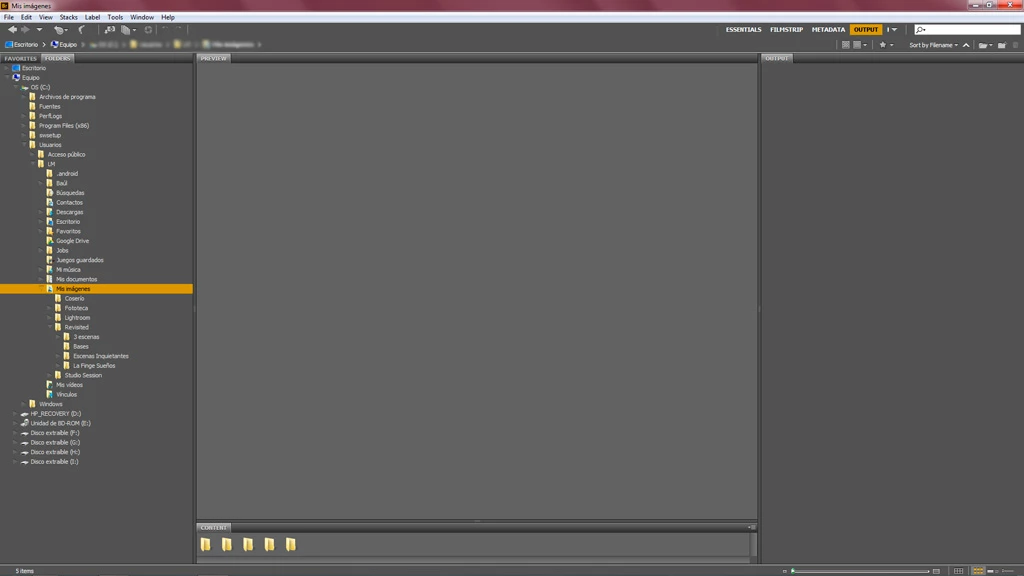
I downloaded and installed Bridge CC Output Module. The module looks blank when I launch Bridge. I already tried the two workarounds for "Possible Issues", covered at the bottom of the download page, but none of them worked for me.

Anybody else with this problem?

I'm using Windows 7, 64 bit. Here's a screenshot:
This topic has been closed for replies.
Correct answer Brett N

Hi,

Thank you for the pointer! The modifiication worked for me on 10.7.5. I'm forwarding on the script modification for the developers to review and comment on any potential downside.

regards,

steve


We've had the script modification tested and now implemented. The files to download from the document have been updated with the new code and will no longer require any changes.

13 replies

Participant
July 28, 2016

I have. Desktop, network files, flash drives. I eventually found that the problem was that I was using the output module for 6.3, and my co-worker's bridge was using 6.0.2.etc . Once updated now the module works perfectly. Sorry for all of the trouble.

Brett N
Adobe Employee
Adobe Employee
July 28, 2016

Thanks for the update

buik
Participant
March 23, 2016

Hi LuisMarin

Go to Bridge preferences/startup scripts and enable the Adobe Output Module.

Known Participant
March 14, 2016

Hello, I have tried installing to the "root" library, but all I can seem to find is my user library. I tried looking it up, has "El Capitan" done away with access to the root library? option+Go gets me to my user library. ~/Library brings up nothing. I have a new iMac, OSX 10.11.1. I have no CS6 to fall back on, can find no Bridge Extensions folder, and am very frustrated after 2 hours of trying to figure this out just so I can regain my ability to create a pdf!

Brett N
Adobe Employee
Adobe Employee
March 15, 2016

The "root" Library folder exists at the "root" of the hard drive (hence the name). The root of the hard drive is the highest level of the folder hierarchy. At this level you should folders like "Applications", "Library", "System", and "Users". This is a required folder for the OS to operate properly and is still part of standard installations, even in the current version of Mac OS. If you have opened a Finder window, your Favorites should probably have "Macintosh HD" listed, if you select this, this will show you the root of the hard drive. Also, if you use Go > Go to Folder, just type in "Library" (without quotes). When you put in "~/Library", you are trying to go to the user Library (the "~" is a shortcut for Users/[Your user name]). Once you get to the correct location, and if you still don't see the Extensions folder, create it and add the contents. It could be a case that the OS prevented this folder from being created for "security" reasons.

Known Participant
March 16, 2016

Thank you Brett, your info did allow me to navigate properly to my root folders, and then I did indeed discover the Bridge CC Extensions folder. So I put the Output Module Folder in there, and the output module workspace into the workspace folder.. and then got the same blank output panel as before. There are a couple of other issues in addition:

1> a pop up window when I load Bridge that alerts me about scripts. This started at some point yesterday when I was trying to sort this and probably messed something up. The end result is no different from before I was getting this, but it should probably be fixed:

2> Output shows up twice in my Window dropdown, that seems off, too:

any ideas???

Participant
January 25, 2016

I've been combing through forums trying to find a solution but I still can't get the Output module working properly. 'Output' appears in my workspaces, but every time I select it nothing happens. I don't even get a blank panel, everything just stays on my current workspace.

Here's a screenshot of my installation. I've never had CS6 installed on this machine, and I don't have a 'Bridge CC Extensions' folder.

Help please!

Brett N
Adobe Employee
Adobe Employee
January 25, 2016

If this is the folder you are installing to, this is the wrong location. You should be installing to the System Library folder, not the User Library folder. I can tell you are in the User Library because that folder is hidden by the system and Hidden folders have that faded look.

Participant
January 25, 2016

DUH! That did the trick. Thanks, Brett!

Participant
January 18, 2016

I have the exact same problem. I've tried ALL the suggestions and absolutely nothing works. I have also checked several times that I have installed the plugin in the right folder. Is there seriously no solution to this? I need to generate a web gallery ASAP. I'm on Windows 8 64-bit using CC. I have neither time nor energy to reinstall an older version of Photosohp in order to get an older version of Bridge. This is ridiculous.

Brett N
Adobe Employee
Adobe Employee
January 18, 2016

Please provide screen shots of how you have installed the required files.

Participant
January 19, 2016

Hello! Thank you for getting back to me so quickly. I found a post that states that changing the programs code manually from "CS6" to "CC" should do the trick. Thanks to that post I have now been able to resolve the problem. If it is apparent that the code states "CS6" instead of "CC" isn't there something you can do about it?

silkroadhawaiitoo
Participant
December 6, 2014

SOLVED (at least for me)

Maybe someone did the same mistake I did because my symptoms were exactly the same. Essentially it came down to two things. 1)  I copied the adobe output module folder into C:\Program Files\Common Files\Adobe\Bridge CC Extensions rather than the Adobe Output Module folder. (Notice the capital letters - because there ARE two folders)

2) The zip file from adobe didn't contain the AdobeOutputModule.workspace file. It contained an AdobeOutputModule java file instead.

Luckily on my computer  I still had the Adobe CS6 extensions folder (C:\Program Files\Common Files\Adobe\Bridge CS6 Extensions\Workspaces) and in there was the AdobeOutputModule.workspace file.  I copied that back into the  (C:\Program Files\Common Files\Adobe\Bridge CC Extensions\Workspaces). Now everything works.

tjacobson909
Participant
December 16, 2014

This worked for me too!  I'm on a Mac and copied the "!!-$$$AdobeOutputModule.workspace" file from Adobe Bridge CS6 to CC and the output module is now working. Thanks so much! 

tjacobson909
Participant
December 17, 2014

Sadly, I spoke too soon.  The output window appeared, but did not have any of the export functions and when I went to another workspace and then tried to go back, the output workspace was not working again    Ugh.

Participant
October 2, 2014

I've been having the same grief as everyone here, I somehow accidentally got it working a month or two ago but then yesterday through an update or something, I could no longer find the module. Anyway, I re-attempted all the Adobe instructions, redownloaded and such - to on avail. This morning however, I was checking something else in Bridge preferences, and in Startup Scripts I saw that Adobe Output Module just wasn't active. I clicked it, restarted the program and it is immediately working perfectly... don't know if this will work for anyone else, but I guess it's something to check, that no one even mentioned to me.

Magnetbirne
Participant
August 8, 2014

OK, here it is how it works on my Windows 7/64Bit PC

I duplicated the C:\Program Files\Common Files\Adobe\Bridge CC Extensions Folder and Named it C:\Program Files\Common Files\Adobe\Bridge CS6 Extensions

And everything ist fine :-)

Say Yeah !

Greetz

May 13, 2014

Hello, and thanks for taking the time to reply

yes, I do have a CS 6 install (a bundle, with Illustrator, Photoshop etc... It is the Design kit I believe), my Mac is a Mac Pro running Mac OS X 10.8.3.

At first, I had no "Output" window at all, then trying some of the steps, this is what I get after, as you can see the pane is now there but blank :

Omke Oudeman
Participating Frequently
May 13, 2014

as you can see the pane is now there but blank

There are two solutions for you to try first:

1 - Click on the triangle next to Output Workspace and from that menu choose "reset workspace"

2 - If still no result quit Bridge and go to your user library (by default hidden, choose menu Go in Finder and when you have the drop down menu in view press option key to reveal the user library. Then use this path (best put finder window for library in column mode) Application Support / Adobe / Bridge CS6 / Workspaces. In this folder find and delete the file called: "!!-$$$AdobeOutputModule.workspace".

Now restart Bridge and try again

May 13, 2014

Hi,

What you described was the last steps I have tried. All of them. And only after that, did I get the empty "Output" window.

This is kinda why I feel hopeless right now someone suggested extracting stuff from installation .pkg but I'd like to know more on that before I intend anything on my machine...

Thanks.

May 13, 2014

well I tried as well, and no success. As for the person who made the suggestion for using the reinstall module and fetching the .pkg, brilliant idea, but unlike him, I am not a super wizz and I'd like to know where to go/what exactly to use, feels like a needle in a hay stack...

Thanks !

Omke Oudeman
Participating Frequently
May 13, 2014

I'd like to know where to go/what exactly to use, feels like a needle in a hay stack...

To put things straight, this is a long thread and in the subject it says Bridge CC, but you seem to talk about CS6 after trying some rereading?

Can you give more details about system version, computerspecs and software versions, and a screenshot of your Bridge window showing the blank AOM?