Inspiring
November 5, 2022
Answered

Br2023- Thumbnails Do Not Wrap

  • November 5, 2022
  • 2 replies
  • 1404 views

I found that new version of Br2023 does not wrap thumbnails. You have to use the bottom bar to see all images.

I am sure there is an option to correct that but I cannot find it!

Thanks!

This topic has been closed for replies.
Correct answer gary_sc

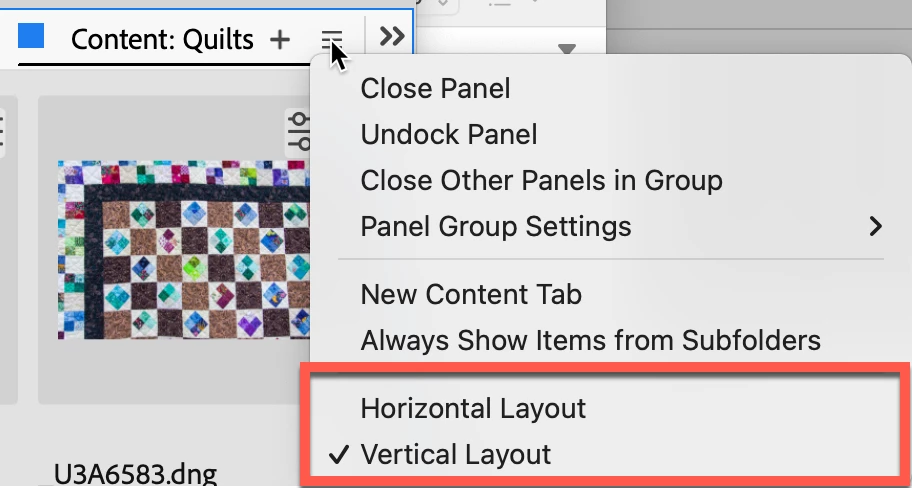
No problem; on every Content Panel's hamburger menu, those two options are on the bottom
 

2 replies

RGO_MAKER Lab
Participating Frequently
November 22, 2022

Yes! @FEbbert - I love you.

Participant
November 18, 2022

I was wondering the same thing and landed on your post.  I had three content tabs open in Light Table view.  Two of them displayed as expected, one did not.  


What worked: right-mouse click on the "Content" tab and made sure "Vertical Layout" was selected.

May it restore your Bridge Zen!


Inspiring
November 18, 2022

Thanks..I check that out. Appreciate your response. I will let you know...

MY other Wind computer Br2023 works fine...wraps just right. I will check those options.


gary_sc
Community Expert
Community Expert
November 18, 2022

The Horizontal Layout is exclusively set to allow the FilmStrip view to function. It is selectable so that if you make a new Workplace that requires the FilmStrip view, you have it available to select it.
