
laurac58136416
Participant
May 22, 2017
Answered

Bridge 2017 CC - Output module install won't open Bridge

  • May 22, 2017
  • 4 replies
  • 2877 views

I installed the output module following this instructions: How to install Adobe Output Module in Bridge CC 2017

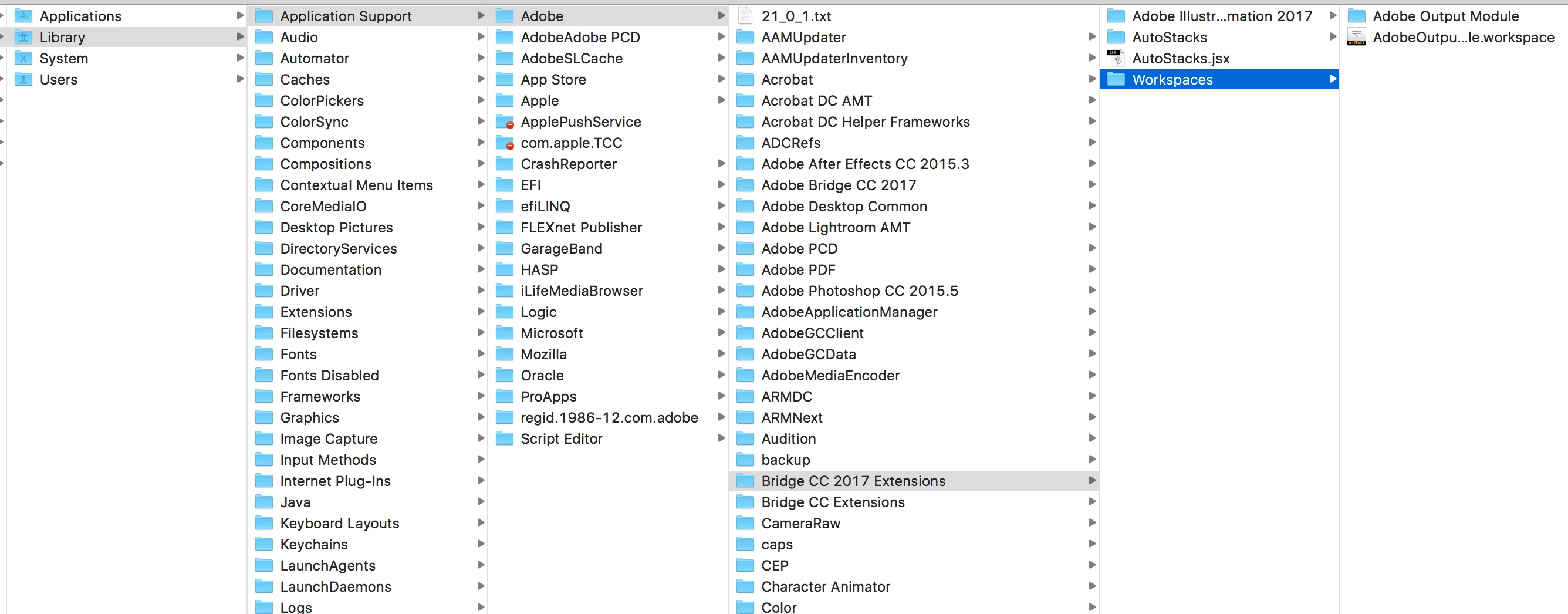
But Bridge wont open. I don't get an error, It's just try to open and then quit. When I remove the folder "Adobe Output Module" Bridge will open and I see the Output dropdown, but I don't have the options to create my contact sheet. I am using macOS Sierra version 10.12.3

    This topic has been closed for replies.
    Correct answer gary_sc

    Hi Laura,

    Sorry for a late response here.

    You have both the AOM folder AND the .workspace in the same folder. Move the AOM folder into the Extensions folder so that it is along side the Workspace folder. (Leave the .workspace file where it is, that's fine.) The, if Bridge is running, quit and restart Bridge, otherwise just start up Bridge and see if that works.

    Please let us know if that works,

    Gary

    4 replies

    Deepak_Gupta1
    Participating Frequently
    October 18, 2017

    Hi All,

    We have released a new version of Adobe Bridge (CC 2018) on 18 Oct 2017. The new version build number is 8.0.0.262. This version is available to install via Adobe Creative Cloud application.

    This Bridge update contains Native PDF Output in application and other new features. Please check the Output workspace after installing new version of Bridge CC.

    You may need to update the Creative Cloud application and restart your computer to see the updated installer.

    Thanks,

    Deepak Gupta

    Participant
    November 15, 2017

    Hi,

    I have the latest version of Bridge CC 2018 (Just installed CC update and Bridge update yesterday).    I have the AOM folder in the Bridge Extension folder and the AOM workspace file in the workspace folder.    I have followed every fix I could find online, yet I still have a blank workspace panel.    I am on assignment with a very large fortune 50 client and need to create over 2,000 contact sheets by end of year for a new DAM cloud app.    

    gary_sc
    Community Expert
    Community Expert
    November 15, 2017

    Hi NuVuMedia,

    AOM, as it was before, is a dead addition to Bridge 2018. If you install it, it will not work.

    By default, Bridge does come with the PDF capabilities called the Output Layout (do not need to add to get this) but the Web thing is gone. It may return if enough people clamor for it but for now it's gone and the only way to get AOM to work is to use an older version of Bridge.

    If you do not care for what the new Output Layout provides, you can also check out DiapoSheet (available from the Mac App store, not available for the PC) as an alternative.

    HTH

    Participant
    July 12, 2017

    Hi All

    I am experience the same issue only on a PC.  Windows 10, bridge CC 2017.  pulled the folder/file to where instructed and restarted system and saw the output module, was able to prep it and select images and everything, when i went to print it gave me an I/O error that won't fix...  how do i get the AOM to work - this is a really useful item and i use it all the time - just got a new system and needing to reset all this stuff.  why hasn't adobe pulled this into bridge as a standard item???  Help!

    Participant
    July 18, 2017

    addendum to see if this helps

    ok.  I'm having same issue as others.  Windows 10, bridge 2017 CC.  installed AOM correctly.  shows up in bridge.  when click on output get weird warning

    clik ok and lets me setup pdf formatting

    clik save and get this

    i've restarted several times and still end up with failure.  please help as i really really rely on this component for sending thumbsheets to requestors of images.  don't understand why it's not fully incorporated into bridge yet.

    Jeff Ellis
    Participating Frequently
    June 20, 2017

    Hi Gary,

    I have the same issue - and I did what ou said - put the AOM folder in the Extensions folder and the plugin for Output Module in the Workspaces folder.

    have restarted multiple times. I have the Output module in the menu now but none of the options for Web Gallery or PDF contact sheets are visible.

    I'm on a MacPro, OS 10.10.5

    gary_sc
    Community Expert
    gary_scCommunity ExpertCorrect answer
    Community Expert
    May 25, 2017

    Hi Laura,

    Sorry for a late response here.

    You have both the AOM folder AND the .workspace in the same folder. Move the AOM folder into the Extensions folder so that it is along side the Workspace folder. (Leave the .workspace file where it is, that's fine.) The, if Bridge is running, quit and restart Bridge, otherwise just start up Bridge and see if that works.

    Please let us know if that works,

    Gary