Bridge 2020 custom export changes size, not DPI?
Ttile, basically. I need to export for print and web. so a 300DPI file is not helpful for web and makes the size huge. Am I misisng something? It was so close to being perfect!

I had the same problem as you, I checked the documentation (https://helpx.adobe.com/bridge/using/export-panel.html) and here is the solution I came up with.
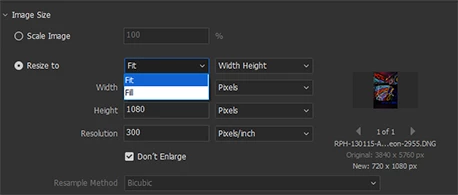
Right click on your export action, then "Edit". In the "Image size" section, choose "Resize to" instead of "Scale image", and make sure you put your desired "Resolution". Then choose again "Scale Image". You will see that the choosen resolution (greyed out) stays as you put it. Save the export preset.
If you see that it still export with 300ppi, just keep selected "Resize to", use "Fit" "Long edge" and put 20000pixels (it's the maximum size you can export with) for the "Dimension" field and make sure you thick "Don't enlarge". And save the export preset.

Already have an account? Login
Enter your E-mail address. We'll send you an e-mail with instructions to reset your password.