
Participant
November 8, 2019
Question

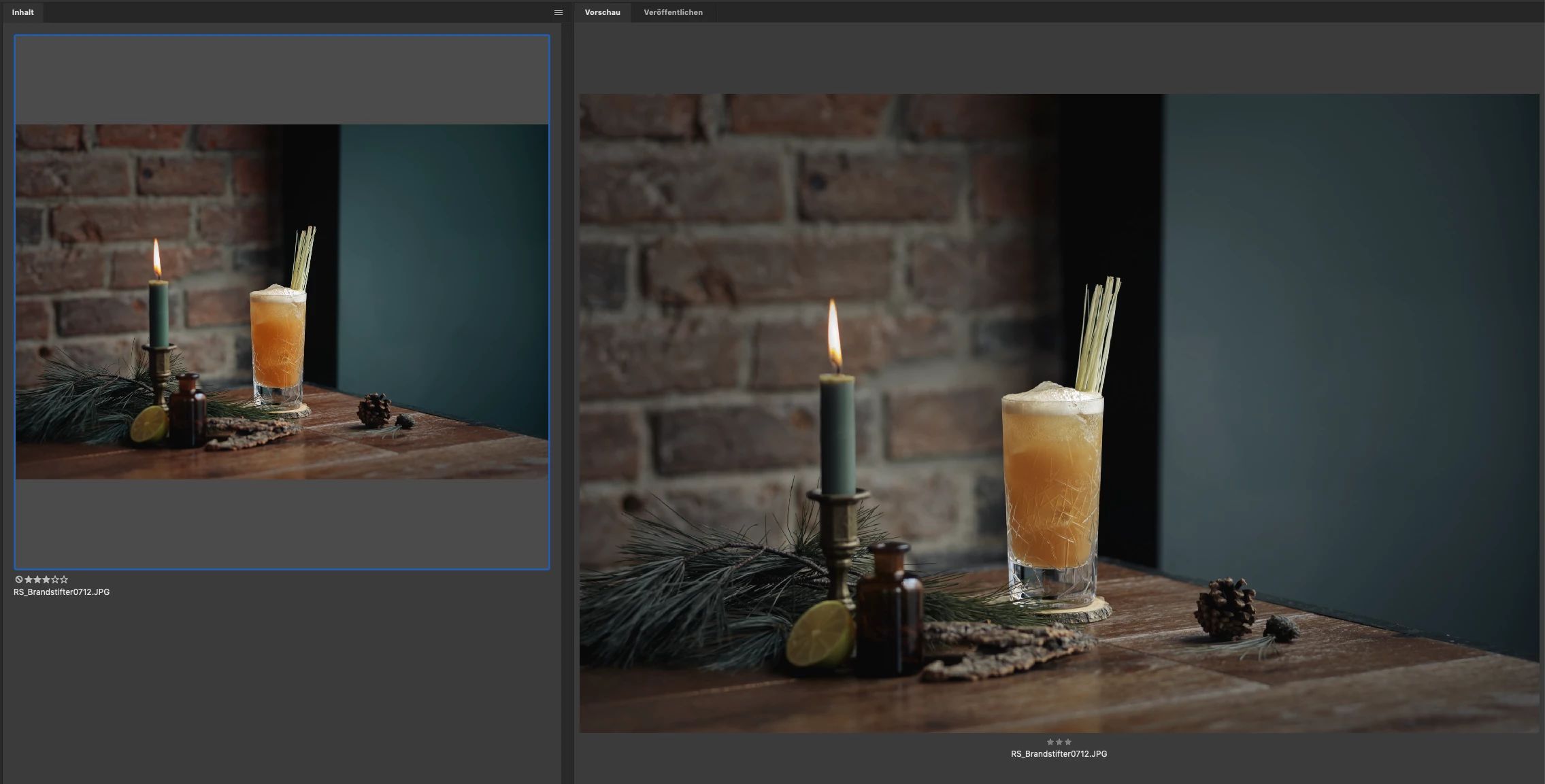
Bridge 2020 - wrong colors in preview window - macOS 10.14.6

  • November 8, 2019
  • 1 reply
  • 1938 views

Hi Everybody.

After updating to Bridge 2020 yesterday, the colors in the preview window are completely off.
This happens with all files. Raw, .jpg, .psd ...
Any ideas how to fix this?


Thanks!


Equipment:
Bridge 10.0.0.124
Mac Book Pro, 2015, Mojave 10.14.6
Eizo CS2730
 

This topic has been closed for replies.

1 reply

Sahil.Chawla
Adobe Employee
Adobe Employee
November 8, 2019

Hi there,


This is a known issue, our engineer team is working on a fix for the same, in the meantime you can go to Preferences > Advanced > Use Software rendering and enable it.

Let us know how it goes.
Regards,
Sahil

Participant
November 9, 2019

Thanks for the reply.
Is there any way to re-install Bridge 2019?
I can't find it anywhere.


Thanks!