
Participant
October 27, 2020
Answered

Bridge 2021: doubleclicking on an image opens ps-elements instead of PS2021.

  • October 27, 2020
  • 1 reply
  • 288 views

Bridge 2021: doubleclicking on an image opens ps-elements (raw)  instead of PS2021. Any way to make it open PS? On menu-item "open with" in menu "file" it is stated that "elements" is standard, but i see no possibility to change this to the 'real' PS....

thx
This topic has been closed for replies.
Correct answer gary_sc

Hi Jos


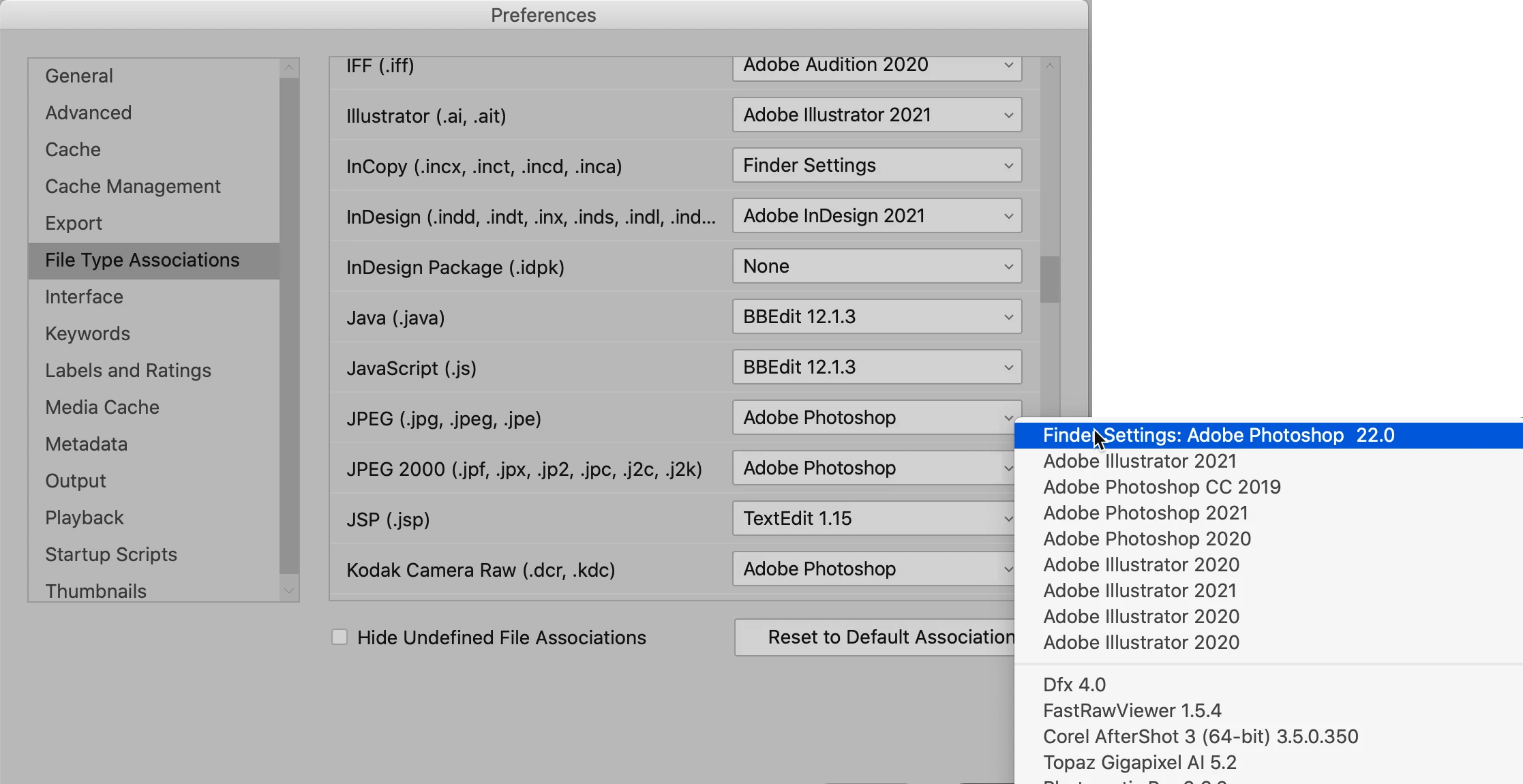
Go to Bridge's Preferences and whatever type of file you are trying to open (I'm using a JPG as an example below), select what application you want


IF you do not see the application you're looking for (i.e., Photoshop) on the bottom of the dropdown is "Browse" and then your systems file system window will open where you can navigate to whatever you want to open that type of file.


Hope that works for you.

1 reply

gary_sc
Community Expert
gary_scCommunity ExpertCorrect answer
Community Expert
October 27, 2020

Hi Jos


Go to Bridge's Preferences and whatever type of file you are trying to open (I'm using a JPG as an example below), select what application you want


IF you do not see the application you're looking for (i.e., Photoshop) on the bottom of the dropdown is "Browse" and then your systems file system window will open where you can navigate to whatever you want to open that type of file.


Hope that works for you.

Jos5FACAuthor
Participant
October 28, 2020

Yes, thx, found it and it works.

Pity though, bridge 2021 didn't keep the 2020 settings...

And suddenly PS2021 is the standard application in the menu "file/open with..." and not elements...