
Inspiring
March 8, 2021
Answered

Bridge 2021 "Find" Function Not Working

  • March 8, 2021
  • 1 reply
  • 414 views

MacOS Mohave 10.14.6 

Bridge 2021 11.0.1.109


I have had this problem occur in previous versions of Bridge (2018) so always dread upgrading and unfortunately forget how the heck I solved this problem in years past ... although I vaguely remember trying a number of different suggestions and stumbling on a solution - clearly something that Adobe should work on making far easier if at all possible. 


When using the 'Find" function, Bridge simply will not reliably find photo files that have specific keywords attached to them. It will find a few but then stops dead in in its tracks and will not continue to scan through the drive and its many subfolders. I have check boxed that it should check all subfolders and non indexed files.


I notice that if I manually view files that I know have this specific keyword, that on subsequent searches it will now show those photos, presumably because thay are now indexed. Why then will Bridge not start searching, alpha numerically, at the drive it is pointed at and index the darn thing from head to toe? 


I'm surprised that Bridge doesnt have a specific function for looking at each file, generating previews and sucking in all the metadata. Something you could run overnight and have all that info indexed. 


Any suggestions to get "Find" working? 
This topic has been closed for replies.
Correct answer Five0Guy

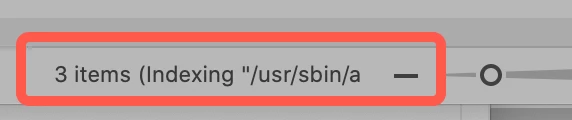
Once you've initated a search do you see this in the bottom of the Content panel?

 The "Indexing..." means that it's doing a deeper dive than an inital search. This can take a very long time.


I have to add that the three (shown above in the screenshot) that Bridge has found so far in my computer are not the three that Houdah Spot has found on my computer. I have sprinkled several files with keywords for testing searches. FWIW, I have never found Bridge's search capabilities one of it's strong suits and for images that need absolute keyword strength I use Lightroom Classic. I know that's probably not what you want to hear but working with keywords in Bridge only works so far.


I thought I would follow-up as it may help others ...


I found a solution in uninstalling all versions of Photoshop and Bridge less that the last versions I knew to be working OK for me - PS 2018 and Bridge 2018. I then re installed Bridge 2021 and PS 2021.


I then went into MacOS Mojave Preferences > Accessability and granted access to PS 2021 and the into Preferences > Full Disk Access and granted access to Bridge 2021. This had been suggested to me by Adobe Support.


When I launched Bridge 2021 it asked if I wanted to pull in Preferences etc. and I said yes. 


The search function in Bridge appears to be working OK for me at this time. 


I realize I did a number of steps and a smaller subset may have returned the same net result - YMMV. 

1 reply

gary_sc
Community Expert
Community Expert
March 8, 2021

Are you looking for this?

Five0GuyAuthor
Inspiring
March 8, 2021

Thanks for your reply, no I'm not looking for that. I'm pressing command + F and bringing up a 'Find" menu. I direct the search toa  specific external drive: 


The problem is it will only show a portion of the pictures I know are tagged with that keyword.

gary_sc
Community Expert
Community Expert
March 8, 2021

Once you've initated a search do you see this in the bottom of the Content panel?

 The "Indexing..." means that it's doing a deeper dive than an inital search. This can take a very long time.


I have to add that the three (shown above in the screenshot) that Bridge has found so far in my computer are not the three that Houdah Spot has found on my computer. I have sprinkled several files with keywords for testing searches. FWIW, I have never found Bridge's search capabilities one of it's strong suits and for images that need absolute keyword strength I use Lightroom Classic. I know that's probably not what you want to hear but working with keywords in Bridge only works so far.