
Inspiring
August 22, 2023
Question

Bridge 2023 PSD thumbnail issue

  • August 22, 2023
  • 3 replies
  • 1190 views

Hi.

There is an issue with Bridge 2023 (v13) when showing PSD thumbnails.
When browsing folder with PSD files thin transparent border may appear on thumbnail from any side of an image (sometimes on multiple sides).

It changes when thumbnail size is changed, may change it's position - for example can move from left to right border.

Please see the screenshot below:
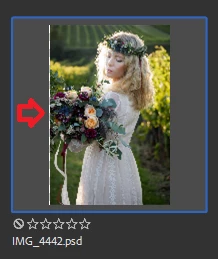
To my experience - this happens in any release of Bridge 2023 (v13) currently released.

This only happens to PSD files.

Bridge 2022 works just fine - there is no such borders on PSD thumbnails.

Please fix this.

This topic has been closed for replies.

3 replies

Adobe Employee
September 8, 2023

Hi @FSt0p  ,

Thank you for reporting the issue to us. This is a known issue and has been assigned to our engineering team.


Regards,
Bridge Team

FSt0pAuthor
Inspiring
September 10, 2023

Thank you for confirming.

Hope it will be fixed until final release of Bridge v14.

gary_sc
Community Expert
Community Expert
August 22, 2023

Hi, @FSt0p can you please share any image that has this issue? If you want, you can DM me the image (or provide a link via DropBox, whatever)


Thank you,

FSt0pAuthor
Inspiring
August 24, 2023

Hi @gary_sc.

Here is this sample image: https://we.tl/t-FwmnVzO3N9 

It actually happens to me with any RAW image opened in PS and saved as PSD no matter do they have LR/ACR edits or not, doesn't matter if I crop them in PS or not.

Here is how it looks for photos from different cameras just converted to PSD:


If I open the exact same image and resave it as PSB or TIFF the issue is gone, previews are correct.

It's only present for PSD files, which I have a lot and doesn't wont to convert just to fix this.
I'm currently using Bridge v12.0.4 which does not have this issue.

I've been testing all releases of Bridge v13 and Bridge Beta v14 and they all have this issue with PSD previews.

This is super annoying and would be greait if it could be fixed.

gary_sc
Community Expert
Community Expert
August 24, 2023

Hi, @FSt0p, a couple of things: First off, great photo. I really like it. Wonderful ballance of light, and you captured the woman's innocence and power at the same time. Very impressive.


Second, this issue is not showing up with your image on my computer in either the current Bridge Beta or in the release 13.0.4.755. [My computer: Apple Studio (M1), 64 GB ram, OS: 13.4.1. Apple Studio monitor]


Also, while I do prowl these forums a lot as an Adobe Community Expert, I do not recall anyone commenting on this issue before. That doesn't mean no one else has seen it, I've not noticed it being commented on. 


All that said, I'm not saying you should be willing to just ignore it. Far from that, you're seeing this and it's something that should not be there. Nonetheless, it's not likely for this to be "fixed" if the engineers are not witnessing the issue. Also, software fixing is not too much different than medical triage: someone who's been shot gets priority over someone with a broken arm, and someone who's program is crashing gets priority over a visual glitch. On the other hand, the one aspect of software is if the thing that's visually broken would require 30 minutes to fix and the crash will take a week but someone has the extra 20 minutes, it can be squeezed in. 


But again, like when you take your car in for a really annoying squeek but it doesn't squeek for the mechanic, they can't fix it.


So, let's go back to the beginning: what is your OS (and what release) what kind of monitor do you have, what is your video ram, etc. Since this has been around for a while, I do think it's something that is enharrent in your system as opposed to an issue with Bridge.

FSt0pAuthor
Inspiring
August 22, 2023

I've just tested this in Bridge Beta v14 and it is not fixed - the same issue with PSD thumbnails.