Participating Frequently
September 20, 2023
Answered

Bridge 2024 losing file extensions and no preview after batch rename

  • September 20, 2023
  • 2 replies
  • 4502 views

Hello everyone,


I need some assistance, please!


After renaming a batch of files, I noticed that the file extensions were missing and I am no longer able to preview them. 


I am using Bridge version 14.0.0.012 on a Mac. I have attached some screenshots for reference. This is my first time using Bridge and I am worried that I have lost all the files that were renamed.


Your help is greatly appreciated. Thank you and have a great day!

 

This topic has been closed for replies.
Correct answer gregreser

Don't worry, you haven't lost your files. Somehow the file extensions were removed in your batch rename. 


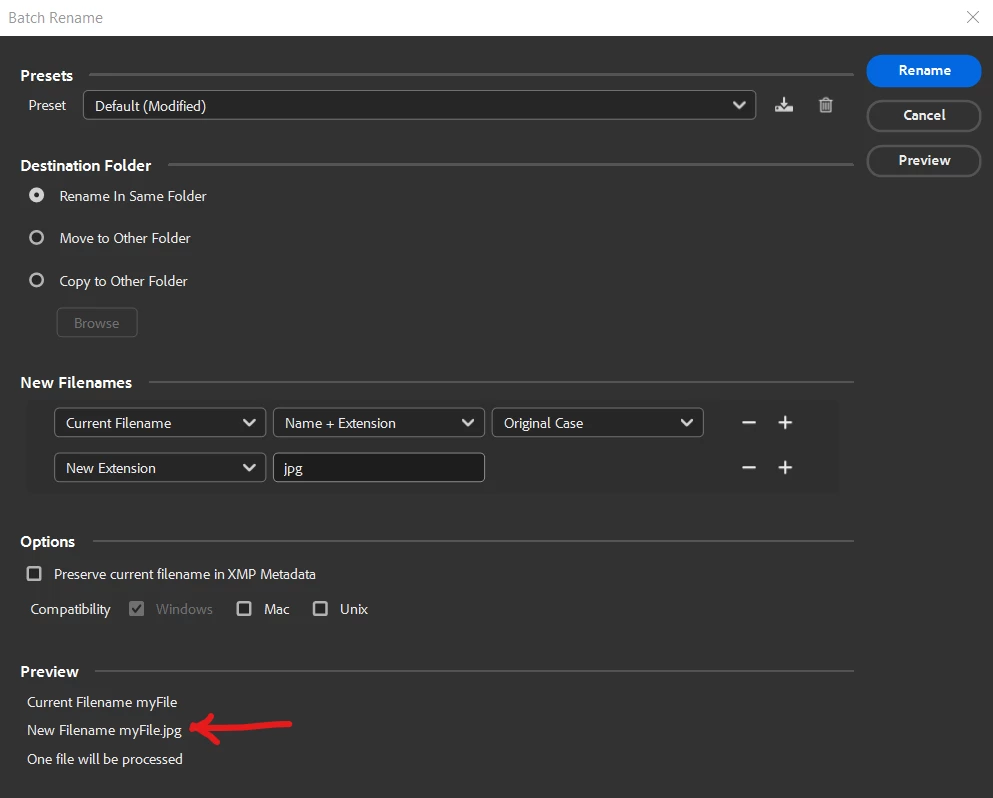
You can restore the file extensions by running batch rename again using Current Filename and New Extension.

For Current Filename, try setting it to Name. Check the preview at the bottom to make sure it's correct. If the preview does not show the name use Name + Extension 


The challenge is that you have to do a batch for each file type. 


2 replies

Stephen Marsh
Community Expert
Community Expert
September 23, 2023

The following solution works for missing file extensions where there's a mix of different file types:


https://prepression.blogspot.com/2017/09/exiftool-automatically-adding-missing.html

Participating Frequently
September 20, 2023

To provide additional information, I am able to view the preview of photos through Bridge; however, I cannot view the preview when I access the original folder where the files are stored. As for videos, I am unable to view the preview or open the files in both Bridge and the original folder.

gregreser
gregreserCorrect answer
Legend
September 20, 2023

Don't worry, you haven't lost your files. Somehow the file extensions were removed in your batch rename. 


You can restore the file extensions by running batch rename again using Current Filename and New Extension.

For Current Filename, try setting it to Name. Check the preview at the bottom to make sure it's correct. If the preview does not show the name use Name + Extension 


The challenge is that you have to do a batch for each file type. 


Participating Frequently
September 20, 2023

@gregreser thank you very much for taking the time to share the solution! I didn't know each file type for the folder with videos, and I know there were .mov, mp4, etc., but I renamed all of them as .mov, and it seemed to work. 

If you don't mind me asking, how can I rename them again using date time - date created without messing this up again?