
Participant
August 10, 2024
Answered

Bridge 2024 version 14.x.x

  • August 10, 2024
  • 1 reply
  • 888 views

I am on a Mac m1 Mini running Sonoma 14.6.1 with an Adobe Creative Cloud account with LrC, PS, Bridge, and Camera Raw. Recently Adobe update Bridge to version 14.1.2 and I upgraded the app. Today I tried to launch it and I get the following error:
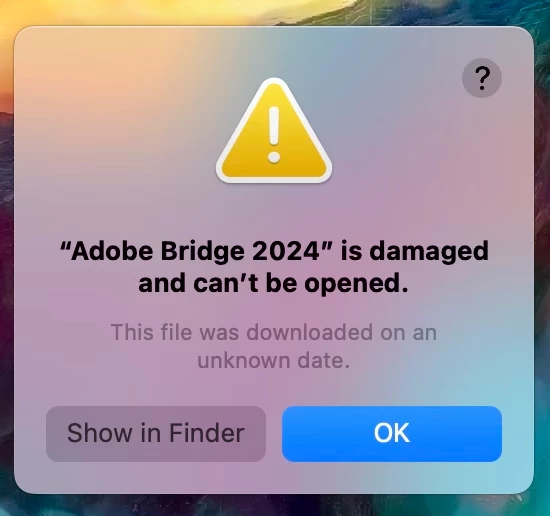
 

Looking at Finder, the date created and modified for Bridge is Nov 3, 2023. I uninstalled and reinstalled the latest version and got the same error. I uninstalled and installed 14.1.1 and 14.1.0 to no avail.


I also went back several months to recover Bridge from Time Machine and nothing changes.


I have also verified permissions.


And checking the web and Adobe forums have not helped.

Any suggestions would be most welcomed.


TIA

This topic has been closed for replies.
Correct answer Sameer K

Hey, @Cheryl28066541np2u & @kims64228815. Welcome to the Photoshop Community. I'll move this post to a new one in Bridge Discussion. More info is required to help you figure this out.


If you're using Photoshop, please share the system info from Photoshop Help > System info > Copy & paste into a text document > upload & attach here. 


I tried to check your email account for crash reports, but I couldn't find any recently submitted reports.

Please share more details:

Is this a personal or IT-managed (work) machine? Does Bridge crash when you open a specific folder, or right at launch?


In general, the steps here to troubleshoot most of the primary issues with Adobe Bridge should help here: https://adobe.ly/46LUJTB


Thanks!

Sameer K

(Use '@mention' to tag me when you reply)

1 reply

Participant
August 12, 2024

I'm getting an error message after I open the application and then it quits.

Sameer K
Community Manager
Sameer KCommunity ManagerCorrect answer
Community Manager
August 12, 2024

Hey, @Cheryl28066541np2u & @kims64228815. Welcome to the Photoshop Community. I'll move this post to a new one in Bridge Discussion. More info is required to help you figure this out.


If you're using Photoshop, please share the system info from Photoshop Help > System info > Copy & paste into a text document > upload & attach here. 


I tried to check your email account for crash reports, but I couldn't find any recently submitted reports.

Please share more details:

Is this a personal or IT-managed (work) machine? Does Bridge crash when you open a specific folder, or right at launch?


In general, the steps here to troubleshoot most of the primary issues with Adobe Bridge should help here: https://adobe.ly/46LUJTB


Thanks!

Sameer K

(Use '@mention' to tag me when you reply)