
Participant
October 18, 2024
Answered

Bridge 2025 not wrapping Thumbnail view to size of window

  • October 18, 2024
  • 1 reply
  • 586 views

I just installed Bridge 2025, and it's not wrapping the view of Thumbnails based on the size of the window.


All of my thumbnails only display on the first row of the thumbnail view, and I have to scroll to the right to see them all.


I've tried switching between Thumbnail View and Grid Lock, but doing that just resets the view magnification of the thumbnails to Maximum, and if I reduce the magnification, it doesn't correct the issue.


I looked through Preferences to see if this was a new "feature" that could be changed or controlled, but couldn't find anything.

This topic has been closed for replies.
Correct answer gary_sc

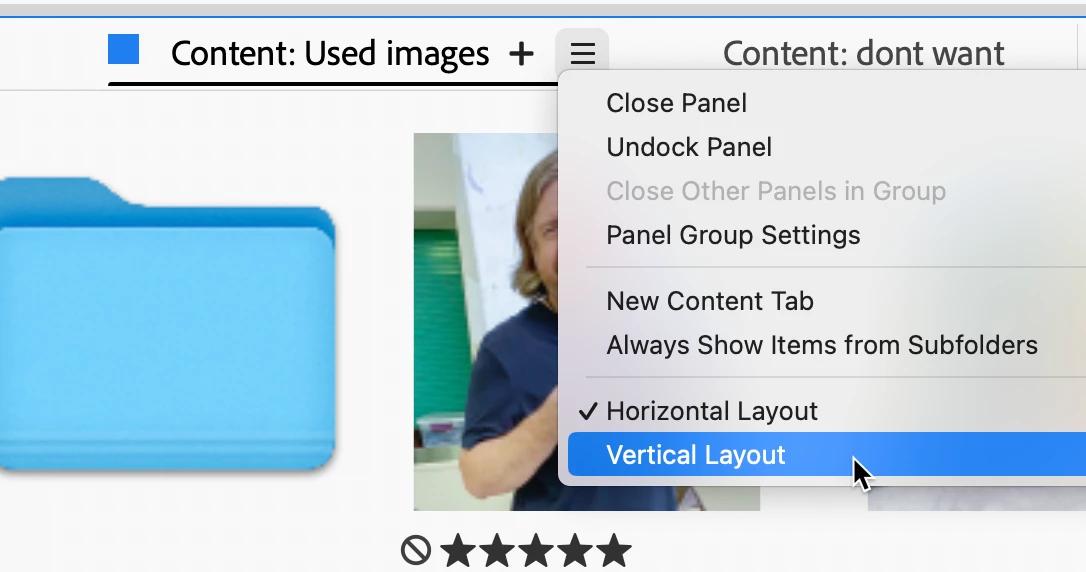
Easy fix: Go to the hamburger menu of whatever Content Panel you're in and mouse down.

You will see, on the bottom,  the options for Horizontal and Vertical — Select Vertical, and that will solve your problem.

The Horizontal Layout is recommended when you have the Content Panel covering the length of the bottom such as you see in the Filmstrip Workpace.


Hope that helps.

1 reply

gary_sc
Community Expert
gary_scCommunity ExpertCorrect answer
Community Expert
October 18, 2024

Easy fix: Go to the hamburger menu of whatever Content Panel you're in and mouse down.

You will see, on the bottom,  the options for Horizontal and Vertical — Select Vertical, and that will solve your problem.

The Horizontal Layout is recommended when you have the Content Panel covering the length of the bottom such as you see in the Filmstrip Workpace.


Hope that helps.

Participant
October 18, 2024

Thanks! That worked—and the setting seems quite hidden. Bridge 2025 must have overwritten the preference I've been using for years. Appreciate the tip.