

twinbrush
Inspiring
October 16, 2024
Question

Bridge 2025 previews very pixelated

  • October 16, 2024
  • 2 replies
  • 1354 views

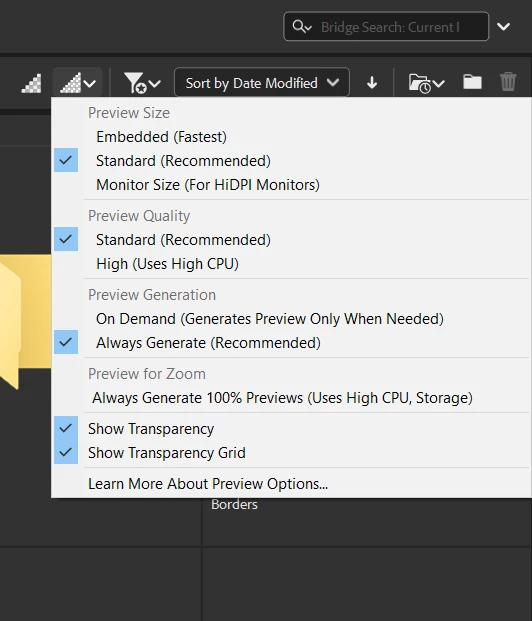
Anyone else having issues with the previews in Bridge 2025 (15.0.0.397) being extremely low quality? Just updated and the quality of the previews are horrible; very pixelated. Maybe I'm missing some setting somewhere but attached are the current settings, which I believe I've been using in all previous versions. (Running Windows 10 by the way)


Any ideas?


This topic has been closed for replies.

2 replies

Adobe Employee
November 26, 2024

Hi,  

We have made some improvements to the previews, and these improvements are available in Adobe Bridge Beta (Version 15.0.1.409).  

We would love for you to try it out and share your feedback. 

For more details about the release, please refer to: 

https://community.adobe.com/t5/bridge-discussions/adobe-bridge-beta-is-now-available-15-0-1/td-p/14997269


Regards

Bridge team

Community Manager
October 17, 2024

Hi @twinbrush  ,
Thanks for your feedback.
Could you share the following details about the issue:

- System configuration
- Is the issue specific to particular files/format?
- Is the issue started to come up due to a recent Bridge upgrade?
- Is the issue not reproducible on previous or any other Bridge version?

Please share the sample file/files on which you are observing the issue at sharewithbr@adobe.com and mention this thread.


Thanks,
Bridge Team

twinbrush
twinbrushAuthor
Inspiring
October 17, 2024

hi @Vijay Singh Negi 

Thanks for the reply.  Here is the info (if you need more, please do let me know)


System configuration:

Windows 10 Version 22H2 (Build 19045.5011)

AMD Ryzen 9 3900X 12-Core Processor 3.80 GHz

RAM 64.0 GB

64 Bit


The issue is apparent on all formats, but particularly noticable on raster images (jpeg, png, psd files that contain fine details such as illustrations or text). It previews them very similarly to how vector formats get previewed.  I've attached a screenshot as an example.


Yes, the issue has only been apparent since the latest update to version Bridge 2025 (15.0.0.397). This issue has not been experienced on any previous version of Bridge.  I will send a few of the files in the screenshot to the address you mentioned. 


Many thanks,

Rian


Adobe Employee
December 5, 2024

Hi @twinbrush,


We have addressed the issue mentioned in Bridge 15.0.1.

We would love for you to try it out and share your feedback.

For complete list of fixed issue refer to:

https://helpx.adobe.com/bridge/kb/fixed-issues.html


Regards

Bridge team