Quick Answer:
There is of course interplay between the program saving the PNG file and the program viewing the PNG file. Then one must take into account the PNG specification and whether a program is adhering to the spec. PNG files are intended for monitor use, so resolution metadata may be considered irrelevant by various software or users.
Photoshop Save As will retain resolution metadata, however depending on the version of Photoshop this may or may not be what you think it is.
Photoshop Export/Quick Export strips the resolution metadata, as does Export/Save for Web (Legacy).
_____________
Longer Answer:
The PNG specification does support resolution metadata (PNG-pHYs PixelsPerUnitX & PNG-pHYs PixelsPerUnitY) – however the official specification for the resolution unit is in metres (not inches or centimetres)!
So a PNG that is 2880x1800px and setup in Photoshop as being 288ppi:
[PNG] ImageWidth: 2880
[PNG] ImageHeight: 1800
[PNG-pHYs] PixelsPerUnitX: 11339
[PNG-pHYs] PixelsPerUnitY: 11339
[PNG-pHYs] PixelUnits: meters
113.39cm x 2.54cm = 288.0106 ppi (rounded to 288 ppi). This is what Photoshop is doing when it opens a PNG image that contains resolution metadata. Otherwise the displayed resolution is set as 72 ppi as a default if there is no resolution metadata in the file.
_____________
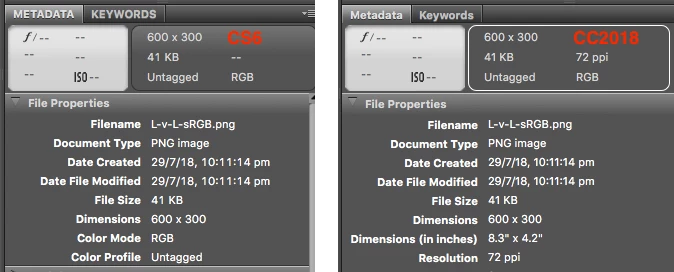
Bridge CC2018 may indicate that a PNG file has a 72 ppi resolution, however this is just a “helpful” arbitrary default resolution value rather than showing as blank. I personally would find it more helpful to simply show this value as blank or not show the data at all as was the case in CS6.
_____________
At one point in time, at least for CC2015, Photoshop was adding in extra metadata that was not to the PNG specification. The extended metadata was:
[XMP-tiff] XResolution: 288
[XMP-tiff] YResolution: 288
[XMP-tiff] ResolutionUnit: inches
And this metadata addition did allow Adobe Bridge to display a resolution entry… However Adobe stopped doing this and now things are back to “normal”.
So if one wishes to add this data back in (which is not to specification and may or may not cause problems in various software) so that Adobe Bridge can show a PPI value, the ExifTool command would be:
exiftool -XMP-tiff:XResolution=288 -XMP-tiff:YResolution=288 -XMP-tiff:ResolutionUnit=inches -r -ext png 'path to top level folder or file'
EDIT: There may be a Bridge script option available, however I could not get it to work:
Re: change resolution



 AdChoices