
Participating Frequently
January 20, 2020
質問

Bridge and Photo Downloader constantly fails

  • January 20, 2020
  • 返信数 2.
  • 1162 ビュー

Hi,


I've been a user of Bridge for many years and as far as I remember it has been a stable and reliable product helping me with productivity in my workflow. This was abruptly changed with the 2020 release. Now Bridge and Photo Downloader appears still be in Beta phase, which is absurd. 


I am on a fresh Windows 10 platform, fully updated, and the application is constantly spitting out random errors, making it completely unusable. Here are a couple of the more critical ones:


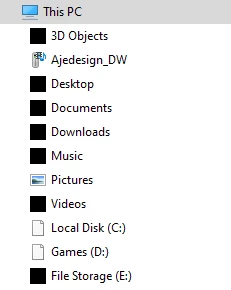
Selecting a download folder shows a corrupt Windows Explorer. I randomly can't select a folder. Sometimes I can.   


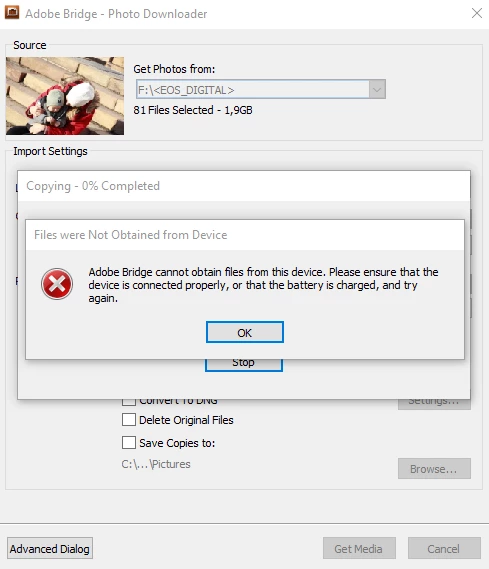
After finally being able to select a folder and begin downloading images from my memory card, the program fails.
 

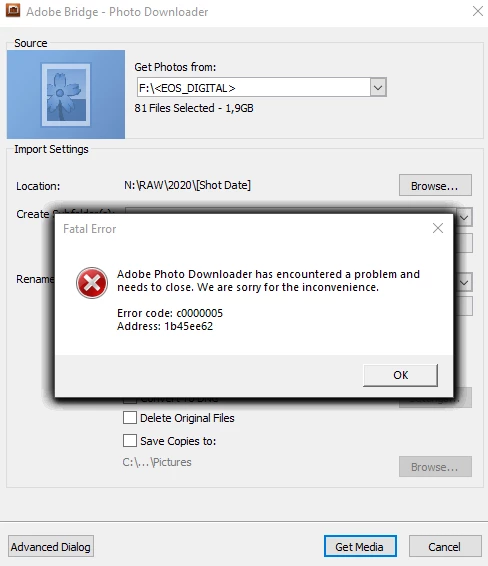
And the last error is a complete crash of the program.
 

All I'm trying to do is import pictures from my memory card to my computer.


BR

Andreas

このトピックへの返信は締め切られました。

返信数 2

jbm007
Community Expert
Community Expert
January 20, 2020

I am  no fan of photo downloader, and its reesults are mixed at best.

But the fact that you are not seeing files in your OS indicatesw toi me you have a corrupt install.

I would suggest you use ACC app cleaner and uninstall Bridge.

Reboot your machine and reinstall.

It may help, but will not hurt.

My suggestion has been use image ingester. 

Its safer and it works.

But it is no longer supported on windows 10


Ajedesign作成者
Participating Frequently
January 21, 2020

Okay, will try the reinstallation one more time, but why would I need a 3rd part application to uninstall Adobe Bridge? Are you saying the uninstallation process performed by Adobe is corrupt too?

jbm007
Community Expert
Community Expert
January 21, 2020

Adobe cleaner app is not a third party app.

I does a better job cleaning things up then then the normal uninstall process


PECourtejoie
Community Expert
Community Expert
January 20, 2020

Hello, ouch, I feel your pain.

Could you share more info about your setup: your OS, the Bridge version, some specs of your computer,

How are you importing the files, straight from camera, from a card reader? tried a different one?

Ajedesign作成者
Participating Frequently
January 20, 2020

Thanks for a quick reply. Impressive! 🙂

I'm on a Windows 10 Pro 1909 OS build 18363.592. It's a custom built machine:

  • Motherboard: ASUS Zenith Extreme Alpha
  • CPU: AMD Threadripper 2950X
  • RAM: G.Skill 64GB (8x8GB) DDR4 3200MHz CL14 - F4-3200C14Q-32GTZRX
  • GPU: ASUS 1080 Ti Strix
  • SSD: Samsung 970 EVO Plus 1TB
  • SSD: Samsung 960 Pro 512 GB
  • HDD: 3x raid0 WD Red Pro 10 TB

The camera is a Canon 5D mark III (latest firmware 1.2.3) with a SanDisk Extreme PRO 32 GB card. I am transfering the images through a standard USB 3.0 card reader made by Kingston FCR-HS3

I have a Synology DS1513+ NAS with mapped network drives in Windows. This is my main offloading drive.

I currently have both 2019 and 2020 installed of Bridge. A recomendation by another Adobe support guy. 

  • 2020 is version 10.0.2.131
  • 2019 is version 9.1.0.338


I have been using the camera and card reader for almost 7 years. The OS and computer hardware has changed three times over that period of time. The only thing that made the system fail is the new version of Bridge. Of course there can be other things I am unaware of. 

Regards

Andreas