Bridge and Raw images
Hi,
Please can you tell me how to update my CS3 Bridge/Adobe/Camera Raw/Photoshop so that it reads Raw images from my Nikon D300?
Many thanks.
Suzanne

Hi,
Please can you tell me how to update my CS3 Bridge/Adobe/Camera Raw/Photoshop so that it reads Raw images from my Nikon D300?
Many thanks.
Suzanne
Hello,
My laptop has Windows 7 Ultimate and Microsoft Office is 365 Business.
kind regards,
Suzanne
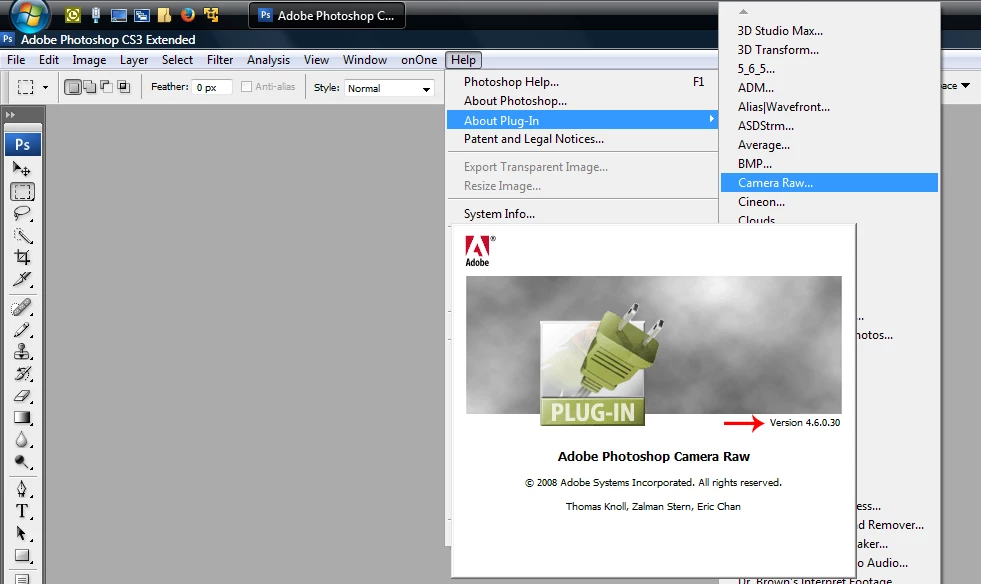
I guess the first thing to do to actually check what camera version is presently installed.
In photoshop cs3 go to Help>About Plug-In and click on the words Camera Raw and see what version its says.
If it says 4.6, then you have another problem other than the camera raw version.

If it's not 4.6, then the downloaded Camera_Raw_4_6.zip needs to be unzipped and the enclosed Camera Raw.8bi
copied to Program Files (x86)\Common Files\Adobe\Plug-Ins\CS3\File Formats.
1. Double click on the Camera_Raw_4_6.zip to extract the contents.
2. Right click on the Camera Raw.8bi and click Copy.
3. Go to Program Files (x86)\Common Files\Adobe\Plug-Ins\CS3\File Formats and right click an empty area and
click Paste and click Yes to replace the existing Camera Raw.8bi file.
Hopefully now cs3 will open the D300 nefs
Already have an account? Login
Enter your E-mail address. We'll send you an e-mail with instructions to reset your password.