
Participating Frequently
December 20, 2016
Answered

Bridge CC 2017 > open vector file > error: “AIGPUSNiffer quit unexpectedly”

  • December 20, 2016
  • 2 replies
  • 642 views

Hello,

Whenever I click on a vector (.AI, .EPS) document icon in the Content window of Bridge, I get the following error message:
“AIGPUSNiffer quit unexpectedly. Click Reopen to open the application again. Click Report to see more detailed information and send a report to Apple."

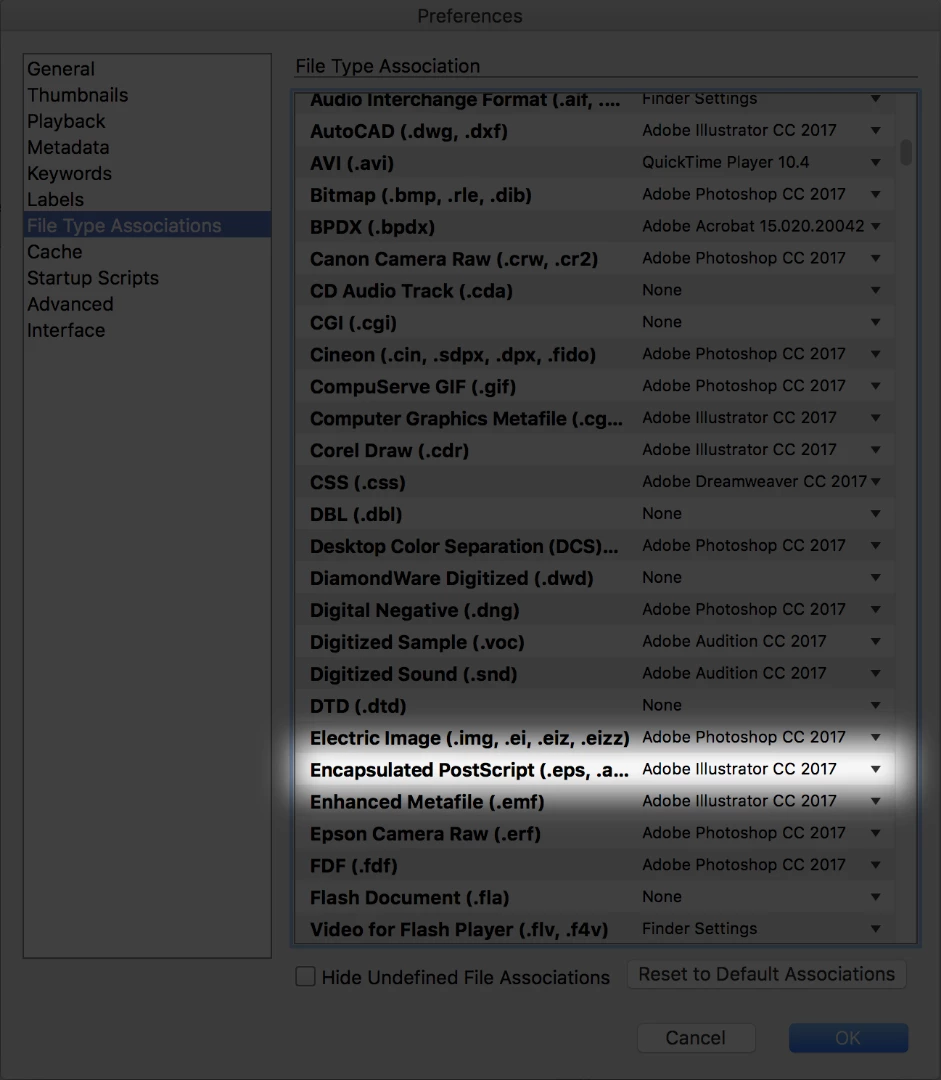
I have changed the Preferences > File Type Associations > Encapsulated PostScript to Illustrator, and it makes no difference.

I have also restarted the system multiple times, and have turned GPU Enhancement on and off within Illustrator Preferences.
Nothing fixes the problem.

How can this be fixed?

System:

iMac (Retina 5K, 27-inch, Late 2015)

Processor 3.2 GHz Intel Core i5

Memory 32 GB 1867 MHz DDR3
This topic has been closed for replies.
Correct answer Sahil.Chawla

Hi Slidviscous,

Have you tried changing the file type association for .ait and .ai to Illustrator?

Regard,

Sahil

2 replies

Participating Frequently
January 11, 2017

I am having the same problem - could you tell me how to change the file type association - do you do this is finder?

Participating Frequently
January 11, 2017

You do it in Preferences, see image above.
You have to change each image type that you are trying to open.

Sahil.Chawla
Adobe Employee
Sahil.ChawlaCorrect answer
Adobe Employee
December 21, 2016

Hi Slidviscous,

Have you tried changing the file type association for .ait and .ai to Illustrator?

Regard,

Sahil

Participating Frequently
December 21, 2016

That was it, thank you!
