Participant
November 13, 2017
Answered

Bridge CC 2018 Search not working

  • November 13, 2017
  • 9 replies
  • 3444 views

I am trying to locate all my Illustrator files for a project. So I used the Find (search) with the parameters of searching for the document type of Illustrator. The result? Nothing. I can see the files via Finder, but Bridge is not populating any/all results.

Anyone have a solution to get the "Find" action to work again?
    This topic has been closed for replies.
    Correct answer Stephen Marsh

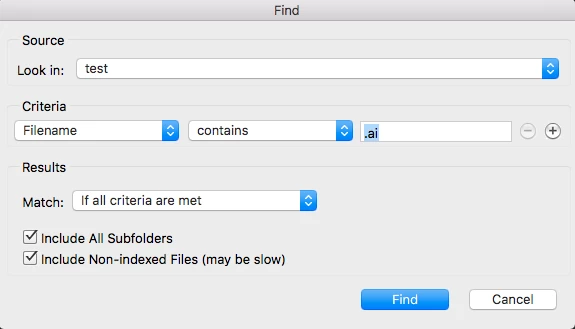
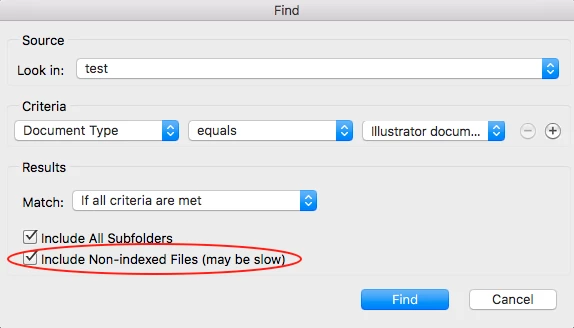
    Not sure if these options help or not…

    Good luck!

    9 replies

    yos_jitr
    Participant
    April 13, 2020

    Super helpful. Thanks!

    moshmosh007
    Known Participant
    October 17, 2019

    i have the same issue wuth Bridge 2019 and 2020. the "search box" for  is "checked as shown above.

    i use bridge 2017 (that is installed parrlel) to search files.

    its unlogic!


    crystall3758383
    Participant
    May 21, 2019

    having the same issue....

    Legend
    May 22, 2019

    Search will not work on unindexed folders. Do a search and chock the box as shown above.

    moshmosh007
    Known Participant
    October 17, 2019
    i have the same issue. the "search box" is "checked as shown above.
    Participant
    July 5, 2018

    uninstall (keep preferences) > reinstall > search working! : )

    OS: win7

    Inspiring
    January 23, 2018

    I am having the same issue with Windows 10. I also tried all the fixes and tried reinstalling then installing 2017, but its not working with it either.I am having the same issue with Windows 10. I also tried all the fixes and tried reinstalling then installing 2017, but its not working with it either.

    Stephen Marsh
    Community Expert
    Stephen MarshCommunity ExpertCorrect answer
    Community Expert
    January 16, 2018

    Not sure if these options help or not…

    Good luck!

    Artes_Stampo
    Participant
    January 16, 2018

    The same issue here.. any help? try everything.. resetting preferences, deleting the cache... and nothing..

    ajn_design
    Inspiring
    December 1, 2017

    I have the same issue using Windows 10. I can't remember the last time the search engine worked. I installed the previous Bridge 2017 app but that didn't work either.

    Sahil.Chawla
    Adobe Employee
    Adobe Employee
    November 28, 2017

    Hi Cdesign,

    Could you please let us know where are those Illustrator files are stored?

    Also, you can try resetting the preferences of Bridge & let us know if it helps: Troubleshoot Adobe Bridge for errors and freezes

    Regards,

    Sahil

    Participant
    November 29, 2017

    Hi Sahil,

    The files are stored on the local drive on my mac within the Documents folder. Yes, I just reset the preferenced as suggested by the link above. Still the same results.

    Sahil.Chawla
    Adobe Employee
    Adobe Employee
    November 29, 2017

    Thank you for sharing the information, appreciate your efforts. Could you please let us know which version of MacOs are you using?