
jameswest22
Participant
October 19, 2018
Question

Bridge CC 2019 preview not working for video effects (still)

  • October 19, 2018
  • 23 replies
  • 17121 views

The issue is that Bridge CC is not showing a preview of any effects in the Library. I have researched this issue and apparently this has been an issue for many years.

Issue:

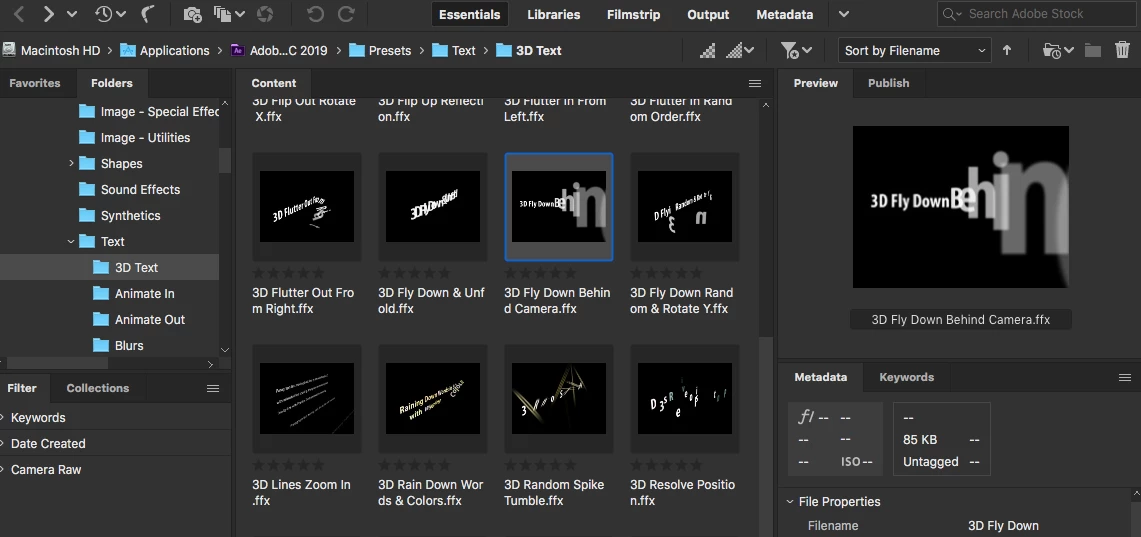
1. When trying to add an effect to Adobe After Effects CC 2019 via Bridge CC 2019, the preview of the effect will not play (see screen where it just shows a thumbnail).

2. Solutions seem to be to reset preferences OR to load an older version of After Effects. I have reset preferences, dumped cache etc to no avail. This issues has been going on for years, so that solution does not make sense.

3. This issue is different than others are having about thumbnails "going crazy". Thumbnails images display fine, effects do not preview at all.

Any solutions to this issue?

Image: This shows the effects, and the right side preview is only displaying a thumbnail, not playing the effect.
This topic has been closed for replies.

23 replies

roberte37460599
Participating Frequently
May 14, 2019

I'm having this problem using Adobe Premiere CC 2019, After Effects CC 2019 and Bridge CC 2019 on a brand new, fresh install iMac 2019 model. What's the deal here?

Participant
April 12, 2019

I subscribed to the full Adobe Creative Cloud and I have the same issue.

I want to animate Text in Adobe After Effects CC 2019 using Adobe Bridge CC 2019 (release 9.0.3.279) and the preview is static.

Thanks for a solution to this issue.
Anja

Participant
April 18, 2019

Wow! thank you!

Participating Frequently
April 7, 2019

Good news: While Adobe has been unable to fix this problem for more than a year, MotionIsland has thoughtfully come to the rescue and taken a great deal of time to create this webpage with rendered previews of text presets, and more:

After Effects Text Animation Presets Preview Gallery

Known Participant
April 20, 2019

At least someone is trying to do something about the issue (hint hint, Adobe). Thank you for posting this link!

Participant
April 7, 2019

No joy here. Just updated to the latest Bridge today and no previews.

Participating Frequently
April 4, 2019

Seriously Adobe...full Creative Suite subscriber here. No animated previews for AE presets in Bridge. What's up? How long does something like this need to stay broken? Is there at least a video somewhere that contains these preview animations?

brandonr45772040
Participant
April 3, 2019

I have a subscription to the entire Adobe creative cloud suite & all of my apps are updated to the latest version & this issue is still occurring. I've cleared cache and reset preferences; still not work.

Please help

Participant
April 3, 2019

I have a subscription to the entire adobe suites & the latest version of Bridge & this issue is still not resolved. I tried the cache clearing preference resetting thing & it still doesn't work. What's the problem Adobe? Please fix this!

Participant
March 21, 2019

Participant
March 21, 2019

The reason is due to NVIDIA software.
I tried to turn on NVIDIA + Bridge CC 2019, Then the software works normally again.

Inspiring
May 31, 2019

<<The reason is due to NVIDIA software.>>

What do you mean? Which software?

jbm007
Community Expert
Community Expert
April 12, 2020

When Nvidia installs  its GPU driver it also installs software which allows for various 3D and Video performance setting.

You need to look in your installed programs and find the Software link.

Participant
March 13, 2019

Has this issue been resolved?  I have a fresh, updated install of AE and Bridge and can't preview.  And like someone earlier said, it saves a lot of time.  Cmon adobe!