Participant
July 5, 2018
Answered

Bridge CC will not recognize my external hard drive

  • July 5, 2018
  • 10 replies
  • 13497 views

Does anyone have a solution to Bridge CC not recognizing external hard drives?  I have tried holding down the option+command+shift keys when opening Bridge and resetting everything.  I have also made sure there are no updates.  I have no problem with the external drive in Lightroom or Photoshop, only Bridge is the problem.  I am on a Mac.

    Correct answer gary_sc

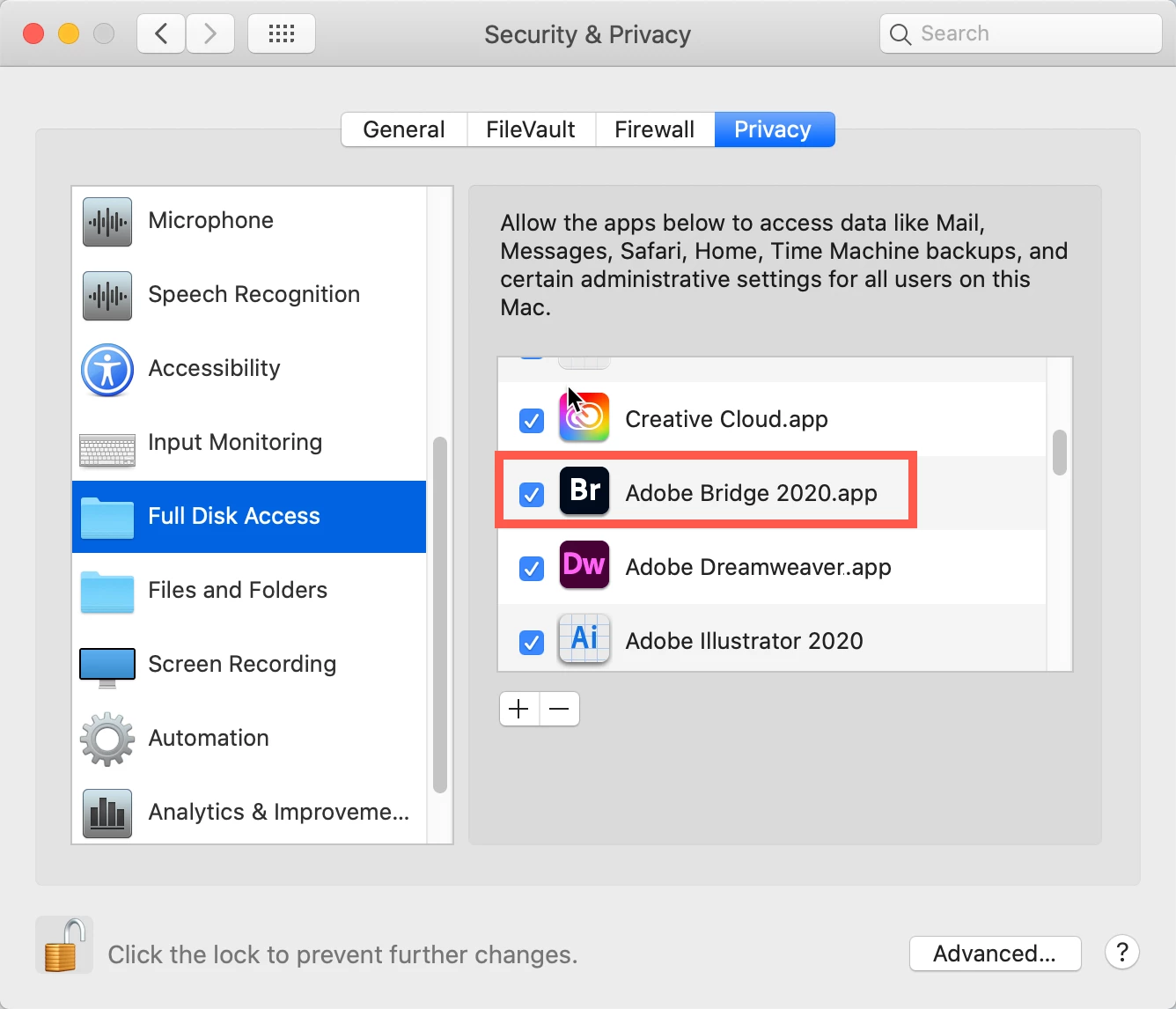
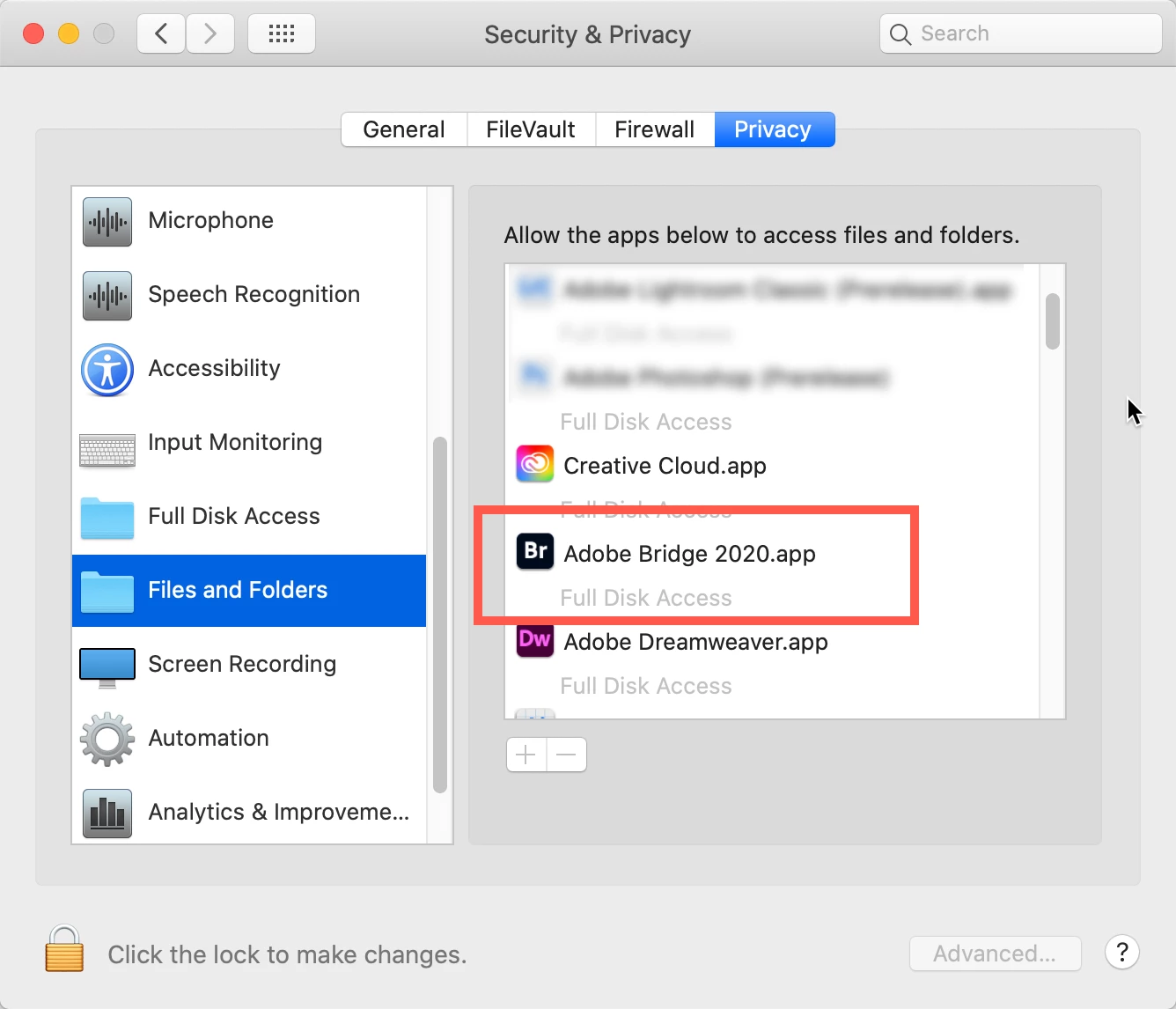
    Go to your System Preferences and select Security and Privacy (found in the top section). Now click on the Privacy setting (last tab). Now click on the lock on the bottom left and provide your Administrator code. Now select the Full Disk Access option and click on the "+" symbol. This will bring up the standard Mac Open window and let you add any application you want or need to have full access. Look for Bridge, select it, it will now appear in that window and make sure it's checked. Next go to the Files and Folders option and do the same thing as above (although there's nothing to check, just add. Close everything down and see if that makes it all work.

    Please let me know


    10 replies

    Participant
    May 6, 2023

    My problem also. Thank-you Gary, this fixed it!

    WencdellHCG
    Participant
    June 30, 2022

    Thank you, gary_sc—excellent advice.  

    Participant
    May 31, 2022

    Thank you Gary_sc that sorted out my issues in a jiffy. 😄

    Participant
    May 21, 2022

    This worked for me, thanks!


    Participant
    May 14, 2022

    Thank you Gary!  I have wasted all morning trying to work out why my new updated LR wouldn't read my external drive Lightroom files, when it did yesterday!  You have saved my deadline, thank you!

    gary_sc
    Community Expert
    gary_scCommunity ExpertCorrect answer
    Community Expert
    November 9, 2020

    Go to your System Preferences and select Security and Privacy (found in the top section). Now click on the Privacy setting (last tab). Now click on the lock on the bottom left and provide your Administrator code. Now select the Full Disk Access option and click on the "+" symbol. This will bring up the standard Mac Open window and let you add any application you want or need to have full access. Look for Bridge, select it, it will now appear in that window and make sure it's checked. Next go to the Files and Folders option and do the same thing as above (although there's nothing to check, just add. Close everything down and see if that makes it all work.

    Please let me know


    sharonpacker@mac.com
    Participating Frequently
    November 9, 2020

    Thank you so much!  Worked like a charm.

    sharonpacker@mac.com
    Participating Frequently
    November 9, 2020

    Same here.  My external drives are mounted and disply but Bridge 2021 will not acknowledge their existence.  I cannot import photos from my card reader using Bridge either.  I have to select all, drop and drag photos into a folder.  At that point I can start to view photos for deleting with Bridge until it freezes.  I've been unable to batch rename with Bridge because it freezes.  I so wish I had not deleted Bridge 2020.  Bridge 2021 is worthless.


    Participant
    November 1, 2022

    Assuming this is going to gary_sc.  THANK YOU!!!!!!  

    Participating Frequently
    November 4, 2020

    Same thing here. Bridge 2021 won't show external drive content.

    Participating Frequently
    July 19, 2018

    Same problem here. Restarting did not help, manually dragging the drive icon to Bridge in the dock did.

    Theresa J
    Community Expert
    Community Expert
    July 6, 2018

    Is the external drive mounted? Can you see it in the Finder? Try dragging the mounted drive icon to Bridge in the Doc. That should take Bridge to the drive.

    Participating Frequently
    November 4, 2020

    Your solution doesn't work.