
Participant
October 25, 2023
Answered

Bridge crashing on startup with blank error message.

  • October 25, 2023
  • 5 replies
  • 3053 views

Found several other users having this problem with bridge crashing on startup, but no real fix to solve the problem.


Had a user having this problem in both Bridge 23 and Bridge 24 on macOS after an OS update earlier today and found that Bridge did not have the correct permissions under (in macOS) Settings - Privacy & Security - Files and Folders. We are using SMB shares and the user probably denied network access when asked after the update.


I found no way to reenable this without deleting Bridge completely, then rebooting the computer to have the entry removed from the system settings and then reinstalling Bridge again. On startup it asked for permissions to access network shares as soon as I tried to access data from the SMB share. After giving the access, Bridge works again without issues.


Someone more knowledgeable in the ways of macOS security might be able to give the app access without going through the full uninstall / reinstall process.
Correct answer brianf53273574

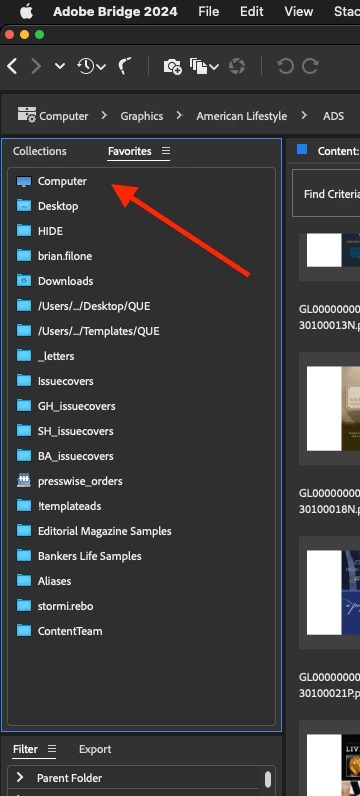
for me the problem was Bridge opening at computer level would crash with errror message every time

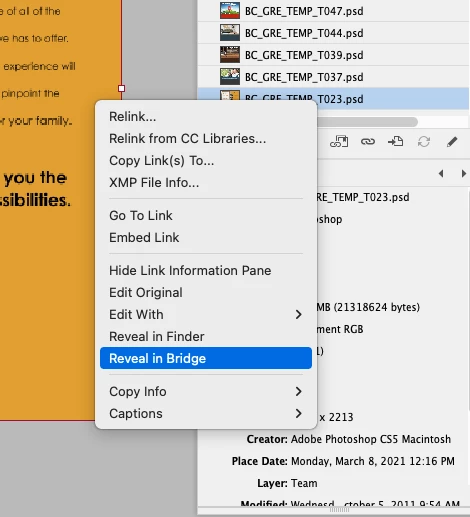
How I fixed was go to InDesign find a linked graphic and right click and choose reveal in Bridge, forces Bridge to open on a folder other than computer might have to do it a few times

5 replies

karend23069192
Inspiring
August 19, 2024

None of the steps mentioned are working for me. I even tried going back a few versions, not importing old preferences, etc. I just can't run this program. 

karend23069192
Inspiring
August 19, 2024

Finally worked. Reinstalled without saving old preferences, changing the privacy and security settings, trying the InDesign reveal in Bridge...none of these worked. Last thing I tried was to hold down command option shift when Bridge was launching and purging the cache and resetting preferences and now Bridge runs again without getting the error dialogue box. 

Participant
December 16, 2024

Thank you! This works for me.

Participant
June 21, 2024

So, Bridge 2024 updaed today to v14.1.1 and it's now giving me the blank error message and crashing.  Using a 2017 27" iMac runnin g Ventura 13.5.  I've set the Files and Folders preference and granted persmission for access to all folders, and set All Disc Access for Bridge to on, but it keeps reverting to off.  Restarted the computer a couple of time and nothing changes.  Pretty P.O.'d that an update would shut me down.  Anyone with any other suggestions?  Thanks...   Dave

Inspiring
June 21, 2024

have you tried my fix? look above for one marked Correct answer by brianf53273574

Participant
April 10, 2024

Since I updated my Mac OS to Sonoma 14.4.1 Adobe Bridge shows error window on startup and freezes.


gary_sc
Community Expert
Community Expert
April 10, 2024

Hi, @Ronchoo36519536, have you tried refreshing your preferences?


Quit Bridge (if running). Just before clicking on Bridge in the Dock or double-clicking the application for the Mac, press Command-Option-Shift. For PCs, press Control-Alt-Shift. Then open Bridge BUT KEEP your fingers on those keys until you see a window pop up. From the window, choose “Reset Preferences," "Entire Thumbnail Cache,” and/or "Reset Standard Workspaces.” In your case, choose I'd check all of them.


Please let us know what happens.

gary_sc
Community Expert
Community Expert
April 10, 2024

I just saw the following. I've no experience with it but if my suggestion doesn't work, this is worth a try:


https://community.adobe.com/t5/bridge-discussions/bridge-crashing-on-startup-with-blank-error-message/m-p/14495748#M49126


Please let me know if either work

brianf53273574Correct answer
Inspiring
February 2, 2024

for me the problem was Bridge opening at computer level would crash with errror message every time

How I fixed was go to InDesign find a linked graphic and right click and choose reveal in Bridge, forces Bridge to open on a folder other than computer might have to do it a few times

Participant
February 26, 2024

This worked for me as a quick fix to the problem!

Inspiring
February 26, 2024

glad i could help someone else solve that problem!

gary_sc
Community Expert
Community Expert
October 25, 2023

Hi, @mpls4tw, I was unaware that having the wrong settings for privacy and all could the cause of crashes at startup (makes sense if it was left at a location that could not be accessed). But here's the instructions for how to set this without having to reinstall Bridge (and Bridge does not have to be running for this as well.


Go into the System Preferences and select the Privacy & Security tab on the left. Note that there are two options on the right you'll need to deal with: "Files and Folders," and "Full Disk Access."


First, going into Files and Folders, note that in various years of different releases of Adobe Bridge, different needs are needed. I do not know why this is, but it's always better to check and make sure that just because you did it for one release, you may or may not need it for a subsequent release.


Lastly, go into the Full Disk Access option. If you do not see your application in the list, click on the "+" symbol at the very bottom of the window. This will bring up a standard Finder window. Navigate to your Applications Folder, find Adobe Bridge, and add it to the list (You will need to add your Administrator's password to do this.). Then you can "switch" it to the "ON" position. 


Participant
October 21, 2024

IT WORKS! THNX!!