
Participant
July 21, 2019
Question

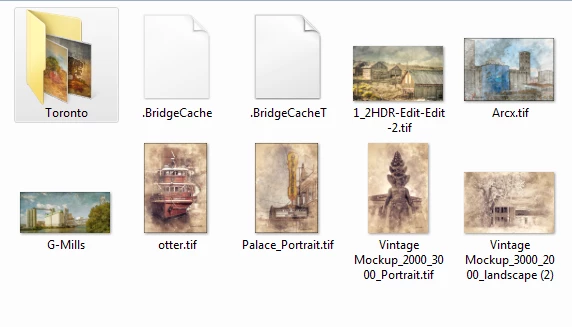
Bridge cs5 showing temp cache files

  • July 21, 2019
  • 2 replies
  • 1016 views

I am using cs5 with the bridge that came with it. lately i have been getting these files showing with thumbnails. bridge cache and bridge cachet. although they don't seem to cause problems i have never had them show and are a little annoying. anybody have an idea why they show and how to get rid of them. i can delete them but they pop right back up again
Message was edited by: Akash Sharma

    This topic has been closed for replies.

    2 replies

    Akash Sharma
    Legend
    July 22, 2019

    Hi Hmillturn,

    Sorry that Bridge is saving some sidecar files on your desktop

    Where are these files located on your computer? Did you changed the Bridge cache location under the Preferences> Cache management section? By default ,it's saved under the "Appdata" folder.

    Also, please note that Bridge has to render thumbnails from every image file upon viewing a folder's contents. This can take a couple of minutes. Are these files you're seeing temporary or stay in that location permanently?

    Thanks,

    Akash

    hmillturnAuthor
    Participant
    July 22, 2019

    i had some work done to my pc and the guy put my cache on a new hard drive but the images are on other hard drives. i figured it was something with that but do not know how to fix it

    Akash Sharma
    Legend
    July 24, 2019

    How big are these temp cache files? Do you have your operating system set to show hidden files?

    ~Akash

    Daniel E Lane
    Inspiring
    July 22, 2019

    Mac or PC?

    hmillturnAuthor
    Participant
    July 22, 2019

    pc