
Dalski K
Known Participant
December 3, 2018
Answered

Bridge CS6 Will Not Open Default Pdf Reader!

  • December 3, 2018
  • 3 replies
  • 665 views

Has anyone experienced this? The pdf filetype is associated with Foxit Pdf Reader, opening pdfs in windows 10 (64 bit) opens them correctly with the assigned app Foxit Pdf Reader.

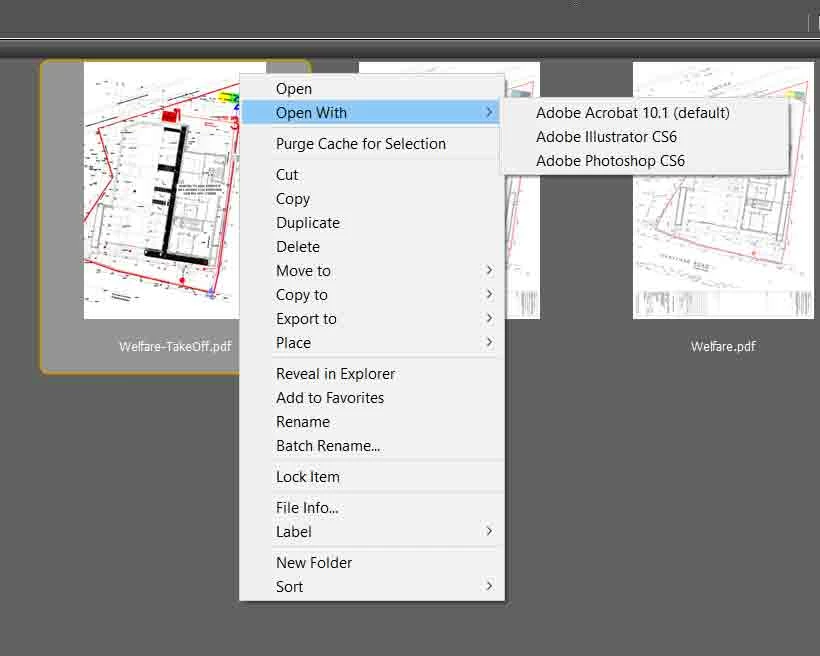
Bridge on the other hand does not give me the option to load via Foxit Pdf Reader; it's not showing even via open with (see attached).
    This topic has been closed for replies.
    Correct answer Ronald Keller

    Yes I read that. If I understand it correctly the association is correct in Windows but not in Bridge?

    That''s why I suggested to change this in Bridge by going to Edit > Preferences > File Type Associations.

    What is listed there for PDF files?

    3 replies

    Dalski K
    Dalski KAuthor
    Known Participant
    December 3, 2018

    Thanks to you Ronald .

    Dalski K
    Dalski KAuthor
    Known Participant
    December 3, 2018

    My apologies Ronald, you were completely correct, this fixed it. I had no idea Bridge had it's own file type associations. Strangely for only pdfs it wasn't in the x86 file.

    Legend
    December 3, 2018

    No problem.

    Glad you got it sorted.

    Legend
    December 3, 2018

    Try using Edit > Preferences > File Type Associations

    Dalski K
    Dalski KAuthor
    Known Participant
    December 3, 2018

    Thanks, but as mentioned in the op "The pdf filetype is associated with Foxit Pdf Reader".

    Ronald KellerCorrect answer
    Legend
    December 3, 2018

    Yes I read that. If I understand it correctly the association is correct in Windows but not in Bridge?

    That''s why I suggested to change this in Bridge by going to Edit > Preferences > File Type Associations.

    What is listed there for PDF files?