


unevens
Participant
February 26, 2017
Answered

Bridge does not start

  • February 26, 2017
  • 5 replies
  • 4531 views

Hello to all, I am on windows 10, 64 bit, and my Bridge CC 2017 does not open.

It doen't matter if I try to open it from Creative Cloud or from Explorer.

In Task Manager I noticed that the Bridge.exe process starts, but as a background process:
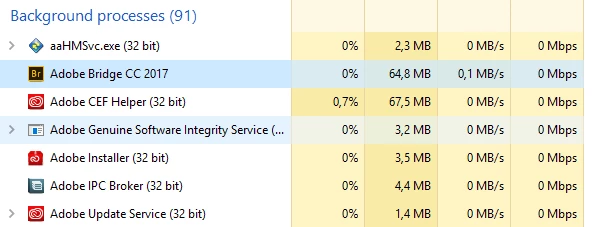
It stays like that, without opening any graphical interface, and it also mess with Photoshop and Creative Cloud:

If I start Photoshop while Bridge is "running" in the background, Photoshop will too remain in the background, untill I end the Bridge process from Task Manager, and then it starts normally.

If I start Photoshop before Bridge, it starts ok. If I then start Bridge (which will just appear as a background process, without really starting), Photoshop will freeze untill I will end the Bridge process from Taks Manager.

If I have the Creative Cloud user interface open while i end the Bridge process from Task Manager, I will be logged out of my account, and asked my credentials to login.

I have reinstalled Bridge  and/or reset the settings several times. When i Ctrl+Click Bridge to open the Reset Settings window, the Bridge process is seen as a running application while the Reset Settings window is open, but after that it becomes again a background process with no interface.

If i keep Bridge open as a background process too long, it seems to cause glitches also in the Internet Browser and in Explorer.

I've already tried Bridge freezes instantly on start-up and Troubleshoot Adobe Bridge for errors and freezes , but got no results from them.

In my ignorant opinion, it seems that Bridge is waiting from seme feedback from Creative Cloud and keeps hanging there, blocking the other Apps.

This topic has been closed for replies.
Correct answer Deepak_Gupta1

Hi,

Communicated with you over email.

Thanks,

Deepak Gupta

5 replies

Participant
March 8, 2023

cc 2023 as Bridge nem inddul, üres oldal jelenik me  egy piros x el egy középen lévő ablakban, nem indul a pr pedig a frissítés megvolt


Participant
February 23, 2023

As this is a public forum for those needing support on your product why wouldn't you share the answer.  A lot of us are the same issue...

Deepak_Gupta1
Deepak_Gupta1Correct answer
Participating Frequently
March 3, 2017

Hi,

Communicated with you over email.

Thanks,

Deepak Gupta

Participating Frequently
March 7, 2017

Could you communicate with us all in public, please. This is a widespread problem. I need it fixing in the next couple of hours for a client job. This is an evident bug, which should have been ironed out before releasing this 'update'.

Deepak_Gupta1
Participating Frequently
March 1, 2017

Hi Dario,

Please try running Bridge.exe as administrator and share your feedback.

Just right click over Bridge.exe -> from context menu, select "Run as Adminstrator"

Does this make any difference?

Don't worry about "Adobe IPC Broker.exe". It will be restarted automatically whenever required, after it is quit.

Thanks,

Deepak Gupta

unevens
unevensAuthor
Participant
March 1, 2017

I tried running Bridge as Administrator, and it behaves the same way.

I let the "Bridge.exe" process running in the background for some minutes, and it did freeze Explorer. After I did terminate Bridge, Explorer restarted itself.

Deepak_Gupta1
Participating Frequently
February 27, 2017

Hi unevens,

Please try following and let me know you observation.

- Restart you machine

- now login wtih you Adobe ID in Adobe Creative Cloud Application

- Kill the "Adobe IPC Broker.exe" (as shown in your screenshot), it will be restarted in some time.

- Just after killing the above app, launch Bridge.

- Wait for a minute

If above does not, please suggest following

1. Are you running your computer in Proxy Server environment (or is it a computer in some organizational network)

2. What is your computer's hardware configuration

Please suggest, this will help us to investigate further.

Thanks,

Deepak Gupta

unevens
unevensAuthor
Participant
February 27, 2017

Hi Deepak Gupta,

thank you for your answer.

I tried the procedure you suggested, several times now. But it did not work.

I noticed that the process "Adobe Ipc Broker.exe" restarts when I run Bridge.

I also tried to terminate the "Adobe Ipc Broker.exe" again after it restarted, but it kept restarting, also in multiple instances.

My computer is not in a Proxy Server environment or in any particular network; it is a home machine.

My hardware is

cpu intel i5-6600K

gpu geforce gtx 960 2gb

mb asus z170-p

ram 32 gb corsair 2133Mhz